Davis
August 5, 2017
Solved

Text appears hazy in Lucid document

  • August 5, 2017
  • 37 replies
  • 1572 views

Hello


I'm creating flowcharts in Lucidchart and there are two different sets of text formatting that I can't fix; one set appears hazy (upper box in image) and the other appears normal (normal box in image). I've tried playing with the text formatting options but can't get the hazy box to look normal - anyone have any insight into how to fix this?


Alternatively is there a way to just delete all special formatting for a text box so I can start at square one?


Thanks.


Best answer by Hayden N

Davis

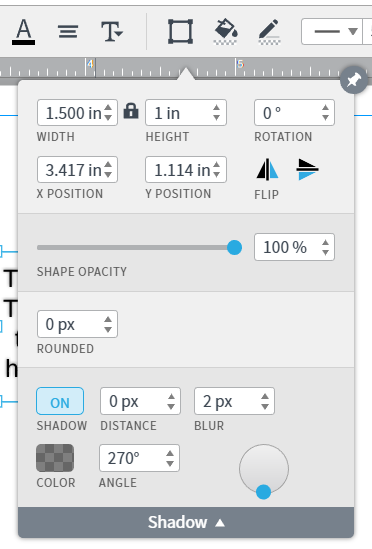
Thanks for reaching out! It looks like the text that appears to be hazy may have a shadow applied to it. To find out click on the Shape Options menu and manage the shadow. Please let me know if this works for you!

Comments

Davis
DavisAuthor
August 5, 2017

Hayden N
Hayden NAnswer
Lucidite
August 7, 2017

Davis

Thanks for reaching out! It looks like the text that appears to be hazy may have a shadow applied to it. To find out click on the Shape Options menu and manage the shadow. Please let me know if this works for you!

Henry F
May 3, 2023

I'm seeing this as well.Any-way-to-resolve?

Micah
Lucid community team
May 3, 2023

Hi Henry thanks for continuing this thread. To clarify is the box in your screenshot above the only bit of text you're experiencing this with or do you see it on all text in your document? Additionally are you experiencing this in multiple documents?

Henry F
May 3, 2023

Thanks for looking into this. When I export the quality is good. For some reason just when I am working in the platform this is occurring.

Micah
Lucid community team
May 3, 2023

Hi Henry thanks for the response. I'm glad to hear that the export appears normally. Could you try opening your document in a private or incognito window to help us narrow down the potential cause? Could you also try connecting to a different network or disconnecting from your VPN (if applicable)? Sometimes account performance issues can be related to internet security/speed or browser issues. These steps will help us eliminate that possibility. For help with opening an incognito window please see this community post. Additionally can you please clarify if the box in your screenshot above is the only bit of text you're experiencing this with or do you see it on all text in your document? Additionally are you experiencing this in multiple documents?

Mauricio G
May 23, 2023

I am experiencing this as well (recently). When the text is selected for editing it's crisp after submitting the change it renders blurry.


Micah
Lucid community team
May 23, 2023

Hi Mauricio thanks for continuing this thread and apologies for the trouble! Can you please try the troubleshooting steps in my comment above and let me the results?

Mauricio G
June 2, 2023


Hi Micah I experience the same issue with/without VPN and in a Chrome Incognito window. It seems to work OK in Safari though.

In the image above the left is Chrome and the right is Safari.

Micah
Lucid community team
June 2, 2023

Hi Mauricio thanks for getting back to me with those screenshots and for trying those troubleshooting steps- I can see the difference you're describing! WebGL might be causing an issue with the graphics card on your computer. Can you try toggling WebGL off? This can be done by selecting View > Rendering > Use WebGL and un-selecting this option. For help with disabling WebGL please see this community post.