Davis
August 5, 2017
Solved

Text appears hazy in Lucid document

  • August 5, 2017
  • 37 replies
  • 1572 views

Hello


I'm creating flowcharts in Lucidchart and there are two different sets of text formatting that I can't fix; one set appears hazy (upper box in image) and the other appears normal (normal box in image). I've tried playing with the text formatting options but can't get the hazy box to look normal - anyone have any insight into how to fix this?


Alternatively is there a way to just delete all special formatting for a text box so I can start at square one?


Thanks.


Best answer by Hayden N

Davis

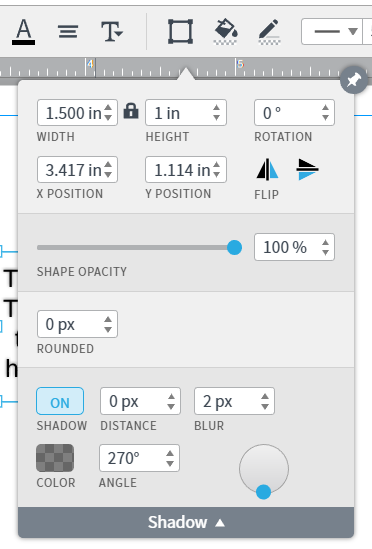
Thanks for reaching out! It looks like the text that appears to be hazy may have a shadow applied to it. To find out click on the Shape Options menu and manage the shadow. Please let me know if this works for you!

Comments

March 2, 2025

@Ambar D Here’s my account support pin: iu6CFFlYGkeJAG206297792

Ambar D
Lucid community team
March 7, 2025

Hi ​@aarabimian, I’m truly sorry for the delay here. Thank you for sending this PIN. I haven’t been able to reproduce this on my end quite yet.

Sorry for the hassle, but would you mind confirming whether you are using an custom font? Have you noticed whether this issue occurs with a specific font on your end of things ? 

Thank you for the account support pin - would you be willing to also share a temporary support PIN for one specific document where you’re noticing this issue? This will allow me to take a closer look at the issue you’re experiencing. For more information on generating a Support PIN, check out this Help Center article.

Again, I am sorry for the hassle and thank you for your patience as I continue looking into this.

March 12, 2025

@Ambar D Just to confirm, have you tried **Linux** with a **Wayland** desktop environment? A generic Ubuntu installation should meet these criteria. I have a suspicion that this is a Linux-specific issue.

I’m not using any custom fonts. I even tried reinstalling my Chrome and starting a new document to confirm.

Document support pin: dutKBWEvAISb2w206297792

Account support pin: iuU1NiUmBGAxDZ206297792

Ambar D
Lucid community team
March 12, 2025

Hi ​@aarabimian, thank you for those PINs and additional information! I am taking a closer look at the documents within your account and can see how text might appear blurry when zoomed out. I am unable to reproduce the same effect when zoomed in more.

Would you mind confirming whether the haziness/blurriness you are seeing on your end matches what is shown in the video below when I zoom out of a test document? From your screenshot above, it does appear that you are fairly zoomed out from your work. I am curious if the blurriness you describe has to do with that, although you mentioned you are not experiencing this in Firefox.


I apologize for the continued trouble here. Thank you for your help and patience as I keep looking into this issue!

March 17, 2025

@Ambar D Thanks for your prompt response.

I can’t tell if the blurriness in the video is a compression artifact or not. Can you send another video that shows other UI elements too? (e.g. the sidebar, the browser’s title bar)

Also, the blurriness remains when I zoom in. See the attached picture from Chrome. Notice how the text in the toolbars is clear, but the text in the canvas is not.


Ambar D
Lucid community team
March 19, 2025

Hi ​@aarabimian, my apologies for the delay here as I raised this with our teams for further investigation. Thank you for this screenshot and additional detail. I can certainly see what you’re referring to here, but unfortunately our team has been unable to reproduce after looking closer at your account. 

I know you mentioned that this problem persists in your home network and university network. Are you by chance using the same device in either network? Would you have the chance to try this on a different device?

Thank you for your patience and sorry for the hassle here as we continue investigating!

April 1, 2025

Blurriness is happening to me as well — in Lucid Spark. No shadows applied to any text. I’ve updated browsers, toggled OpenGL rendering. It was not always this way… something changed. 

Ambar D
Lucid community team
April 1, 2025

Hi ​@chrismagdelain, I’m sorry you’re also having trouble with this. Would you mind confirming whether this is one specific document, or across multiple documents in your account? Additionally, would you mind confirming which font you are using? 

Can you please send the following information so I can take a closer look?

  • A screenshot of the issue.
  • A screenshot of the associated Javascript Console output after reproducing the issue. You can open your Javascript Console by pressing Ctrl+Shift+J (if your computer is a Windows/Linux) OR Cmd+Opt+J (if your computer is a Mac).

Thanks in advance for your help and patience!

April 1, 2025

Hi ​@chrismagdelain, I’m sorry you’re also having trouble with this. Would you mind confirming whether this is one specific document, or across multiple documents in your account? Additionally, would you mind confirming which font you are using? 

Can you please send the following information so I can take a closer look?

  • A screenshot of the issue.
  • A screenshot of the associated Javascript Console output after reproducing the issue. You can open your Javascript Console by pressing Ctrl+Shift+J (if your computer is a Windows/Linux) OR Cmd+Opt+J (if your computer is a Mac).

Thanks in advance for your help and patience!

You can see the post-its on the left are blurry… compared to the text in the javascript console to the right.

Ambar D
Lucid community team
April 2, 2025

Hi ​@chrismagdelain, thank you for your reply and screenshot! Are you seeing this only within this specific document, or across multiple documents in your account?

Would you mind trying the following steps and confirming if they resolve the blurry text?

  1. Opening your document in a private or incognito window. For help with opening an incognito window, please see this community post.
  2. Connecting to a different network or disconnecting from your VPN (if applicable)
  3. Checking that you're using the most recent version of your browser. Lucid is optimized for Google Chrome. For best performance, we recommend using Chrome.
  4. Does selecting a new font eliminate the blurriness? Certain fonts may be incompatible with your device.
  5. Ensuring that your browser zoom settings are at 100%. To check and update these settings in Google Chrome, select the three-dot menu in the upper-right corner (next to your profile icon).


If the above steps do not resolve your problem, can you please send a temporary Support PIN for this document? This will allow me to take a closer look at the issue you’re experiencing. For more information on generating a Support PIN, check out this Help Center article. This PIN is only accessible by members of the Lucid support team, so it is safe to share in this thread.