Davis
August 5, 2017
Solved

Text appears hazy in Lucid document

  • August 5, 2017
  • 37 replies
  • 1572 views

Hello


I'm creating flowcharts in Lucidchart and there are two different sets of text formatting that I can't fix; one set appears hazy (upper box in image) and the other appears normal (normal box in image). I've tried playing with the text formatting options but can't get the hazy box to look normal - anyone have any insight into how to fix this?


Alternatively is there a way to just delete all special formatting for a text box so I can start at square one?


Thanks.


Best answer by Hayden N

Davis

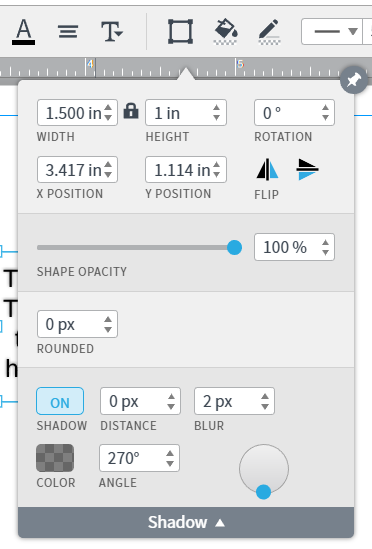
Thanks for reaching out! It looks like the text that appears to be hazy may have a shadow applied to it. To find out click on the Shape Options menu and manage the shadow. Please let me know if this works for you!

Comments

April 2, 2025

Thanks for the suggestions Ambar.

  • Incognito mode didn’t yield any better results
  • Disconnecting the VPN didn’t yield any better results
  • Using Google Chrome; everything is always up to date.
  • Any font I select is Lucid is blurry… even the default Lucid fonts
  • Browser is set at 100%
  • All other fonts any any other web page look perfectly fine. Its just the text in Lucid Spark that looks blurry… not interface components, but content on the board (even text in images).
  • Its as though there’s some anti-aliasing making all the letterforms a bit blurry on the edges… regardless of Zoom level.
April 2, 2025

This side-by-side comparison is a screenshot of text in this support thread, compared to larger text in Spark. You can see how the text on the right looks fuzzy in comparison. 

Ambar D
Lucid community team
April 2, 2025

Thank you ​@chrismagdelain for confirming that those steps did not resolve this and for the screenshots for reference. 

To take a look at your document, can you please send me a temporary Support PIN for this document?

This will allow me to take a closer look at the issue you’re experiencing. For more information on generating a Support PIN, check out this Help Center article. This PIN is only accessible by members of the Lucid support team, so it is safe to share in this thread.

Sorry for the hassle - thanks for your help and patience here as I continue looking into this!

November 11, 2025

I have the same exact issue irrespective of which browser i use. 

Also tried all steps mentioned in the previous messages.


Ambar D
Lucid community team
November 12, 2025

Hi ​@MartinD, thanks for adding to this thread and I’m sorry that you’re experiencing trouble with this. 

Can you please confirm whether you’ve tried each of the following?

  • Can you try toggling WebGL off? This can be done by going to View > Rendering > Use WebGL and un-selecting this option. If your text still isn’t appearing as you expect, WebGL might be causing an issue with the graphics card on your computer.
  • Opening your board in a private or incognito Google Chrome window to help us narrow down the potential cause. For help with opening an incognito window, please see this community post.
  • Connecting to a different network or disconnecting from your VPN (if applicable).


If you’ve tried the above steps and the issue persists, would you mind sending me the following information so I can take a closer look?

  • Can you confirm what font you are using? Is the font you are experiencing this with a custom font? 
  • A screenshot of the associated Javascript Console output after reproducing the issue. You can open your Javascript Console by pressing Ctrl+Shift+J (if your computer is a Windows/Linux) OR Cmd+Opt+J (if your computer is a Mac).


Thank you!

November 13, 2025

If you’ve tried the above steps and the issue persists, would you mind sending me the following information so I can take a closer look?

  • Can you confirm what font you are using? Is the font you are experiencing this with a custom font? 
  • A screenshot of the associated Javascript Console output after reproducing the issue. You can open your Javascript Console by pressing Ctrl+Shift+J (if your computer is a Windows/Linux) OR Cmd+Opt+J (if your computer is a Mac).


Thank you!

Hello, thanks, i tried using chrome in incognito without webgl and the text is still blurry.

The font i was using is Arimo

Here is a screenshot of the Java console:
 

​​​​​​

Ambar D
Lucid community team
November 13, 2025

Hi ​@MartinD, thanks for following up here with that information!

Could you share a temporary Document Support PIN for this document? This will help me take a closer look at what’s going on. This PIN is safe to post in this thread because it is only accessible by members of the Lucid support staff. You can find steps for generating a Support PIN in this Lucid Help Center article: Generate a Lucid Support PIN.