Nicole   L
October 27, 2023
Solved

How to import ChatGPT Mermaid code into Lucidchart

  • October 27, 2023
  • 15 replies
  • 14285 views
I have a Marmaid code from ChatGPT for a flowchart. How do you transform that code to a diagram in Lucidchart?
Best answer by Darbie

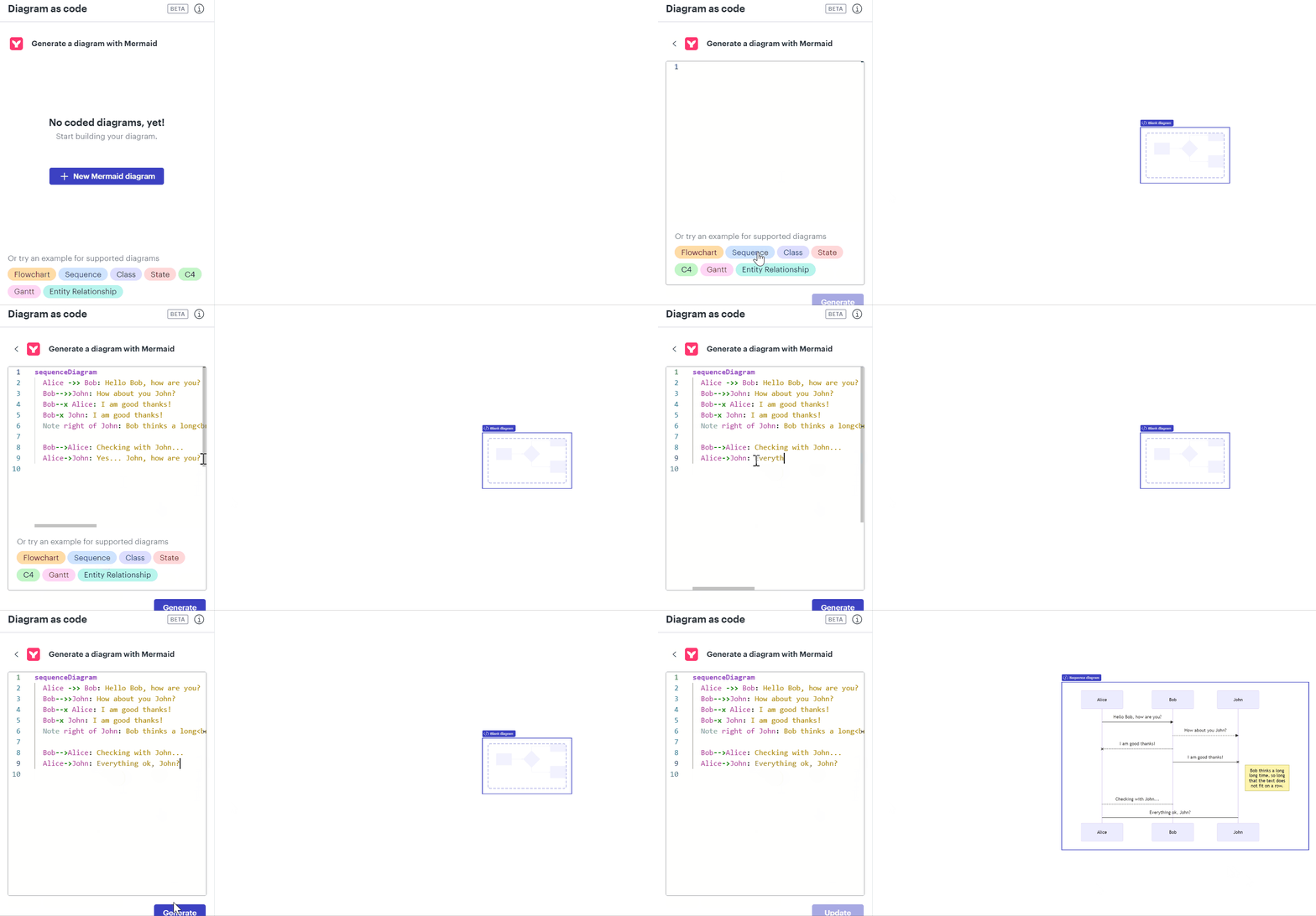
I am excited to share that Lucid has released the ability to create a diagram using mermaid code syntax! We support 8 different diagram types including: flowchart, sequence, class, state, C4, gantt, and entity relationship diagrams. Try it out for yourself or learn more here


Comments

Micah
Lucid community team
October 27, 2023

Hi Nicole thanks for your post! Unfortunately Lucidchart doesn't directly support diagram builds from Mermaid. If you're able to use UML markup instead I would recommend our UML markup tool which will automatically generate a sequence diagram based on your input. I hope this helps! If you'd like to share more detail about your use case for Mermaid specifically we'd love to hear your feedback in this thread. 

Lucid product team
February 2, 2024

Hi @Nicole L!  Have you seen our recently released Lucid GPT feature? Check it out here: https://help.lucid.co/hc/en-us/articles/18974741074708-Create-AI-generated-diagrams-using-the-Lucid-GPT

In addition, I am on the product team here at Lucid and am actively investigating some features that may further help your use case. If you’d be interested in meeting with me to discuss, I’d love to learn from you! Let me know if you’re up for it and we can send more info to the email associated with your account. Thanks!

DarbieAnswer
Lucidite
September 5, 2024

I am excited to share that Lucid has released the ability to create a diagram using mermaid code syntax! We support 8 different diagram types including: flowchart, sequence, class, state, C4, gantt, and entity relationship diagrams. Try it out for yourself or learn more here


September 10, 2024

Thanks @Darbie! This is fantastic.

I successfully create a sequence diagram using mermaid code syntax. I however cannot use this in google docs using lucid extension. I exported to jpeg and used for now. Is there any timeline to make lucid extension work too?

Kelsey Gaag
Lucidite
September 12, 2024

Hi @Tej

Currently we don’t have a timeline for Mermaid code to be available in the Google docs extension. 

However,  we’re very interested in your feedback and committed to continually improving our products, we invite you to share your idea in our Product Feedback section. To do this please first search the community (with the filter Topic Type = Idea) to see if it’s already been submitted. If so, please add any additional details you’d like and upvote the request - this consolidation helps to refine feedback and properly capture the popularity of the request.

If no one has submitted this idea yet, please create one of your own and be sure to include details about your use case or what you’d like to see in this experience. This will also allow other users with similar requests to discover and upvote it, then add details of their own.

Finally, for more information on how Lucid manages feedback via this community, take a look at this post:


January 7, 2025

I am excited to share that Lucid has released the ability to create a diagram using mermaid code syntax! We support 8 different diagram types including: flowchart, sequence, class, state, C4, gantt, and entity relationship diagrams. Try it out for yourself or learn more here


I wanted to convert a mermaid diagram into a Lucid Diagram and found your post to do this via ChatGPT Lucid Agent.  This is a bit clunky, but it works!  Much better than having to start from scratch and interpret mermaid diagrams by hand.   Hopefully the Lucid GPT agent will be integrated into the Lucid native AI interface.  Thanks for the tip!!


https://chatgpt.com/g/g-bHwQjRxeg-lucid

Kelsey Gaag
Lucidite
January 7, 2025

@Peter Meusburger, Thank you for sharing that!

Lucid support team
February 3, 2025

We have released additional resources for using Mermaid to diagram as code in Lucidchart! This resource includes syntax for each supported diagram type along with examples. To learn more about Mermaid syntax and explore example diagrams, check out this Community post!

February 28, 2025

I’ve found it very useful to use an AI to create a rough-draft diagram with Mermaid syntax. I was pleased to see that Mermaid support was added to Lucid, but it’s not exactly what I expected. I was hoping that I could import the Mermaid diagram as a standard Lucid chart, so that I could drag elements around, resize, etc., to make it look more professional. I would be completely OK with no longer being able to edit the original Mermaid code, or losing some styling -- it would not need to be an exact representation.

Lucid support team
February 28, 2025

Hi ​@jmesterh 

Thanks for contributing to this thread! 

You are able to use AI to generate Mermaid code to create a diagram in Lucidchart, however you are not able to change styling utilizing this feature in Lucidchart. Unfortunately, this isn’t currently supported in Lucid, but we’re very interested in your feedback and committed to continually improving our products. Please first search the Product Feedback section of this community (with the filter Topic Type = Idea) to see if it’s already been submitted. If so, please add any additional details you’d like and upvote the request - this consolidation helps to refine feedback and properly capture the popularity of the request. If no one has submitted this idea yet, please create one of your own and be sure to include details about your use case or what you’d like to see in this experience. This will also allow other users with similar requests to discover and upvote it, then add details of their own.


As a workaround, if you are wanting to create a sequence diagram, you can utilize UML markup to generate a diagram in Lucidchart. Check out the steps to use UML markup in our Create a sequence diagram with UML markup in Lucidchart article. Once you have created the diagram, you are able to resize and edit styling of the diagram in Lucidchart. Read this section from the aforementioned article for more information.