March 4, 2025
Solved

Move object to another layer doesn't take the links with it

  • March 4, 2025
  • 19 replies
  • 201 views

Hello,

I had a large diagram with objects connected with lines to show interdepencies. To try to make it clearer I wanted to move parts of the diagram to separate layers, but it seems it moves the object but does not maintain the links they remain on the page layer unless I move them separately.

Is there a way to do this or should I have created the objects and the layers *then* linked them ?


Many thanks

Ian

Best answer by Kelsey Gaag

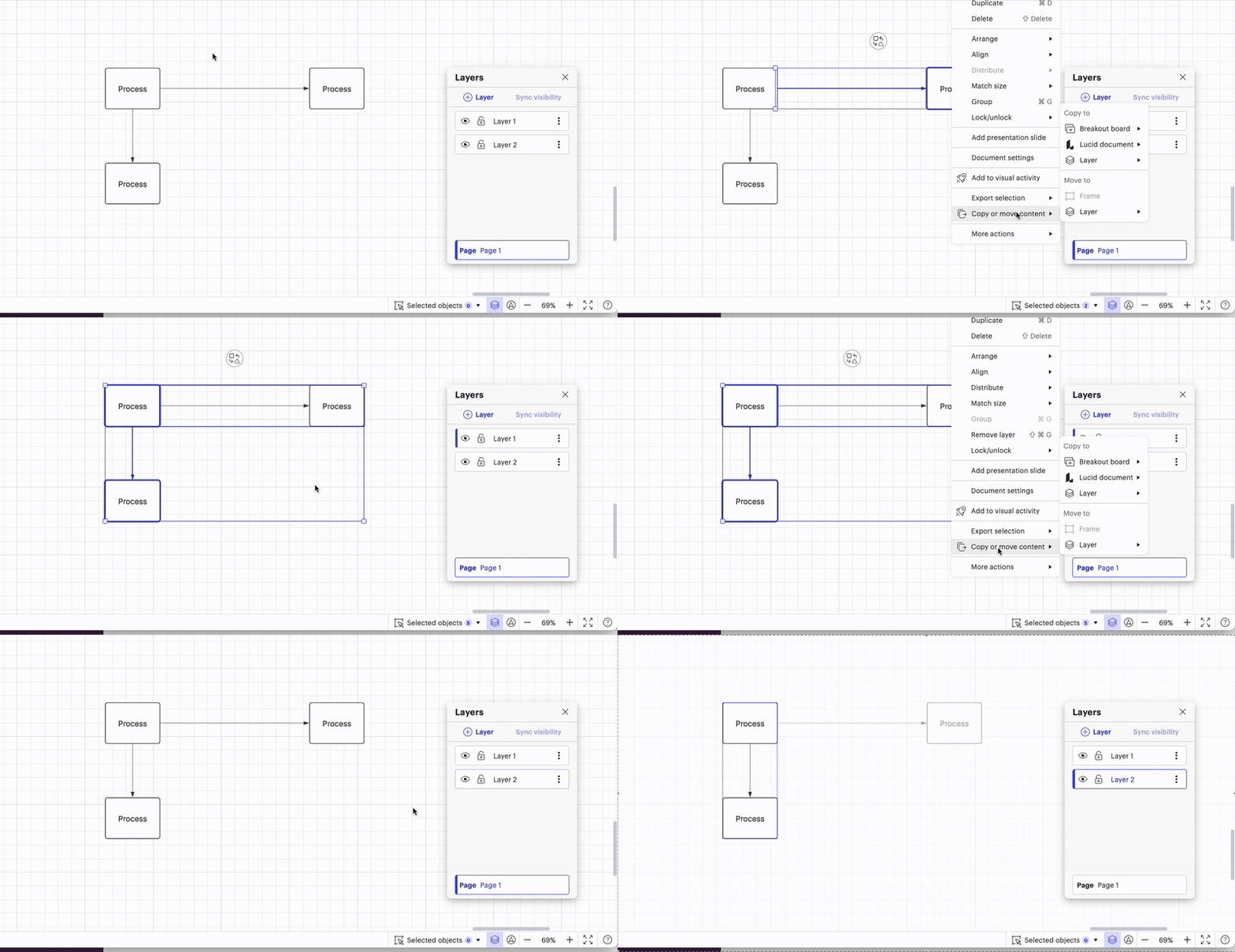
I see, thanks for your patience ​@ian.brown, I apologize for the misunderstanding. It does look like this behavior is intended. I did notice in my investigating that you can copy the contents to another layer, and then later on if you need to move it, it will allow you to move it to a new layer since there is two separate shape entities. 

However, if the contents were moved to a layer, and then copied to a second layer, the contents in the first layer won’t move. 

So while this doesn’t solve you’re current issue, I’ve included this in case it helps in the future. Additionally I think that this would be great insight to add to our product feedback section

Comments

Kelsey Gaag
Lucidite
March 11, 2025

Hi ​@ian.brown

Thank you for providing that support pin! It looks like you have a lot of layers in this document, and from my investigation I noticed that lines that are already in another layer don’t transfer to a new layer, unless, you open up the layer they are in and move them. Are the lines that you are encountering this issue with in another layer already? 

ian.brownAuthor
March 12, 2025

Hi ​@Kelsey Gaag I originally made the flat diagram on the ‘page’ layer. Then added additional layers and moved the computer objects to the other layers, so the lines were all created on the ‘page’ layer, except the one in the example, created later.

Kelsey Gaag
Lucidite
March 12, 2025

@ian.brown

I see, thanks for clarifying. Can you try removing the “page” layer and moving the content to the page to see if that resolves the issue?

ian.brownAuthor
March 13, 2025

Hi ​@Kelsey Gaag the page is the default layer, I don’t think I can remove it ?


Kelsey Gaag
Lucidite
March 13, 2025

Hi ​@ian.brown,

Oh I see, I apologize I thought you meant you had a layer named “Page.” Do you mind looking at the lines you are experiencing this issue with to see if they are in a different layer? In my testing I found that if they are in another layer, you have to open the layer those lines are in to move them to a new layer. I attached a video of this below. You can see if a line/shape is in another layer by either:

1) hiding layers to see if the line/lines with an issue disappear or
2) by double clicking on the line, this will open up the layer they are in.


ian.brownAuthor
March 14, 2025

Hi ​@Kelsey Gaag yes, they are on a different layer. That is kind of where we started in that although they are connected to an object, they don’t move layers with that object. Now I understand that this is the expected behaviour I will go through and move them all manually.  I sort of hoped that with object A in layer 1 connected to object B in layer 2, when you selected layer 1 you’d see the link to another layer (even if you didn’t see the connected object B) and the same for layer 2, but you don’t, the lines remain in no layer.


Thanks for all your help. I really appreciate you sticking at it !

Ian

Kelsey Gaag
Lucidite
March 14, 2025

I see, thanks for your patience ​@ian.brown, I apologize for the misunderstanding. It does look like this behavior is intended. I did notice in my investigating that you can copy the contents to another layer, and then later on if you need to move it, it will allow you to move it to a new layer since there is two separate shape entities. 

However, if the contents were moved to a layer, and then copied to a second layer, the contents in the first layer won’t move. 

So while this doesn’t solve you’re current issue, I’ve included this in case it helps in the future. Additionally I think that this would be great insight to add to our product feedback section

ian.brownAuthor
March 26, 2025

Hi ​@Kelsey Gaag 

Thank you so much. I truly appreciate it.

Ian

Kelsey Gaag
Lucidite
March 26, 2025

@ian.brown, no problem! Let me know if you have any other questions that come up!