March 4, 2025
Solved

Move object to another layer doesn't take the links with it

  • March 4, 2025
  • 19 replies
  • 201 views

Hello,

I had a large diagram with objects connected with lines to show interdepencies. To try to make it clearer I wanted to move parts of the diagram to separate layers, but it seems it moves the object but does not maintain the links they remain on the page layer unless I move them separately.

Is there a way to do this or should I have created the objects and the layers *then* linked them ?


Many thanks

Ian

Best answer by Kelsey Gaag

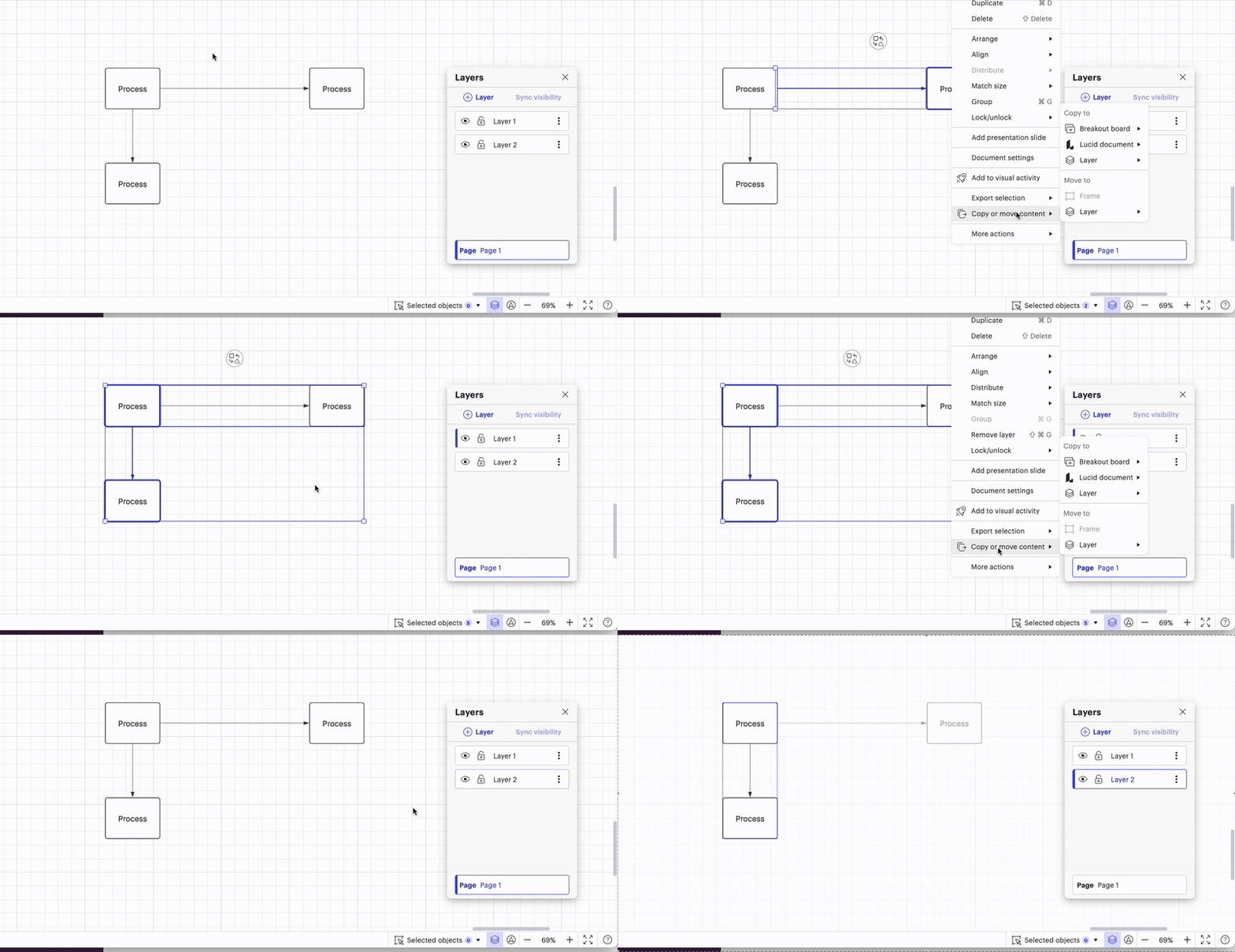
I see, thanks for your patience ​@ian.brown, I apologize for the misunderstanding. It does look like this behavior is intended. I did notice in my investigating that you can copy the contents to another layer, and then later on if you need to move it, it will allow you to move it to a new layer since there is two separate shape entities. 

However, if the contents were moved to a layer, and then copied to a second layer, the contents in the first layer won’t move. 

So while this doesn’t solve you’re current issue, I’ve included this in case it helps in the future. Additionally I think that this would be great insight to add to our product feedback section

Comments

Humas1985
Lucid Legend Level 10
March 4, 2025

Hi ​@ian.brown 

Your understating is right, ideally, you should create the objects on their respective layers first before linking them.

Hope this helps - Happy to help further!!
Thank you very much and have a great one!
Warm regards

Huma || Lucid Legend
ian.brownAuthor
March 4, 2025

Hi Huma,

thank you for your reply !

I didn’t like the answer 😄 but I appreciate that you replied. I will look to remove and re-add the links post adding the layers.


Many thanks

Ian

Kelsey Gaag
Lucidite
March 4, 2025

Hi ​@ian.brown ,to clarify, when you refer to linking, do you mean linking with lines or hyperlinking objects?

ian.brownAuthor
March 5, 2025

Hello Kelsey,

thank you for replying.

I have a network diagram and linked the objects with lines to illustrate process flow and dependancies. Once moving the objects to a different layer, the connections with lines to other objects are not treated as part of the new layer.

I hope that makes it clearer.


Best regards,

Ian

Kelsey Gaag
Lucidite
March 5, 2025

Hi Ian, 

Thanks for clarifying! What method are you using to move shapes to the new layer? Are you copying and pasting? If you use that method or select the shapes, right click > copy to > layer, the lines should move to the new layer.


ian.brownAuthor
March 6, 2025

Hello ​@Kelsey Gaag ! Unfortunately I did use the method you suggest; and I end up with this

There is only one line in the layer, and that is one I created later with the ALT-Line method to connect objects on different layers.

Thanks,

Ian

Kelsey Gaag
Lucidite
March 6, 2025

Hi ​@ian.brown
Thank you for clarifying! Can you please send a temporary Support PIN for this document? This will allow me to take a closer look at the issue you’re experiencing. For more information on generating a Support PIN, check out this Help Center article.

ian.brownAuthor
March 7, 2025

Hi ​@Kelsey Gaag , thank you for looking. I have generated the pin, what is the process for giving it to you ? Post it here in the public forum or raise a support ticket?  The help doc glosses over that bit.

Thanks

Ian

Kelsey Gaag
Lucidite
March 7, 2025

Hi ​@ian.brown

Thanks for the reply! You can post the pin here, it is only accessible to our support team so, other users are not able to access your document.

ian.brownAuthor
March 10, 2025

Thank you ​@Kelsey Gaag here it is

dubnZ7GRaLno8P125189771

I am greatful for any advice.

Ian