Answer

Lucidspark is not showing priority icons

  • October 16, 2024
  • 3 replies
  • 41 views

Forum|alt.badge.img+3

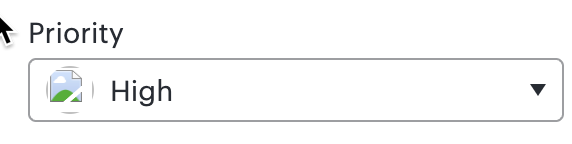
Lucidspark is not showing priority icons, just gray circles in cards and something like a missing icon when editing the card values. Any ideas? We are using default priority icons.


Best answer by Michelle S

Hello @Shawn Giese , thank you for your help @Humas1985 ,

Thank you for posting in the Lucid community!

Could you try opening your document in a private or incognito window to help us narrow down the potential cause? Could you also try connecting to a different network or disconnecting from your VPN (if applicable)? Sometimes account performance issues can be related to internet security/speed or browser issues. These steps will help us eliminate that possibility. For help with opening an incognito window, please see this community post.

Additionally, WebGL might be causing an issue with the graphics card on your computer. Can you try toggling WebGL off? This can be done by selecting View > Rendering > Use WebGL and un-selecting this option. For help with disabling WebGL, please see this Community post (in English).

If those don’t resolve the problem, can you please send a screenshot of the associated Javascript Console output after reproducing the issue. You can open your Javascript Console by pressing Ctrl+Shift+J (if your computer is a Windows/Linux) OR Cmd+Opt+J (if your computer is a Mac).

Thanks in advance for your help and patience!

Comments

Humas1985
Lucid Legend Level 10
Forum|alt.badge.img+24
  • Lucid Legend Level 10
  • October 16, 2024

Hi @Shawn Giese 

Is this issue occurring in Google Chrome? Have you attempted to replicate it using a private browser or an alternative browser?

Hope this helps - Happy to help further!!
Thank you very much and have a great one!
Warm regards


Forum|alt.badge.img+3
  • Author
  • October 17, 2024

Hi, missing icons in both in Chrome and MacOSX Safari.


Forum|alt.badge.img+8
  • Lucid support team
  • Answer
  • October 17, 2024

Hello @Shawn Giese , thank you for your help @Humas1985 ,

Thank you for posting in the Lucid community!

Could you try opening your document in a private or incognito window to help us narrow down the potential cause? Could you also try connecting to a different network or disconnecting from your VPN (if applicable)? Sometimes account performance issues can be related to internet security/speed or browser issues. These steps will help us eliminate that possibility. For help with opening an incognito window, please see this community post.

Additionally, WebGL might be causing an issue with the graphics card on your computer. Can you try toggling WebGL off? This can be done by selecting View > Rendering > Use WebGL and un-selecting this option. For help with disabling WebGL, please see this Community post (in English).

If those don’t resolve the problem, can you please send a screenshot of the associated Javascript Console output after reproducing the issue. You can open your Javascript Console by pressing Ctrl+Shift+J (if your computer is a Windows/Linux) OR Cmd+Opt+J (if your computer is a Mac).

Thanks in advance for your help and patience!