Christian S101
January 18, 2017
Solved

Lucidchart's BPMN Functionality

  • January 18, 2017
  • 21 replies
  • 322 views

Hello

am I right that there is no default message flow in Lucidchart available? There is no default shape in the collection and it is not possible to configure a dashed line with a circle at the start and an arrow at the end. What’s the reason for that and how can I draw valid message flows in Lucidchart?

Thank you!

Best answer by Micah

Hi all thanks for posting in this thread! I'm hoping to clarify Lucidchart's BPMN functionality with this post and provide resources for making BPMN diagramming in Lucidchart more efficient. 


First to clarify default line styles such as Message Flow are not part of the BPMN 2.0 shape library. As with other Lucidchart shape libraries lines are not included among the other shapes As such you will not find a dropdown menu to choose the type of line connector or flow as you do with Tasks Data Objects Events etc.


However it is still possible to style these lines to represent proper BPMN semantics using the line styling tools. Simply choose the correct line style and endpoints from the line menu to apply to any line you've manually created. Please see the GIF below for an illustration of this method:
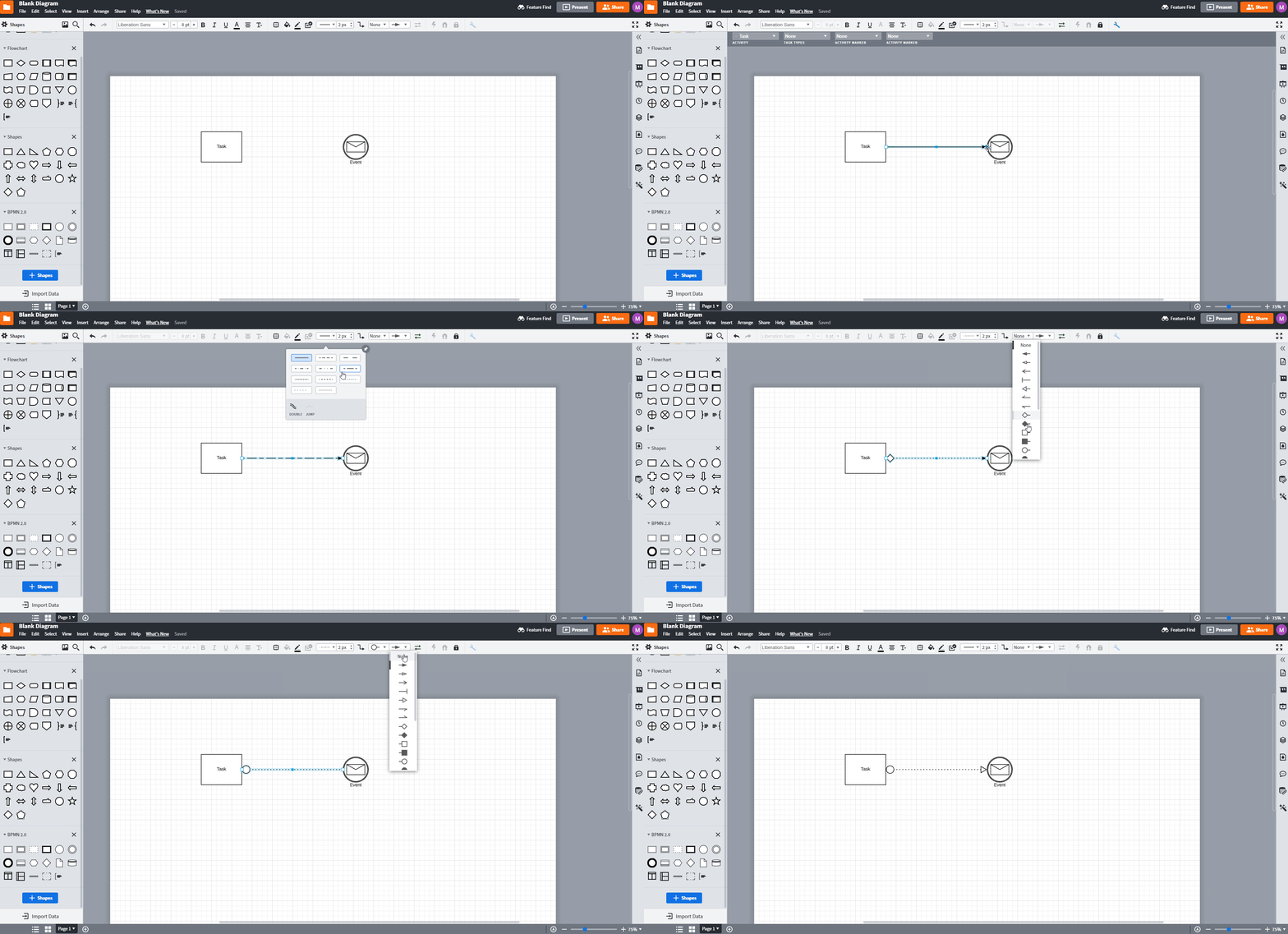
6o2Is6U2skRFKEBVvTTcog.gif

You can also set this to be your default line style by making the line style and endpoint choices when you do not have any other object selectedThen any lines created after will be made with this default style applied. 


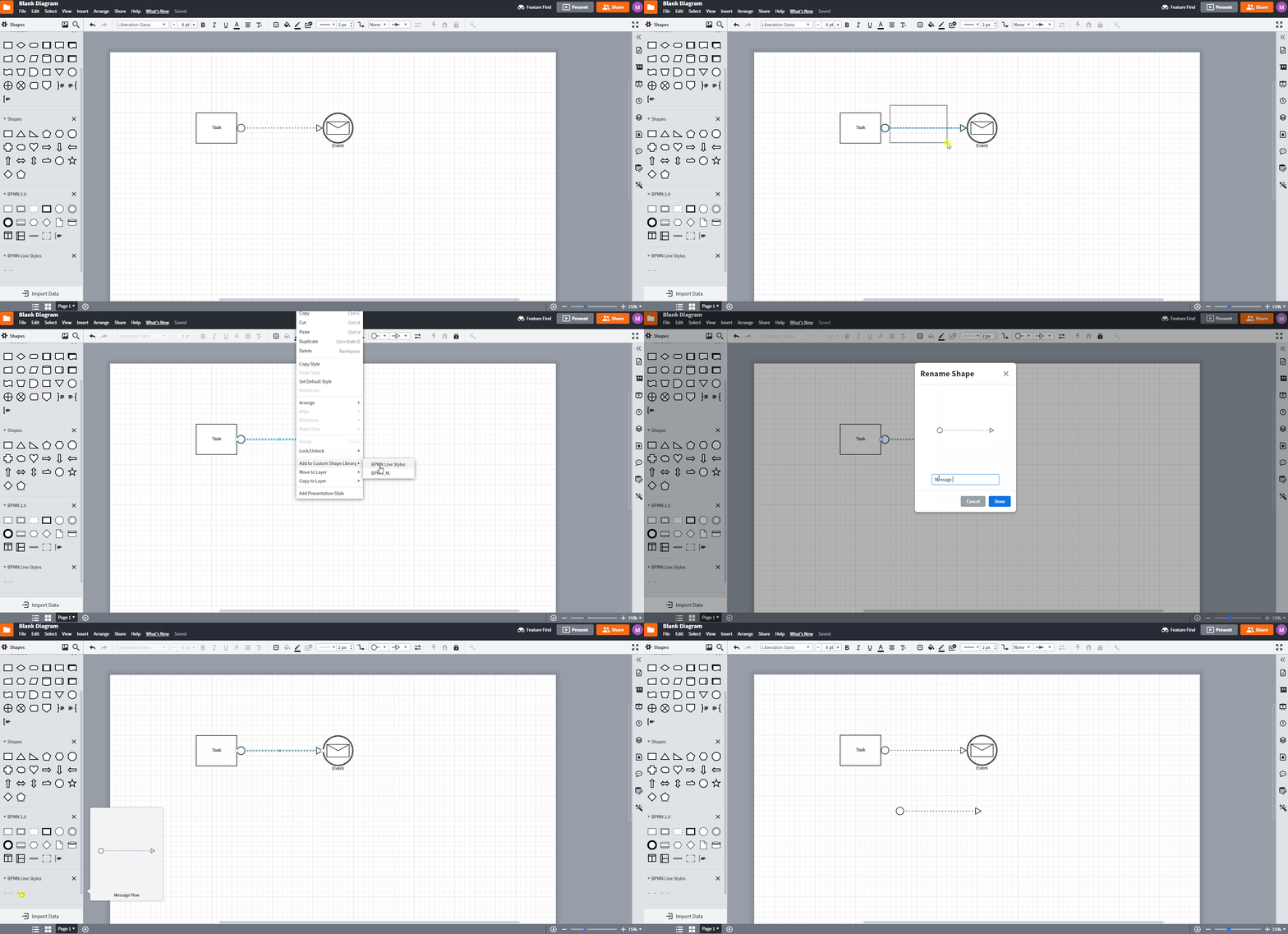
For ease of use and to avoid having to apply or change line styles with each line creation you can save your frequently used line style as a custom shape which will then be easily accessible from a shape library and can be dragged and dropped onto the canvas just like other shapes. For instructions on how to create a custom shape please view the GIF below and review our Add and customize shapes in Lucidchart article

_rZzMAixKI0Og9OPPJ8etQ.gif


Finally if you would prefer that line creation and styling would be automated please continue to share feedback in our Product Feedback space as this is the best way to help our development team prioritize improvements to the product. Thanks!

Comments

pdmosiatlhaga
May 8, 2017

i do not have a problem with creating diagrams. I am a qualified OCEB 2 practitioner. I am referring to the message flow that has a small circle attached to the boundary of the process or lane. Is it available in Lucidchart or not or are you working on making it available in later releases? 

Karsten B
Lucid support team
May 9, 2017

We do not have a specific line type for a message flow at the moment.  You can work around the issue by placing an open circle where you want the message flow to happen and then drawing a dotted line to your next shape.  If this is something you would like to see in the product please post in our Product Feedback space

Daniel M104
May 24, 2017

There isn't an open circle endpoint available in the BPMN library that is typically used for message flows I'd just draw the message flow as a dashed line with an open arrow and not worry about the open circle as it doesn't have any significance to interpreting the diagram (that I'm aware of).

If you really want to incorporate the open circle endpoint then you could use a start event and shrink it to the correct size then place that at the start of your message flow.

Andrew L101
September 26, 2018

Has this missing feature been added yet? When clients are expecting to receive semantically correct BPMN 2.0 models the "doesn't have any significance" argument doesn't always work.

Maison W
Lucid support team
September 26, 2018

Hi Andrew! Thanks for reaching out in the community. We do have an open circle line start/endpoint available and then you have the option of making the line dashed. If you add the UML shape library the endpoint becomes available in the drop down menu. Hope this helps!

Manuel101
April 3, 2019

Why is the message flow feature not available within the BPMN library? Your documentation https://www.lucidchart.com/pages/bpmn-symbols-explained suggest that you do. So why do you advertise when it is not available? 

Thor already wrote and asked: "Other tools have predefined types of lines in the library with type checking to automate that part of the process". That is a serious drawback. Why is this not implemented?

Megan W101
Lucid support team
April 3, 2019

Hi Manuel thanks for the post! We offer every standard BPMN shape so you can quickly and easily represent business flows. However while we do not have the message flow feature at this time these shapes can be manually made in Lucidchart. I understand this workaround may not be ideal at this time so I apologize for the inconvenience. 

ProjectS
June 15, 2020

Hi!

Has  missing feature been added yet? Have the same problem.

I need to have message flow that have small letter sign.

Micah
MicahAnswer
Lucid community team
June 15, 2020

Hi all thanks for posting in this thread! I'm hoping to clarify Lucidchart's BPMN functionality with this post and provide resources for making BPMN diagramming in Lucidchart more efficient. 


First to clarify default line styles such as Message Flow are not part of the BPMN 2.0 shape library. As with other Lucidchart shape libraries lines are not included among the other shapes As such you will not find a dropdown menu to choose the type of line connector or flow as you do with Tasks Data Objects Events etc.


However it is still possible to style these lines to represent proper BPMN semantics using the line styling tools. Simply choose the correct line style and endpoints from the line menu to apply to any line you've manually created. Please see the GIF below for an illustration of this method:

6o2Is6U2skRFKEBVvTTcog.gif

You can also set this to be your default line style by making the line style and endpoint choices when you do not have any other object selectedThen any lines created after will be made with this default style applied. 


For ease of use and to avoid having to apply or change line styles with each line creation you can save your frequently used line style as a custom shape which will then be easily accessible from a shape library and can be dragged and dropped onto the canvas just like other shapes. For instructions on how to create a custom shape please view the GIF below and review our Add and customize shapes in Lucidchart article

_rZzMAixKI0Og9OPPJ8etQ.gif


Finally if you would prefer that line creation and styling would be automated please continue to share feedback in our Product Feedback space as this is the best way to help our development team prioritize improvements to the product. Thanks!

January 25, 2024

See several mentions in this thread about need to “add BPMN shape library”, but dont see any guidance on HOW to go about adding that.   Any pointer greatly appreciated!