August 14, 2019
Solved

How do I scroll down without zooming out in Lucidchart?

  • August 14, 2019
  • 17 replies
  • 6041 views

I am making a flow diagram with Swim lanes showing the flow vertically instead of horizontally. I have zoomed out of the page and made the chart as long as possible but when I try to scroll down the page to add boxes and text that I can physically read it cuts off half of the chart. How do I scroll down the page without zooming out?

I have screenshotted the bottom of the page so that you can see the issue.

I have searched on the posts that people have posted and tried the following solutions but with no avail.

- hold SPACE and scroll using the mouse
- ALT and scroll using the mouse
- Checking GL web is turned off.

Best answer by Addie

Hi @cory h thanks for posting and apologies for the trouble you're experiencing! To clarify did scrolling used to function properly and the issue recently started happening?

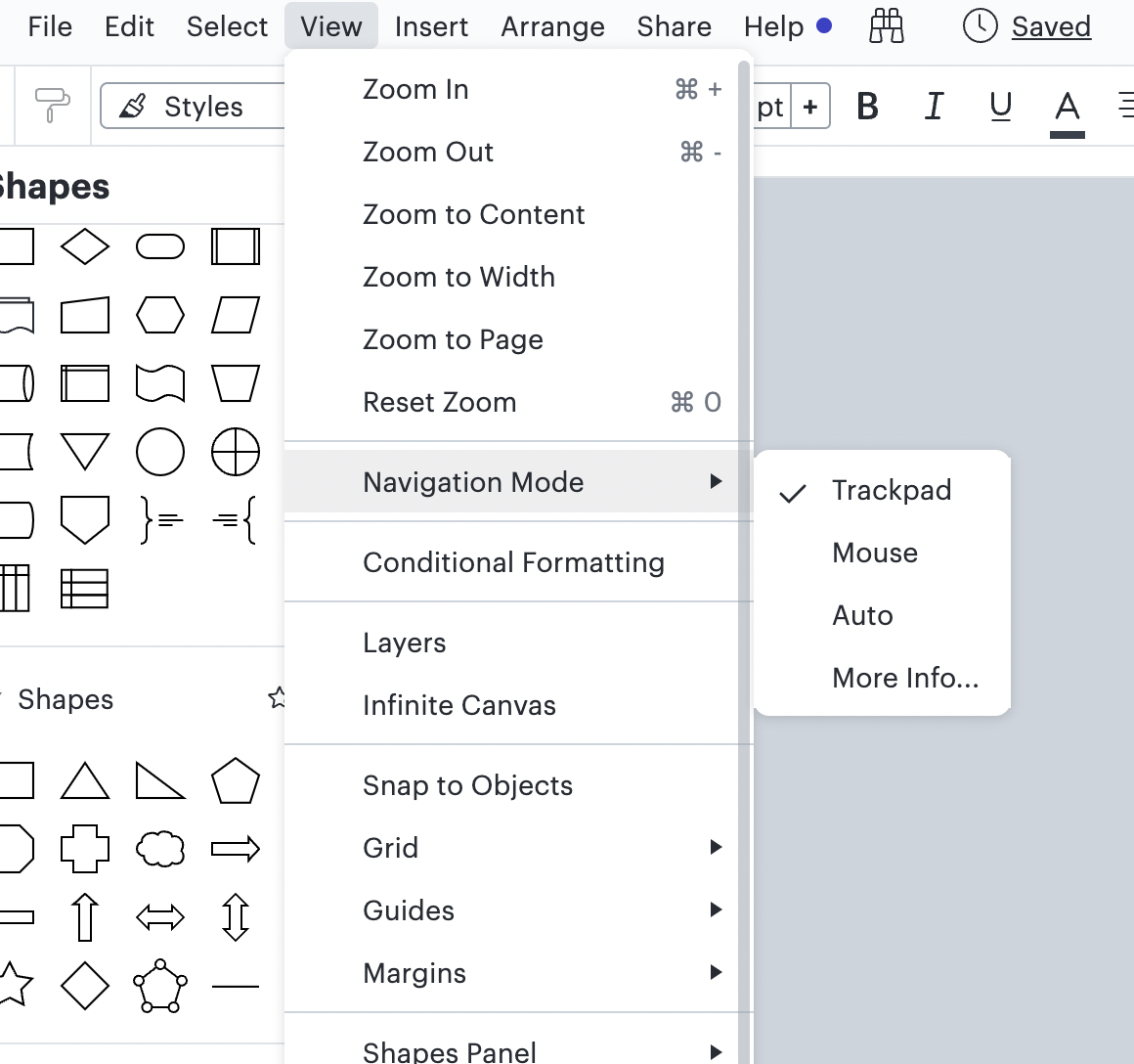
Additionally if you click on the "View" option in the toolbar "Navigation Mode" should be in the drop down list of options. If this is not the case do you mind sharing a screenshot of what you're seeing on your end? 

Thanks for your help and patience! 

Comments

Addie
November 29, 2023

Hi @omar.bendada! So glad we could help! Let us know if you have additional questions.

Addie
December 5, 2023

glad to find this thread!


As a UI dev, it was a little bizarre to me that I had to choose ‘trackpad’ to get both regular standardized mouse behavior (scroll wheel scrolls, scroll wheel + modifier zooms) and trackpad usage (two fingers to pan, two fingers to zoom) back...pretty unintuitive and never would have guessed that without finding this particular piece of knowledge here. Might be worth feeding this back to the devs. Thanks!

Addie
December 5, 2023

Hi @dalawrence, thanks for posting your thoughts in this thread! We really value your feedback, and actually have a whole new space where you can share your ideas with us: Product feedback. 

You can post your idea, it can be upvoted, and the top requests will be looked at by our team! For more information on how our new feedback system works, please review this post:

Thanks so much for being a helpful contributor here in the Lucid Community! 

Addie
February 9, 2024

So happy to find this thread. The zoom out feature when scrolling down was very awkward and flow breaking at times.

July 23, 2024

Is there a short cut to scroll side to side?

Kelsey Gaag
Lucidite
July 23, 2024

Hi @dosmundson

Thank you for the reply! There is not currently a shortcut to scroll side to side. A list of our keyboard shortcuts are available in under the “Help” tab. If you would like to change your navigation settings, I recommend checking out this Community post: 

If you would like to see this feature in Lucid, I would recommend posting an idea. We’re very interested in your feedback and committed to continually improving our products.

Please first search the Product Feedback section of this community (with the filter Topic Type = Idea) to see if it’s already been submitted. If so, please add any additional details you’d like and upvote the request - this consolidation helps to refine feedback and properly capture the popularity of the request.

If no one has submitted this idea yet, please create one of your own and be sure to include details about your use case or what you’d like to see in this experience. This will also allow other users with similar requests to discover and upvote it, then add details of their own.

Finally, for more information on how Lucid manages feedback via this community, take a look at this post:


tetra
February 26, 2025

Wow, that was absolutely infuriating!!! Why is this the default I wonder? On top of this, since I am using a mouse, why on Earth would I select Trackpad to get normal application behavior with a mouse?

Must be a ‘Mac Thing’ or something. I can’t tell you how much this annoyed me and slowed down my work until I made myself go use the forum just to make the mouse work normally.

So much of Lucid is simply amazing, it was just so weird. Please consider improving the settings aspect of the program now that you have a beautiful interface that makes fantastic charts.