Ex: My Org Chart goes from CEO - EVP - SVP - Director - Manager - Staff. I want to collapse SVP so that Director is hiden but still shows Manager and Staff (also auto-reconnect SVP to Manager - Staff). Is there any way to do it?
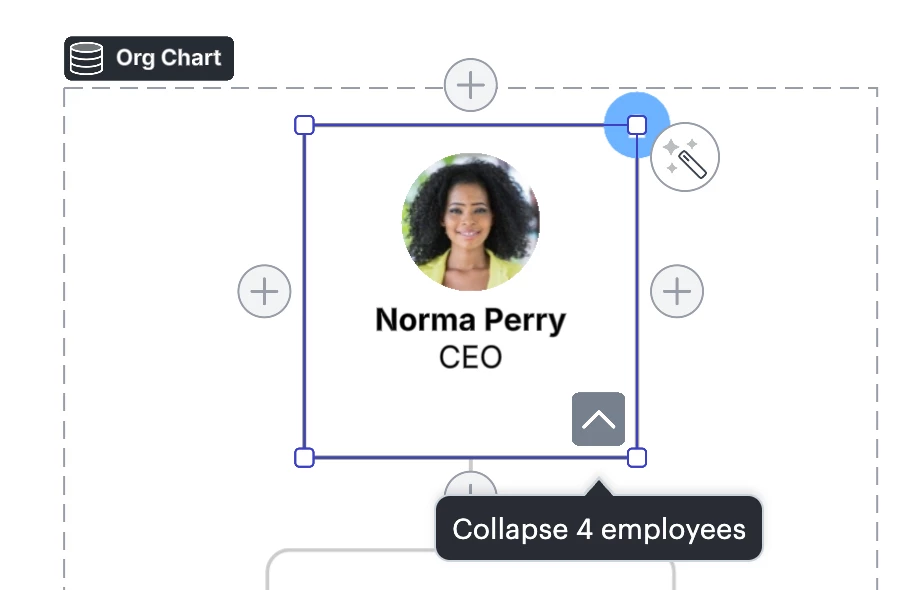
Unfortunately, collapsing just a section of an org chart isn’t currently supported in Lucid. There is the option to collapse all direct reports for a manager by clicking that employee's shape and clicking the arrow that appears on the bottom right corner to expand/hide subordinates. However this option will hide all employees that are at any level below the selected employee.
We’re very interested in your feedback and committed to continually improving our products. If you’re willing to share, we’d love to hear more details about your use case or what you’d like to see in this experience within this thread.
I’ve also converted this post to an idea so that it’s visible to others within the Product Feedback section of the community - from here, they can upvote it and add details of their own. Finally, for more information on how Lucid manages feedback via this community, take a look at this post:
Unfortunately, collapsing just a section of an org chart isn’t currently supported in Lucid. There is the option to collapse all direct reports for a manager by clicking that employee's shape and clicking the arrow that appears on the bottom right corner to expand/hide subordinates. However this option will hide all employees that are at any level below the selected employee.
We’re very interested in your feedback and committed to continually improving our products. If you’re willing to share, we’d love to hear more details about your use case or what you’d like to see in this experience within this thread.
I’ve also converted this post to an idea so that it’s visible to others within the Product Feedback section of the community - from here, they can upvote it and add details of their own. Finally, for more information on how Lucid manages feedback via this community, take a look at this post:
A Lucid or airfocus account is required to interact with the Community, and your participation is subject to the
Supplemental Lucid Community Terms.
You may not participate in the Community if you are under 18. You will be redirected to the Lucid or airfocus app to log in.
A Lucid or airfocus account is required to interact with the Community, and your participation is subject to the
Supplemental Lucid Community Terms.
You may not participate in the Community if you are under 18. You will be redirected to the Lucid or airfocus app to log in.

 Your privacy choices


