Solved

Formatting toolbar missing in Lucidchart

  • July 30, 2026
  • 7 replies
  • 213 views

Forum|alt.badge.img+1

I haven’t used LucidCharts in a month or so and going into it now, the Formatting Toolbar is completely missing and there’s no option to toggle it on/off. This is immensely frustrating as the Format Paint tool was one I used often and now it’s embedded waaaay within the Shape properties dialog box.

Has anyone else noticed this?

Is there a workaround to get the toolbar back or add shortcuts etc? This also means the undo/redo buttons and others aren’t available to use.


It looks like the AI integration in the contextual floating toolbar has resulted in the permanent formatting toolbar at the top of the screen being completely hidden/removed.

Best answer by Zuzia S

Hi ​@BennyT, thank you for posting in the Community and thank you ​@Humas1985 for chiming in!

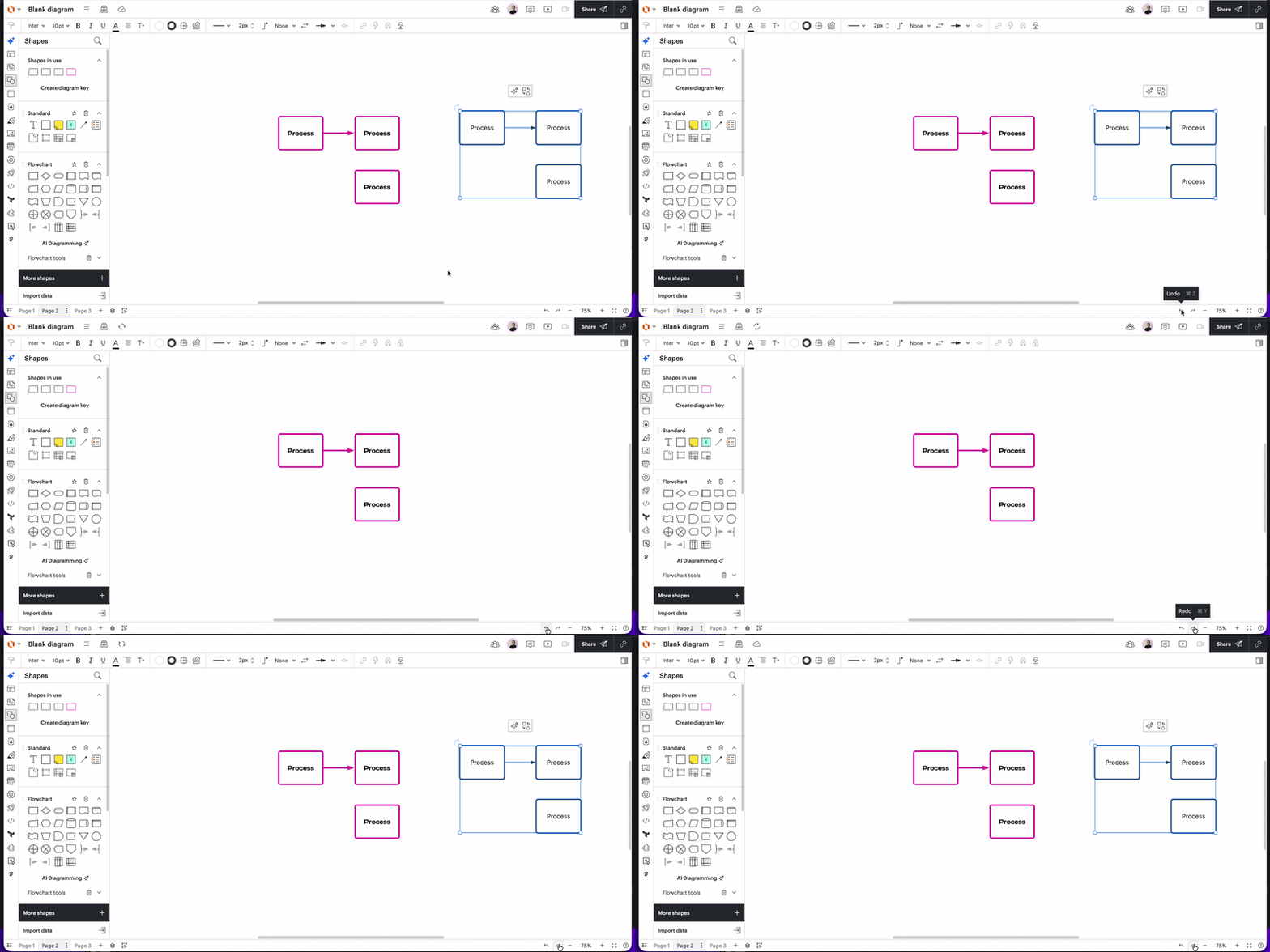
Just to add a few more details here, you can now find undo/redo buttons at the bottom right side of the canvas, as such:

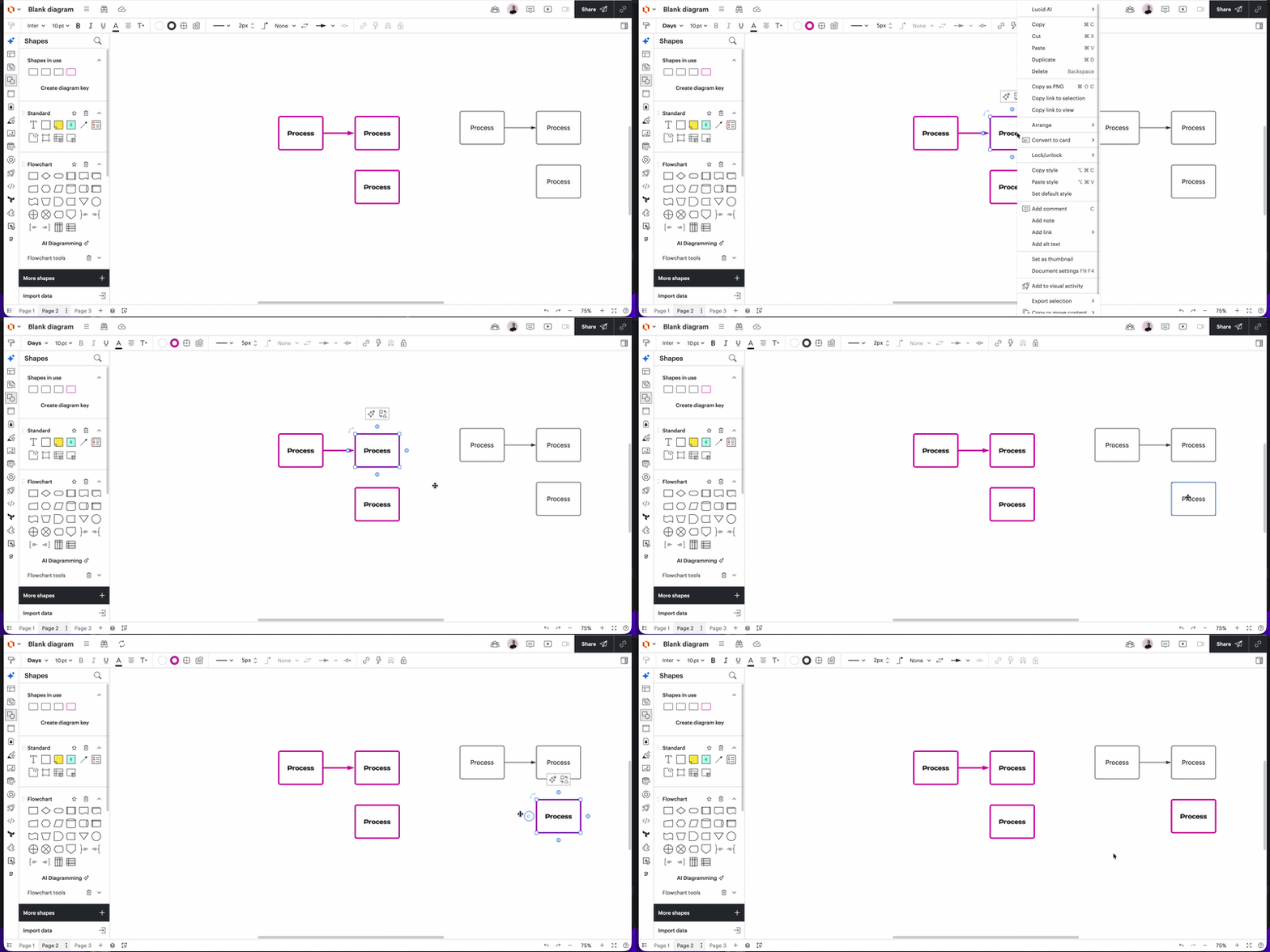
Additionally, if you are referring to the Copy style/Paste style feature, you can find it in the menu when clicking right, as in this example:

I hope this is helpful, please let me know if you have any additional questions!

Cheers

Comments

Same here. this is such a bad decision on Lucid’s part. I cannot even do simple stuff like change colors or fonts! 


Humas1985
Lucid Legend Level 10
Forum|alt.badge.img+24
  • Lucid Legend Level 10
  • July 31, 2026

Hi ​@BennyT 

Follow this community thread to learn more on this - Unable to see the Top Taskbar ribbon | Community

Also the Menu options and the formatting bar,

Welcome to Lucidchart – Lucid

Hope this helps !!


Forum|alt.badge.img+1
  • Author
  • July 31, 2026

I’m ok with the move to standardised however I cannot find the Paste Format option anywhere in the menu. Please advise where it is located


Zuzia S
Forum|alt.badge.img+9
  • Lucid community team
  • Answer
  • August 5, 2026

Hi ​@BennyT, thank you for posting in the Community and thank you ​@Humas1985 for chiming in!

Just to add a few more details here, you can now find undo/redo buttons at the bottom right side of the canvas, as such:

Additionally, if you are referring to the Copy style/Paste style feature, you can find it in the menu when clicking right, as in this example:

I hope this is helpful, please let me know if you have any additional questions!

Cheers


Forum|alt.badge.img+1
  • Author
  • August 6, 2026

Thanks for the detailed response. This does clear up where and how the Paste Format went to and how it works now.


However I’d like to feedback to the UI team that this has made it much more complicated/involved in what was a very simple task. Even with this menu method, there isn’t a way to keep the selected format on hold so that it can be applied to multiple shapes with one-click. Bit hard to explain but this ability was previously available (and is on most other software applications) by double-clicking on the Paste Format button then clicking on the shapes to be changed. 

Now the process is to manually select each shape while holding the Ctl key down then right-clicking and selecting Paste Format. Not ideal when trying to apply to a large amount of shape spread out on a complex diagram. 

In essence, the unification of the UI has significantly reduced the functionality and ease of use of LucidCharts.


Zuzia S
Forum|alt.badge.img+9
  • Lucid community team
  • August 6, 2026

@BennyT Thank you for following up and for providing additional details about your experience!

You can also copy the shape style by using the Paint Format tool. To do so:

  1. Select the shape with the style you want to copy.
  2. Click the Paint Format icon from the Formatting bar at the top-left of the workspace.
  3. Select the objects you want the style applied to.
    • A single click will activate paint format for one selection change. A double-click will activate paint format until the button is clicked again or ESC is pressed on the keyboard. As such:

We’re very interested in your feedback and committed to continually improving our products. Please first search the Product Feedback section of this community (with the filter Topic Type = Idea) to see if it’s already been submitted. If so, please add any additional details you’d like and upvote the request - this consolidation helps to refine feedback and properly capture the popularity of the request.

If no one has submitted this idea yet, please create one of your own and be sure to include details about your use case or what you’d like to see in this experience. This will also allow other users with similar requests to discover and upvote it, then add details of their own.

Finally, for more information on how Lucid manages feedback via this community, take a look at this post:

Cheers!


Forum|alt.badge.img+1
  • Author
  • August 6, 2026

err this whole thread is because that entire Formatting toolbar has been removed from the latest update, supposedly as part of the UI unification with other Lucid apps.


if that’s incorrect and there is a way to re-enable that toolbar, please let me know as that will resolve all my issues in one go.