Brendan S
August 29, 2016
Solved

Flip shapes vertically or horizontally in Lucidchart

  • August 29, 2016
  • 14 replies
  • 12297 views

Is there no ability flip shapes vertically or horizontally in Lucidchart?

Best answer by Micah

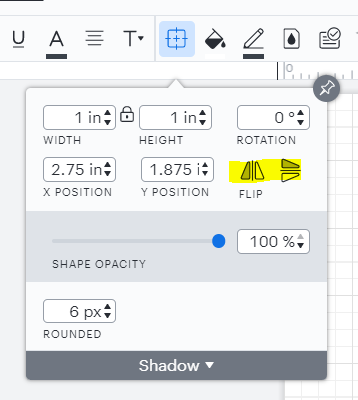
@shelley d102 Thanks for continuing this thread! The Lucidchart user interface has undergone several changes in this area since 2016 - the "Metrics Panel" mentioned in Sara M's comment has been replaced by the Shape Options menu.


The highlighted flip functionality remains the same however and is demonstrated in the GIF in Abby's official comment above. I do see that you mentioned this functionality isn't what you're looking for - would you please provide an example of what you're hoping to achieve? I'd be glad to keep assisting!

Comments

Sara M102
Lucidite
August 29, 2016

Hi Brendan - Thanks for reaching out! You can flip shapes using the metrics panel. See attachment.

Brendan S
Brendan SAuthor
August 29, 2016

Excellent thanks for the prompt response :)

Vadim B
March 13, 2017

This does not seem to work.


I am trying to flip a door shape from the "floor plan" template's "doors and windows" panel the flip option of the metric panel grayed out.

Sara M102
Lucidite
March 13, 2017

Hi Vadim. Floor plans work differently from normal shapes. This post should help answer your question about rotating doors and windows: https://lucidchart.zendesk.com/hc/en-us/community/posts/206027203-Can-I-rotate-windows-and-doors-

Abby S
Lucid community team
January 5, 2018

Hi

Thank you for posting. If you select the shape and then select the Shape Options (circled in red below) the panel will appear.

Peter N102
May 21, 2018

It would be nice to be able to flip an entire Group of objects at once too. Especially if you can keep the text intact without flipping with the objects so that it remains readable.

Shelley D102
April 5, 2022

How do you even find the Metrics Table to flip the whole image?  I have been looking everywhere for it and I cannot find it.  The other flip version under the Shape options Table is not what we are looking for.  We have floor plans that we are working on that we need to mirror flip the images so that we can plan for an actual site.  Thanks. 

Micah
MicahAnswer
Lucid community team
April 5, 2022

@shelley d102 Thanks for continuing this thread! The Lucidchart user interface has undergone several changes in this area since 2016 - the "Metrics Panel" mentioned in Sara M's comment has been replaced by the Shape Options menu.


The highlighted flip functionality remains the same however and is demonstrated in the GIF in Abby's official comment above. I do see that you mentioned this functionality isn't what you're looking for - would you please provide an example of what you're hoping to achieve? I'd be glad to keep assisting!

May 26, 2024

The “flip” action appears to only be available to standard closed shapes (squares, circles, etc.). I can’t flip a curved line, or a group of lines that comprise a line drawing. The “flip” icons are grayed out/inactive. This makes the application useless for my needs.

Kelsey Gaag
Lucidite
May 28, 2024

Hi @robinobudd

It looks like you created a post about this question! I have answered this question on your post, you can check it out here.