Brendan S
August 29, 2016
Solved

Flip shapes vertically or horizontally in Lucidchart

  • August 29, 2016
  • 14 replies
  • 12297 views

Is there no ability flip shapes vertically or horizontally in Lucidchart?

Best answer by Micah

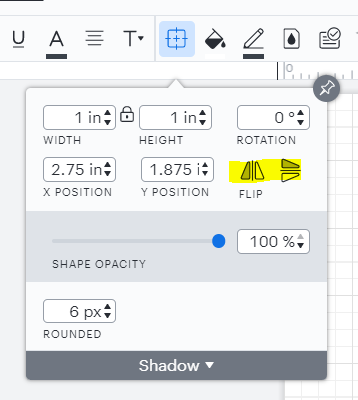
@shelley d102 Thanks for continuing this thread! The Lucidchart user interface has undergone several changes in this area since 2016 - the "Metrics Panel" mentioned in Sara M's comment has been replaced by the Shape Options menu.


The highlighted flip functionality remains the same however and is demonstrated in the GIF in Abby's official comment above. I do see that you mentioned this functionality isn't what you're looking for - would you please provide an example of what you're hoping to achieve? I'd be glad to keep assisting!

Comments

February 26, 2025

I will follow with this thread. The flip action is very inconsistent in a sense it does not flip all shape types or it does but only in a single axis. Bellow is an example of a shape grouped from 4 lines and a dot (circle). Flipping buttons are available but do not work.


Kelsey Gaag
Lucidite
February 27, 2025

Hi ​@pbmcc2

Thank you for the reply! You are correct, the flip functionality only applies to closed shapes like squares, triangles, etc. It does not apply to lines. you can upvote this idea if you would like to see this functionality in Lucid!


March 9, 2026

None of these options exist in the ‘new UI’ anymore…..but thankfully the article’s still published, so I can see how I used to be able to do this.

Please…..hide more of the menu so doing everything else is equally unintuitive.
(and make sure you don’t document that either)

Leianne C
Lucid support team
March 10, 2026

Hi ​@Tim Treacy, thank you for continuing this thread. If you are looking for ‘Shape options’ and the flip button, it should still be available in Lucidchart along the Formatting bar at the top of the workspace. 

If this option is not available, would you mind sharing a screenshot of what your editor looks like? This will help me take a closer look on my end. Thanks!