Sami H
Lucid support team
January 19, 2022
Solved

Employees at different levels reporting to the same manager in org chart

  • January 19, 2022
  • 18 replies
  • 2105 views

Hello are you able to manually state what 'tier' members of staff should be. We have instances where different tiers/levels report into the same staff.

For example let’s say employee 2 has a higher title/position than employee 3. But both of them directly report to employee 1. How can I display this? I don’t want employees 2 and 3 to be on the same tier.

Best answer by Micah

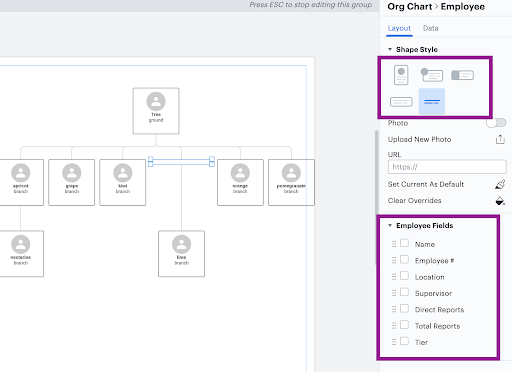
Hi there thanks for posting in the community! Unfortunately Lucidchart does not have a feature to have two employees at different tiers/ levels reporting to the same supervisor. However a workaround for this would be to create an employee in the area that should be 'skipped' and on the right hand menu deselect all information and choose the 'text only' style. This will leave an (almost) blank space which will look for the most part correct in terms of the reporting structure and move the employees to the correct tiers. Here's an example below - Hope that helps!

For more information on org charts take a look at this Org Charts Help Center article.

____________________________________________________________________________________________________________

¿Habla español? ¡Haga una pregunta aquí!

Fala português? Faça uma pergunta aqui!

Comments

Leianne C
Lucid support team
April 10, 2024

Hi @casalemi, thank you for continuing this post and sharing valuable feedback about this feature. 

If possible, could you please upvote the following idea post and share any additional details about your use case or what you’d like to see in this experience there? This will help to refine feedback and properly capture the popularity of the request. Thank you!


Finally, for more information on how Lucid manages feedback via this community, take a look at this post:


We appreciate your willingness to provide your requests and feedback in the Lucid Community!

November 21, 2025

Is there any way to exclude this placeholder/phantom box from the total employee count in the org chart?

I need to maintain accurate headcount statistics while using this visual workaround. The blank box helps achieve the correct visual structure, but it's being counted as an actual employee in the total count.

January 20, 2026

I was working on this same issue and created a new employee global field called “Total Active” with the following formula:

=countif(DESCENDANTS(graphnodes), employee => contains(employee."Status", "active"))

On all of my blank boxes, I set the “status” to an empty field.

In conditional formating i hide the default total count from lucid and created a new one based on the new global status see below:


Leianne C
Lucid support team
January 28, 2026

Hi ​@tdang, thank you for sharing your workaround. This is so insightful! Please let us know if you have any questions about the Org Chart feature.

March 8, 2026

I am chiming in here to say that as a new user it is extremely disappointing that there is not an easy way to represent people at different levels reporting to the same manager but not appearing in different tiers.In the case of our org, it almost makes this program not worth it. I have been searching for a software/app to create an org chart more easily and was hopeful Lucid would be it. 

I totally agree with you!!!

March 8, 2026

Glad to hear it!


When are you planning to have this function in Lucidapp, that employees at different levels reporting to the same manager??

March 8, 2026

I am chiming in here to say that as a new user it is extremely disappointing that there is not an easy way to represent people at different levels reporting to the same manager but not appearing in different tiers.In the case of our org, it almost makes this program not worth it. I have been searching for a software/app to create an org chart more easily and was hopeful Lucid would be it. 

Did you find another app with this functionality?

Leianne C
Lucid support team
March 10, 2026

Hi ​@mariavictoria, thank you for continuing this thread. This is not currently supported in Lucid however we are continuously looking for ways to improve our products and your input is the most effective way to achieve that goal. 

This feature request is currently a future consideration and we encourage you to upvote the this Community Idea post: Change tiers in org charts in Lucidchart. Please feel free to leave your feedback there as well for our product development team! They actively review feedback within this space as they research product enhancements. For details on how feedback submissions are collected and considered, check out this Community post
 
We appreciate your willingness to provide your requests and feedback in the Lucid Community!