Pinned Reply By Darbie

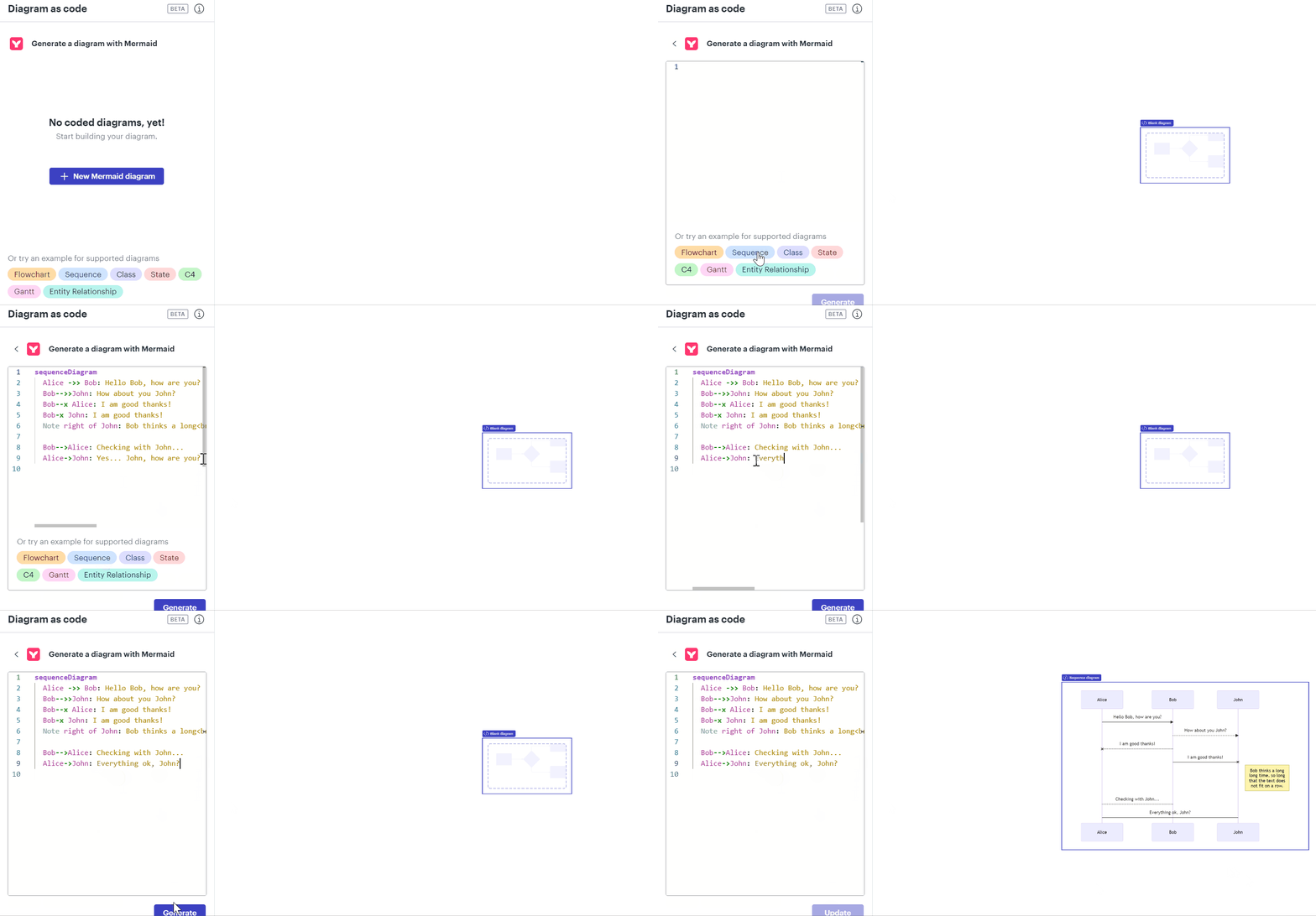
I am excited to share that Lucid has released the ability to create a diagram using mermaid code syntax! We support 8 different diagram types including: flowchart, sequence, class, state, C4, gantt, and entity relationship diagrams. Try it out for yourself or learn more here

You will still be able to create UML diagrams leveraging our UML markup features.


Comments

Phil W
November 24, 2021

Agreed - being able to author diagrams in Lucidchart then import them into Azure DevOps wikis would be very useful.

Abby S
Lucid community team
February 18, 2022

Hey Luciano and Phil thank you for posting in the Lucid community! Our sincere apologies for the delayed response on this thread--I wanted to follow up in case this answer may still be useful to you and to provide a solution for other users who see this thread in the future. 

We’re very interested in your feedback and committed to continually improving our products. If you’re willing to share, we’d love to hear more details about your use case or what you’d like to see in this experience within this thread. I’ve also converted this post to an idea so that it’s visible to others within the Product Feedback section of the community - from here, they can upvote it and add details of their own.

Finally, for more information on how Lucid manages feedback via this community, take a look at this post.

Luciano B
Luciano BAuthor
February 25, 2022

Hey Phil W

Sorry for delay in responding.  Hopefully you found out already that Azure DevOps Wikis natively support Mermaid Diagrams.

Enter as following: 

::: mermaid
sequenceDiagram
    Alice->>John: Hello John how are you?
    John-->>Alice: Great!
:::

Then it will render the diagram for you.

Unfortunately there is a limited set of diagrams that it supports.

Erik H102
February 21, 2023

Is there a place where we can track a feature request? Or can someone give us a status update?

It's more than one year ago and I'd also like to see support for Mermaid in Lucid so at least I can design my charts in one place export them etc.

Phillip W
Lucid support team
February 21, 2023

Hi Erik

Thank you for keeping this thread going and I want to ensure you that we DO hear you however this integration is not yet built. We receive lots of fantastic ideas (including this one 😎) that our Dev Team has to prioritize and construct. Rest assured once this functionality is in place we will definitely reach out and deliver the good news!

Again thank you for voicing how Lucid can best assist with your workflow and giving us the opportunity to make things even easier--firm handshakes 🤝

William
March 20, 2023

One can import a mermaid diagram into Draw.io. Then one can import the draw.io diagram into Lucid. But my basic flow chart in draw.io only created a blank page after import in Lucid.

So we have a undeveloped new feature and an existing broken feature. I reported the bug in the app with a link to my draw.io file.

:-(

Leianne C
Lucid support team
March 21, 2023

Hi William thank you for continuing this thread and submitting a support ticket - I can see that someone from our team has responded to your ticket! Please continue working with our team in the support ticket to troubleshoot the issue. 

For anyone reading with a similar request for Mermaid support we encourage you to add your voice to the thread. Thank you!

Lorne H
March 21, 2023

Hello

I also would love to be able to export a Lucid chart to Mermaid for native display in Azure DevOps!. 

Micah
Lucid community team
March 21, 2023

Hi Lorne thanks for adding your request here - we've logged it!

Tim C102
April 19, 2023

Support for importing and exporting Mermaid code would be great a number of tools I use already support it. See a list of tools that support it here: https://mermaid.js.org/ecosystem/integrations.html

For sake of an example I use Obsidian heavily and it would be great to be able to draft my diagrams as Mermaid code in Obsidian and then paste the code into Lucidchart to share it or be able to copy Mermaid code for a diagram from Lucidchart and paste it into my notes in Obsidian.