Katharine M
April 7, 2022
Validating

Disable contextual panel from displaying in Lucid

Related products:Lucidchart
  • April 7, 2022
  • 34 replies
  • 1073 views

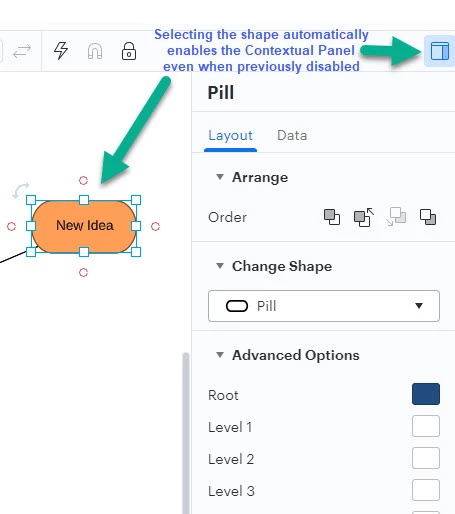
When I select a shape the Contextual Panel for that shape automatically opens up even when I've previously clicked the Contextual Panel icon to disable it (in the hopes it would stop opening each time).  This is highly inconvenient as it takes up screen space and often covers up the very shape I just clicked on with the intention of entering text.  Each time I have to click to disable the panel and then when I click the next shape it opens again.

It seems to happen on all container elements. The example is from a Mind Map but I've also seen it on Org Charts Swim Lames etc.
 

Pinned Reply By AnnieMoscon

Hi, my name is Annie and I am on the product team here at Lucid. All of the feedback mentioned in this thread is super valuable and will be noted. This is an area of our product that we are actively working to improve the usability of. If this is something you are interested in discussing further, you can leave a comment below and I can work on getting something set up to chat. We appreciate the thoughtful feedback. 

Comments

Liz G
Lucid support team
April 7, 2022

Hi Katharine

Thank you for contacting Lucid Support. Unfortunately, this isn’t currently supported in Lucid, but we’re very interested in your feedback and committed to continually improving our products. If you’re willing to share, we’d love to hear more details about your use case or what you’d like to see in this experience within this thread. I’ve also converted this post to an idea so that it’s visible to others within the Product Feedback section of the community - from here, they can upvote it and add details of their own.

Finally, for more information on how Lucid manages feedback via this community, take a look at this post:

https://community.lucid.co/welcome-to-the-lucid-community-15/feedback-and-feature-requests-5439

.

If there are any other users with feedback regarding the Content Panel please add your feedback below.

aurelie.gabriel
April 13, 2022

@Liz G Is it possible to move the position of the contextual panel ? it used to be under the horizontal menu and now its on the right side why ?

Liz G
Lucid support team
April 13, 2022

Hi @aurelie.gabriel thank you for continuing this thread! There is not currently a way to move the content panel. 


Micah
Lucid community team
May 10, 2022

Hi all I wanted to update this thread with good news! Our development team has improved this experience so that now if you dismiss the context panel after it opens when you click on a shape it will remain hidden and will not continue to open. Please let us know here if you continue to experience issues with this. Thank you!

Stephen K
December 7, 2022

Good idea I'd like to add that this happens with Hotspot shapes and the action panel at the top too pinning the panel and moving it elsewhere gets it out the way but it will disappear and re-appear here as soon as you click back on it again.


Coumba D
Lucid support team
December 7, 2022

Hi Stephen

Thanks for chiming in!

What you describe is the intended behaviour of the Actions/Hotspots pop-up panel however I do understand your point and encourage you to share that here.

Ideas and comments submitted to this form as passed on directly to our Product Development Team for their consideration.

Thanks for taking the time to let us know your thoughts!

May 2, 2025

Hi all I wanted to update this thread with good news! Our development team has improved this experience so that now if you dismiss the context panel after it opens when you click on a shape it will remain hidden and will not continue to open. Please let us know here if you continue to experience issues with this. Thank you!

For me, this is neither good news, nor an improved experience.  I only want to see the Contextual panel when I click on its icon or maybe when I right-click on a shape.  The Lucid team is better than this. 🙂

Ambar D
Lucid community team
May 5, 2025

Hi ​@kcrossley, thank you for your feedback on this feature! 

We’re very interested in your feedback and committed to continually improving our products. Our product team is regularly reviewing feedback in this space as they research product enhancements. Feel free to leave additional details about what you’d hope to see in this experience within this thread! Thanks again for voicing your thoughts on this!

July 17, 2025

This seems to be broken.. I select an object and it pops out. I hide it and I select another object and it pops out again.
Let me add, this is only true for swimlanes.  If you click a swimlane it always opens regardless if you closed it before.


Ambar D
Lucid community team
July 21, 2025

Hi ​@turbo2ltr, thank you for adding to this thread! 

When you first click on a swimlane, the contextual panel will open. If you close the panel, you should then be able to click on individual lanes without the contextual panel opening. If you click outside of your swimlane, then click back into your swimlane or on another swimlane, the contextual panel will reopen once again. Does this match your experience?


I am sorry for any frustration caused by this experience. Upvoting this post and commenting with details on what you are hoping to see are the perfect ways to get your feedback in front of the product teams!

Please let me know if you have any additional questions here.