Andrew M101
September 8, 2019
Solved

Zooming in/out using trackpad or mouse

  • September 8, 2019
  • 16 replies
  • 1712 views

I'm unable to zoom in/out with my trackpad OR the scroll wheel on my mouse and instead have to manually move the slider bar each time I want to reorient my page. The mouse and trackpad both just allow me to scroll up/down on the page not in/out. Based on all of your Help Center and Community posts it seems that this shouldn't be the case and it definitely makes work within Lucidchart clunky and kind of a pain. What am I doing wrong? Please don't refer me to your "Documents Settings" help page as this doesn't answer the question. 

Best answer by Micah

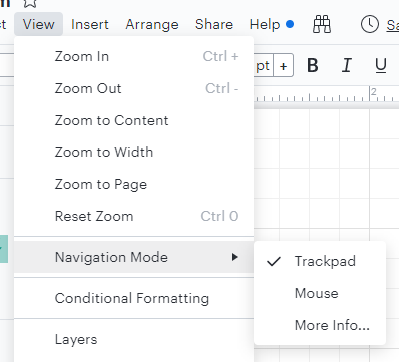
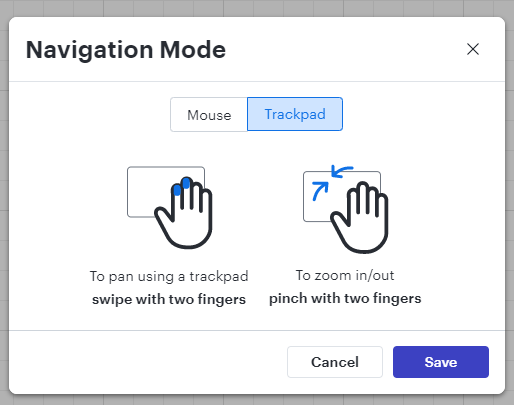
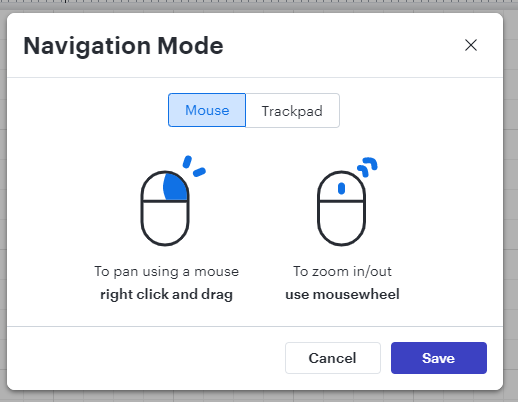
@jsmolley Thanks so much for updating this thread with that information! I wanted to add a few screenshots of what you're referring to in your comment in case it's helpful for other users. 

Comments

Lisa L103
September 12, 2023

I would love to turn OFF the mousewheel for scrolling. It's driving me crazy! I'm constantly accidentally changing the zoom by trying to use the mousewheel to scroll. I use the mousewheel for scrolling in every other web browser and application I use so Lucid is the exception here and it's proving very difficult for me to override my default automatic navigation behavior. 

Micah
Lucid community team
September 12, 2023

Hi Lisa thanks for your comment and apologies for the frustration. Good news - it is possible to change the behavior here so that the mouse wheel pans up and down instead of zooming. To do so simply choose the "Trackpad" option in the Navigation Mode menu as shown in my screenshot above. Shift and ctrl + shift will also make the mouse wheel pan instead of zoom regardless of the navigation mode you've selected. 

Lisa L103
September 12, 2023

Fantastic! (I also submitted this as a feature request so that can be deleted.)

Micah
Lucid community team
September 12, 2023

No worries Lisa! Thanks for taking the time to let us know this is important to you. 

September 3, 2025

I’m surprised that this is still the default behavior. My mouse wheel should scroll up and down by default, and zoom if combined with a key. I’ve never used an app that did it the other way around out of the box.

Lucid & airfocus support team
September 4, 2025

Hi ​@LTomGriff

Thanks for responding to this post! I found an idea in the Lucid Community similar to yours here: 

We would love to hear more details about your use case or what you’d like to see in this experience within this thread. We appreciate all of your feedback and are always looking for ways to improve our products!