Andrew M101
September 8, 2019
Solved

Zooming in/out using trackpad or mouse

  • September 8, 2019
  • 16 replies
  • 1712 views

I'm unable to zoom in/out with my trackpad OR the scroll wheel on my mouse and instead have to manually move the slider bar each time I want to reorient my page. The mouse and trackpad both just allow me to scroll up/down on the page not in/out. Based on all of your Help Center and Community posts it seems that this shouldn't be the case and it definitely makes work within Lucidchart clunky and kind of a pain. What am I doing wrong? Please don't refer me to your "Documents Settings" help page as this doesn't answer the question. 

Best answer by Micah

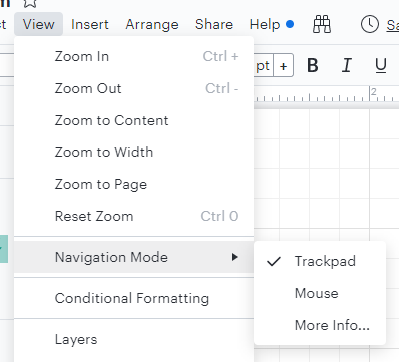
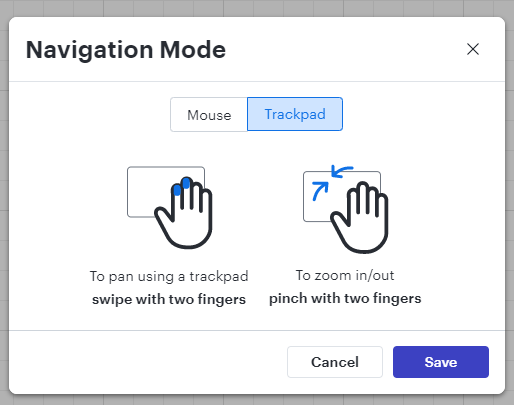
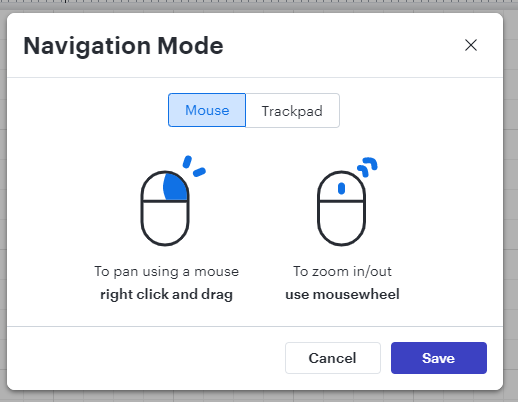
@jsmolley Thanks so much for updating this thread with that information! I wanted to add a few screenshots of what you're referring to in your comment in case it's helpful for other users. 

Comments

Tate S
Lucid support team
September 11, 2019

Hi Andrew

Thanks for posting in the community and sorry for the trouble. You are correct it is possible to zoom in and out using the trackpad and this functionality is working normally on my end. If you have not already could you try opening a document in a Chrome incognito window and seeing if that has any effect? 

Andrew M101
September 11, 2019

Hi Tate-

I hadn't tried that but it doesn't seem to work. Same problem.

-A

Andrew M101
September 11, 2019

Chrom Version 76.0.3809.132

Mac OS 10.13.6 (High Sierra)


Robin S
June 12, 2020

Try holding down the spacebar while scrolling with the scroll wheel. Also clicking with the scroll wheel lets you pan.

Brad M
July 8, 2021

The suggestion from Robin S worked for me.  On a Mac using the magic mouse if I hold down the space bar and use the single finger scroll action I can zoom in or out.  The space bar also seems to allow you to click and move the canvas.

Leianne C
Lucid support team
July 8, 2021

Hi Brad thanks for continuing this thread and providing such a great tip! Another shortcut I like to use is holding SHIFT while using the mouse scroll to move left and right across the canvas. 

If anyone else has any great Lucidchart tips or shortcuts they like to use please share it here in the community. We'd love to hear it! 

michael102
July 18, 2021

I've got the same problem but working in an chrome incognito window fixes it. 

I'm new to Lucidchart. I'm sure this didn't happen for the first couple of hours. In fact logging out of the original non-incognito window seemed to have reset it. Smells like a bug to me.

Emma D
Lucid support team
July 19, 2021

Hi Michael! Thanks for contributing to this thread. Issues like this can be tricky to pin down to one specific cause as there are a number of things that might influence this for each user (like browser issues extensions mouse/keyboard device settings etc). From your description it sounds like there might have been browser-related performance issues in the original window you opened the document in.

If this reoccurs I recommend trying a hard-refresh of your browser window as a first step (Ctrl+Shift+R on Windows or Cmd+Shift+R  on Mac.) This will refresh and clear your cache for that page- so to avoid losing any work please ensure that your network connection is strong and your document does not show 'Saving' when you try this. If that doesn't work and the issue is still not occurring in an incognito window it's likely that a browser extension is causing the issue- in which case you may need to disable the extension when working in Lucidchart. 

If the issue persists and these tips do not help please feel free to fill in this form to submit a support ticket for further assistance. Hope this helps!

jsmolley
April 3, 2023

Just found this (Google Chrome on Windows):

"View" menu --> Navigation --> Trackpad:  With this mode the mouse scroll wheel will scroll the page vertically (horizontally if shift is held at the same time)

Selecting other modes ("Mouse" or "Auto") results in the scroll-wheel causing the page to zoom in and out around where the cursor is located.

Micah
MicahAnswer
Lucid community team
April 3, 2023

@jsmolley Thanks so much for updating this thread with that information! I wanted to add a few screenshots of what you're referring to in your comment in case it's helpful for other users.