February 28, 2024
Solved

Why hidden layers in presentation are showing when slides are exported to a pdf?

  • February 28, 2024
  • 17 replies
  • 414 views

I am exporting slides to PDF and it looks like the toggle for which layers to show in the presentation has no impact on the exported PDF. 

Best answer by Micah

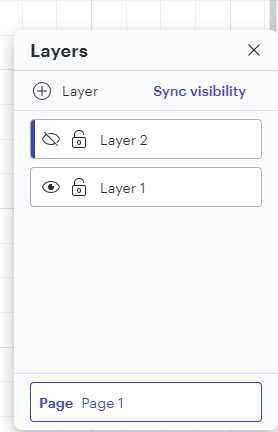
Excellent tips, @Ria S! I have one additional suggestion to contribute, @JanneSOK, which is to ensure that you click the “sync visibility” button in the layers menu after you have them configured with your desired visibility settings.   


This will make sure that your configuration is carried over into any printing or exporting that you do. 

Comments

Micah
Lucid community team
August 23, 2024

Hi Don, thanks for your response. My apologies - I think I misunderstood your original description that this behavior is happening specifically with “Slides to PDF”, not with a regular PDF export. I understand now what you’re experiencing. 

Your description is accurate - currently, exporting to Google slides allows you to define layers per slide via this menu, overriding other settings like Sync Visibility,


but export to slides to PDF depends on the state of Sync Visibility. I’ve been able to reproduce this, and I believe it’s a bug due to the inconsistency in behavior. I have filed a report with our development team so they can take a closer look - my sincere apologies for the inconvenience here. I will be sure to let you know via this thread as soon as I have an update. In the meantime, I do believe the best workaround is to utilize the Export to Google Slides function. 


Please let me know if you have additional questions.

August 26, 2024

Thank you and no apologies necessary. 

Any chance this is a relatively quick fix?

I'm building up a library to work with my clients and the export to PDF is required. 

Slides is the ideal way to walk them through it without wastintntime on a separate slide deck. Which I know was the original intent of this feature. 


Thank you again for the quick responses. 

Customer support is a tremendous part of the decision I make in software. 

I pay for several services out of my own pocket to give myself an edge. 

Micah
Lucid community team
August 26, 2024

Hi @Don.McCarty, appreciate your kind words - we’re grateful to be a part of your toolkit!

You’re correct - that is the intended use for Slides to PDF, but as a workaround in the meantime, I do believe the best alternatives are the Google Slides export or the regular PDF export. For the latter, you could utilize the Crop to content function, which would give you a slide-like appearance. 


I recognize that this issue may hinder your workflow, and I want to be transparent so that you are able to move forward in the best way possible. Our development team has to rigorously prioritize what to work on based on the extent and criticality of the issue. Because of this, it is not likely that this issue will be resolved quickly. I apologize for any disruption this may cause, and I would like to do all I can to help you continue your work. I will continue to monitor progress closely and share an update with you via this thread as soon as I’m able.


August 27, 2024

That is fine.
The challenge with this work-around is that the automatic export to Google Slides is not crisp.
It comes across fuzzy, degrading the overall quality of the material.

Micah
Lucid community team
August 27, 2024

@Don.McCarty Agreed - this isn’t the ideal solution! I’ll continue to provide any updates I can. 

December 12, 2024

Hi Micah - I’ve also just come across this same issue with exporting slides to PDF...any updates on the resolution for this?  My personal preference would be to never have to produce another PowerPoint deck in my life-time, but there always seems to be some group or another that prefers these over alternatives like Spark or Lucid presentations...really hoping this bug resolution is close 🤔

Micah
Lucid community team
December 12, 2024

Hi ​@Andrew McHutchison, thanks for your comment, and my apologies that you’re experiencing this, too. Unfortunately, I don’t have a status update to share on a resolution for this. I recognize it’s disruptive, and I appreciate you explaining the impact this has on your work. I hope that the workarounds I mentioned in a prior response might be helpful in the meantime. I’ll continue to monitor the bug and provide an update as soon as I’m able!