Solved

Visio stencils

  • November 20, 2025
  • 3 replies
  • 40 views

Forum|alt.badge.img

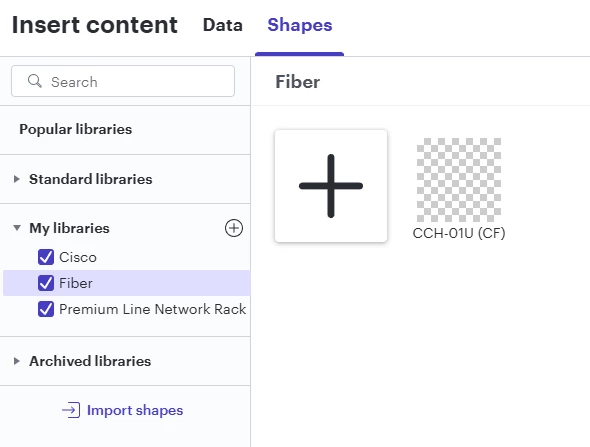
I have several Visio stencils downloaded directly from Cisco, Dell, etc. directly that don’t seem to work in Lucid. Some of the Cisco stencils work fine, like all of the C9000 series switches. But then others like the Edge 5000 don’t work at all.

For example, this one downloaded from Corning’s website for the CCH-01U. The stencil imports fine, but it’s just blank and there is nothing there. It works fine in Visio. 


Best answer by Humas1985

Hi ​@Tech Guy 

Not all Visio stencils translate fully into Lucid because some contain advanced or proprietary Visio-only elements. Resaving the stencil in a newer Visio format (such as VSSX) or simplifying the file can improve import success, but unsupported object types may still result in blank or missing shapes. In those cases, manual conversion (e.g., exporting shapes as SVG) or assistance from Lucid Support may be required.

Troubleshooting tips for Visio import for Lucidchart | Community

Hope this helps - Happy to help further!!
Thank you very much and have a great one!
Warm regards

Comments

Humas1985
Lucid Legend Level 10
Forum|alt.badge.img+24
  • Lucid Legend Level 10
  • Answer
  • November 20, 2025

Hi ​@Tech Guy 

Not all Visio stencils translate fully into Lucid because some contain advanced or proprietary Visio-only elements. Resaving the stencil in a newer Visio format (such as VSSX) or simplifying the file can improve import success, but unsupported object types may still result in blank or missing shapes. In those cases, manual conversion (e.g., exporting shapes as SVG) or assistance from Lucid Support may be required.

Troubleshooting tips for Visio import for Lucidchart | Community

Hope this helps - Happy to help further!!
Thank you very much and have a great one!
Warm regards


Forum|alt.badge.img+1
  • December 1, 2025

I have this same issue. I have uploaded several shapes (mostly Cisco stencils) in the past and tried uploading the same stencils that I know used to work again but they’re no longer loading properly. Something seems to have changed.


Leianne C
Forum|alt.badge.img+15
  • Lucid support team
  • December 15, 2025

Hi ​@ipvrey, thank you for continuing this thread and apologies for the delayed response. I can see that you created a separate community post and the issue was resolved there. I’ve added a link to it here for anyone else who might be seeing a similar issue.

If you’re still seeing the issue or have any other questions, please reach out in this thread or the post above. We are happy to help!
