Solved

Unable to import PDF thumbnail

  • March 19, 2026
  • 14 replies
  • 78 views

Forum|alt.badge.img+1

We’re currently experiencing an issue with the PDF extraction feature and wanted to check if anyone else has encountered something similar.

When attempting to extract content from a PDF, the tool continues loading for around 15 minutes before ultimately failing. This is consistently reproducible across multiple files.

Has anyone seen this behaviour before or found a workaround?


Best answer by Ambar D

Hi ​@Mari Clift, thank you for your report. Sorry you’re still running into issues here.


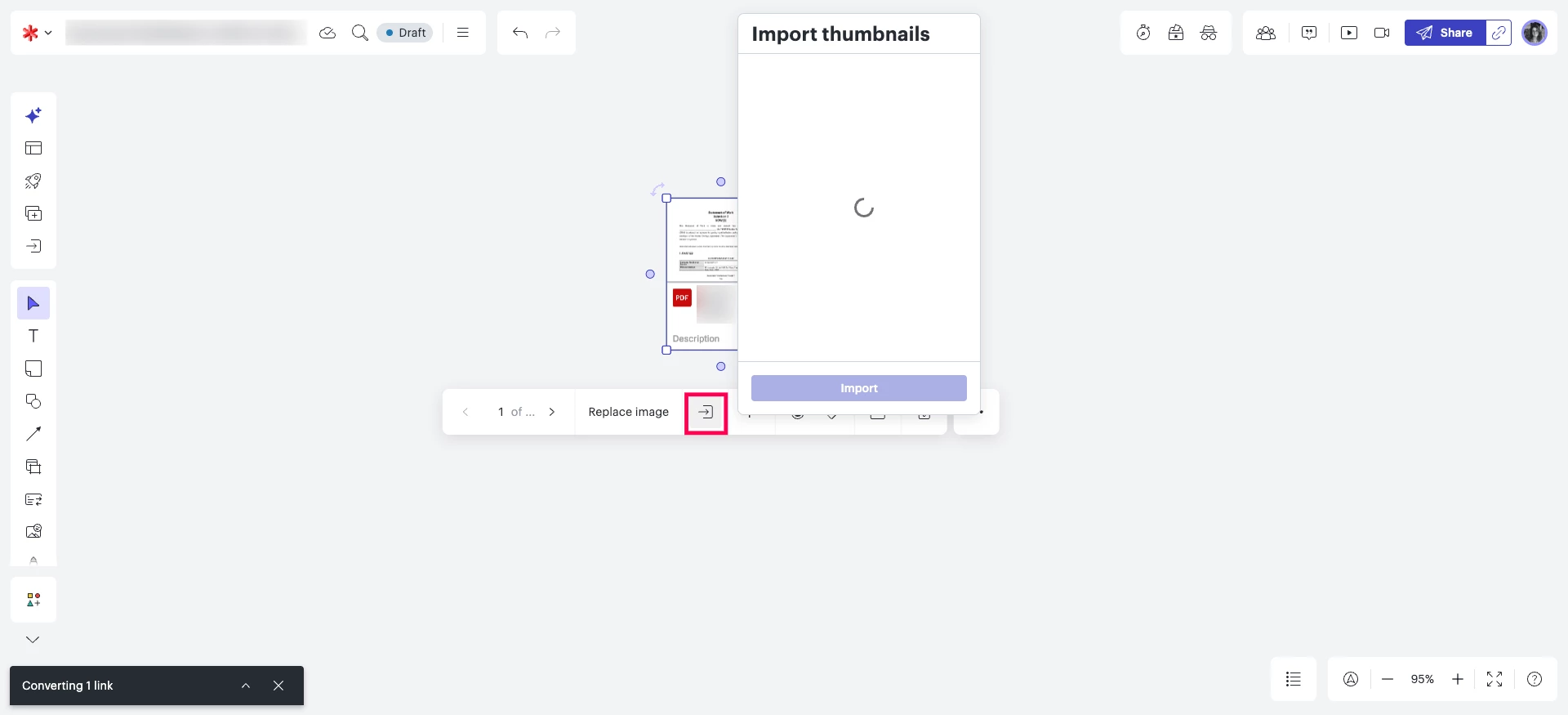
After selecting ‘import thumbnails, you may be experiencing long load times or your document may be stuck in the process of ‘Converting 1 link’ and ‘Running virus scans’ as shown below. 

I apologize for any disruption this may cause. I have reported this to our development team and I will update this thread with any new information about a fix


Comments

aparrish
Lucid Legend Level 7
Forum|alt.badge.img+15
  • Lucid Legend Level 7
  • March 21, 2026

@Mari Clift thanks for sharing what you’ve already tried. Lucid has a troubleshooting article for this exact thing: https://help.lucid.co/hc/en-us/articles/17988548286100-Troubleshooting-Export-or-print-a-document#export-failed

If none of the four troubleshooting steps work, there are additional steps in this resolved thread:  


Forum|alt.badge.img+6
  • Lucid Legend Level 3
  • March 23, 2026

Hi, I don’t encounter problems with exporting the content in PDF, and probably the links from Aparrish will be handy for solving any occurring issue.
Nevertheless, I see that you mention actually “EXTRACTION FROM PDF”, so do you mean that you are trying to IMPORT some of PDF content into document? 


Forum|alt.badge.img+1
  • Author
  • March 23, 2026

Hi Victor
Yes, that is correct. We’re experiencing issues with the IMPORT of PDF content into a document (using the PDF extraction feature)


Forum|alt.badge.img+6
  • Lucid Legend Level 3
  • March 23, 2026

Hi Victor
Yes, that is correct. We’re experiencing issues with the IMPORT of PDF content into a document (using the PDF extraction feature)

If you are trying to do it via File->Import Data→PDF, then I think multi-page docs are not supported, at least when I tried it last time.
I guess if you provide the exact sequence of actions, it will help to determine the issue.


Forum|alt.badge.img+1
  • Author
  • March 23, 2026

Hi Victor

We regularly extracted multi-page exports in LucidSpark (excluding the last 2 weeks we’ve been experiencing this issue)

We start by importing the PDF, then we click on “import thumbnails” (see screenshots below)

1. Import PDF
2. Extract Thumbnails


Zuzia S
Forum|alt.badge.img+8
  • Lucid community team
  • March 23, 2026

Hi ​@Mari Clift, thank you for posting in the Community and thank you so much ​@aparrish and ​@Viktor for chiming into this thread!

I believe you have identified a bug, and I have reported this to our development team. I apologize for any disruption this may cause, and I will update this thread with any new information about a fix. Please follow along on this thread for updates, and post any additional questions or concerns below.


Forum|alt.badge.img+2
  • April 1, 2026

I’m also experiencing this problem with importing thumbnails from pdfs and other documents. Lucid seems to get stuck in the “Running virus scans...” step. Is there an update or work around?

Stuck in the Running virus scans step


Ambar D
Forum|alt.badge.img+11
  • Lucid community team
  • April 8, 2026

@Ken G, ​@Mari Clift, ​@Viktor, ​@aparrish

Hi all, I have good news!

Our development team has let me know that the issue should now be resolved. I’m sorry for any inconvenience this may have caused.

If you’re still seeing the issue or have any other questions, feel free to reach out in this thread.


Forum|alt.badge.img+2
  • April 8, 2026

Thanks ​@Ambar D. It looks like I still have the problem. I clicked the button to convert a 5 page document about 20 minutes ago and the “converting” indicator is still spinning with the “Running virus scans...” message just like my previous image.


Ambar D
Forum|alt.badge.img+11
  • Lucid community team
  • April 8, 2026

Hi ​@Ken G, sorry that you’re still having trouble with this! I am reporting your comment here directly to our development team so they can keep investigating.

Could you share a temporary Document Support PIN for this document? This will help our teams take a closer look at what’s going on. This PIN is safe to post in this thread because it is only accessible by members of the Lucid support staff. You can find steps for generating a Support PIN in this Lucid Help Center article: Generate a Lucid Support PIN

I hope to have a new update to you shortly! 

In the meantime, would you try this again in an incognito window? I tried that on my end and had a bit more success in incognito. For help with opening an incognito window, please see this community post.


Forum|alt.badge.img+1
  • Author
  • April 10, 2026

Hi ​@Ambar D & team

Thank you for the update.

The issue is still occurring in certain cases. It seems that while most team members are now able to upload and extract documents successfully, the problem persists when attempting to process more than one document onto the same Lucid. 


Ambar D
Forum|alt.badge.img+11
  • Lucid community team
  • Answer
  • April 10, 2026

Hi ​@Mari Clift, thank you for your report. Sorry you’re still running into issues here.


After selecting ‘import thumbnails, you may be experiencing long load times or your document may be stuck in the process of ‘Converting 1 link’ and ‘Running virus scans’ as shown below. 

I apologize for any disruption this may cause. I have reported this to our development team and I will update this thread with any new information about a fix


Forum|alt.badge.img+2
  • April 13, 2026

@Ambar D I can confirm ​@Mari Clift's experience. First document seems to convert just fine but second document fails.

I made an example board for you containing two PDF documents and some screen shots. Support PIN: duALz1La5piCnT3LAXCTC57Hg2uOQfjTyU180012012


Ambar D
Forum|alt.badge.img+11
  • Lucid community team
  • April 14, 2026

@Ken G, thank you for providing your support pin! 

I’ve added your comment and Document Support PIN, along with ​@Mari Clift’s experience, to the report for our development team.

They’re actively investigating this, and I hope to have an update for you soon!