Solved

There was an error laoding your document

  • June 1, 2026
  • 4 replies
  • 51 views

Forum|alt.badge.img+1

I was working today on a mind map using Lucidspark, and I’m unable to open it now. Other people were editing it as well.


This same error has been reported multiple times in the past few days, but they were labeled as fixed.


The issue I’m seeing has not been fixed.


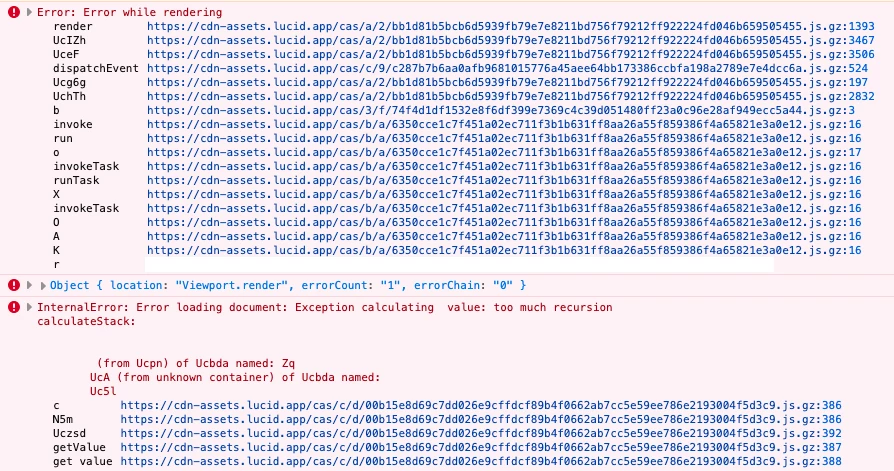
I see this error on the console.


Error: Error while rendering


Object { location: "Viewport.render", errorCount: "1", errorChain: "0" }


InternalError: Error loading document: Exception calculating UcA (from unknown container) of Ucada named: value: too much recursion calculateStack: UcA (from unknown container) of Ucada named: Uc5l




Best answer by Ambar D

Hi ​@Esteban Trejos,  I have good news! Our development team has let me know that the issue should now be resolved.

I’m sorry for any inconvenience this may have caused.

If you’re still seeing the issue or have any other questions, feel free to reach out. I’m happy to help! 

Comments

Ambar D
Forum|alt.badge.img+12
  • Lucid community team
  • June 1, 2026

Hi ​@Esteban Trejos, thank you for your report here, I have reported this to our development team.

I sincerely apologize for any disruption this may cause, and I will update this thread with any new information about a fix. 

In the meantime, would you mind providing me with the following information to help us take a closer look?

  • Can you please provide me with a screenshot of the associated Javascript Console output after reproducing the issue? You can open your Javascript Console by pressing Ctrl+Shift+J (if your computer is a Windows/Linux) OR Cmd+Opt+J (if your computer is a Mac).
  • To protect your personal information, I’ve removed the link to your document from your post. Instead, could you share a temporary Document Support PIN for this document? This will help me take a closer look at what’s going on. This PIN is safe to post in this thread because it is only accessible by members of the Lucid support staff. You can find steps for generating a Support PIN in this Lucid Help Center article: Generate a Lucid Support PIN

Additionally, to help us eliminate all other possibilities, can you please try the following steps?  Sometimes new account performance issues can be related to internet security/speed or browser issues. These steps will help us eliminate that possibility and continue to investigate.

  • Could you try opening your board in a private or incognito window to help us narrow down the potential cause? For help with opening an incognito window, please see this community post.
  • Could you also try connecting to a different network or disconnecting from your VPN (if applicable)?

I will update this thread with any new information about a fix. Please follow along on this thread for updates, and post any additional questions or concerns below. 


Forum|alt.badge.img+1

Hi Ambar, thank you for following up on this.


Here’s the screenshot of the JavaScript console output.


I was able to generate a document support PIN, let me know if you want a technical support PIN, here it is: dug0Cou0PHOWxWASyKCsVzoe4IyPQEuwHo204236345


I’ve tried opening the chart in browsers Chrome and Firefox, and incognito windows in those browsers. My coworkers have also tried to open the chart, which are all in different networks and geolocations, and the chart fails for them as well. I’ve also tried to log in from a different network for completeness, and have obtained the same result.


Safari is able to open the chart, but in a very broken state, a lot of data (nodes in the mind map) is lost, and there are lines connecting to places that doesn’t seem like they should be connecting, e.g cyclic connections, connections to nodes that have no text, that previously had text. It’s pretty bad.


Ambar D
Forum|alt.badge.img+12
  • Lucid community team
  • June 2, 2026

Hi ​@Esteban Trejos, thank you for getting back to me with that additional information! I am providing these details to our development team.

To help us take a closer look, would you mind answering the following questions?

  • Was your document originally created in Lucidspark or Lucidchart?
  • Are you seeing the error code at the top of the home page at all? Would you mind providing a screenshot of the error code message?

I apologize again for the disruption this is causing, and I will continue to update this thread with any new information about a fix. 


Ambar D
Forum|alt.badge.img+12
  • Lucid community team
  • Answer
  • June 2, 2026

Hi ​@Esteban Trejos,  I have good news! Our development team has let me know that the issue should now be resolved.

I’m sorry for any inconvenience this may have caused.

If you’re still seeing the issue or have any other questions, feel free to reach out. I’m happy to help!