I have a lucidapp Individual Plan and I use this tool from 2018.
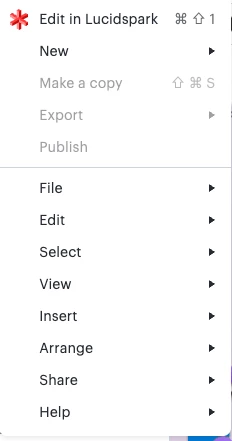
Today I found something strange, I can’t more export my diagrams and save them in PNG to attach in my documents.
I see all the links in grey.
It’s a my issue or application issue?
Two weeks ago everything works fine.
All the best
Alessandro Ciappei
Best answer by Zuzia S
Hi @aciappei, thank you for posting in the Community and thank you @Humas1985 for chiming in! I’ll be happy to help.
Could you try opening your Lucid account/document in a private or incognito window to help us narrow down the potential cause? Could you also try connecting to a different network or disconnecting from your VPN (if applicable)? Sometimes account performance issues can be related to internet security/speed or browser issues. These steps will help us eliminate that possibility. For help with opening an incognito window, please see this community post.
If those don’t resolve the problem, can you please send the following information so I can take a closer look?:
A screenshot of the associated Javascript Console output after reproducing the issue. You can open your Javascript Console by pressing Ctrl+Shift+J (if your computer is a Windows/Linux) OR Cmd+Opt+J (if your computer is a Mac).
A Technical Support PIN for your account. This PIN is safe to post in this thread because it is only accessible by members of the Lucid support staff. You can find steps for generating a Support PIN in this Help Center article.
Hi @aciappei, thank you for posting in the Community and thank you @Humas1985 for chiming in! I’ll be happy to help.
Could you try opening your Lucid account/document in a private or incognito window to help us narrow down the potential cause? Could you also try connecting to a different network or disconnecting from your VPN (if applicable)? Sometimes account performance issues can be related to internet security/speed or browser issues. These steps will help us eliminate that possibility. For help with opening an incognito window, please see this community post.
If those don’t resolve the problem, can you please send the following information so I can take a closer look?:
A screenshot of the associated Javascript Console output after reproducing the issue. You can open your Javascript Console by pressing Ctrl+Shift+J (if your computer is a Windows/Linux) OR Cmd+Opt+J (if your computer is a Mac).
A Technical Support PIN for your account. This PIN is safe to post in this thread because it is only accessible by members of the Lucid support staff. You can find steps for generating a Support PIN in this Help Center article.
Thanks for the suggestions. I tried using Incognito mode, but the issue persists.
However, I just tested a different browser, Safari, and I am able to export successfully there. This seems to isolate the problem to Chrome on my Mac. Does anyone have insights into why Chrome specifically might be failing, or what settings I should check?
A Lucid or airfocus account is required to interact with the Community, and your participation is subject to the
Supplemental Lucid Community Terms.
You may not participate in the Community if you are under 18. You will be redirected to the Lucid or airfocus app to log in.
A Lucid or airfocus account is required to interact with the Community, and your participation is subject to the
Supplemental Lucid Community Terms.
You may not participate in the Community if you are under 18. You will be redirected to the Lucid or airfocus app to log in.








 Your privacy choices


