Richard F101
March 27, 2018
Solved

Switch pointer on callout shapes

  • March 27, 2018
  • 16 replies
  • 1159 views

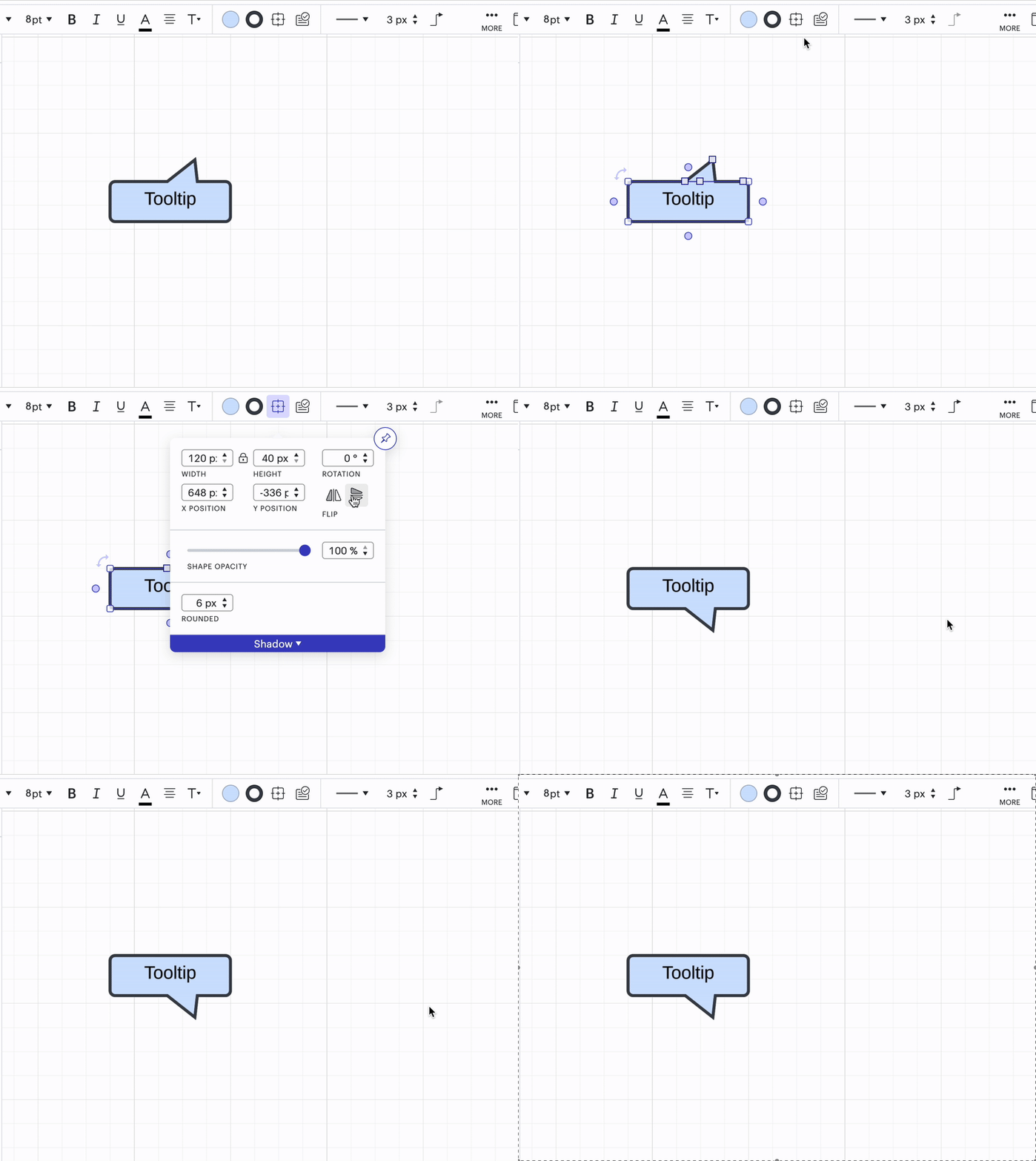
I found the callout shape but the arrow does not move around the rectangle to allow it to point in any direction.  It only points up. Is there another shape that works like the one in PowerPoint which allows the arrow to point in any direction?

Best answer by Kelsey Gaag

Hi ​@Graysanalysis

Thank you for the reply! Can you try selecting the shape, going to Shape Options, and flipping the shape vertically?


Comments

April 23, 2024

Hi @yianni

Do you have a UI Mockups library? Can you provide a screenshot? 

looks like i found it. it was dug in there. the search didnt find them

Kelsey Gaag
Lucidite
April 23, 2024

Hi @yianni

I’m glad you found it! Let me know if you have any other questions. 


April 15, 2025

This did not work for me.  When I hold the shift it does not rotate.  I am unable to have the call out poing down.  It only points up.  Please advise 

Kelsey Gaag
Lucidite
April 15, 2025

Hi ​@Graysanalysis

Thank you for the reply! Can you try selecting the shape, going to Shape Options, and flipping the shape vertically?


May 9, 2025

I am coming from using MS Visio where there were options as far as callouts. Are there any other options besides the one mentioned above. It is the only option when I search the shapes library (besides the yellow dot) but I find this one bulky and it also does not connect to the shape on which I am adding the callout. I found workaround where I can lock it in place, but it still is not as efficient as I am used to. Any other tips or shapes that anyone is aware of? 

Kelsey Gaag
Lucidite
May 14, 2025

Hi ​@KNL8588

Thanks for the reply! You can also customize the shape or upload a shape of your own by following the instructions in this Help Center article