Richard F101
March 27, 2018
Solved

Switch pointer on callout shapes

  • March 27, 2018
  • 16 replies
  • 1159 views

I found the callout shape but the arrow does not move around the rectangle to allow it to point in any direction.  It only points up. Is there another shape that works like the one in PowerPoint which allows the arrow to point in any direction?

Best answer by Kelsey Gaag

Hi ​@Graysanalysis

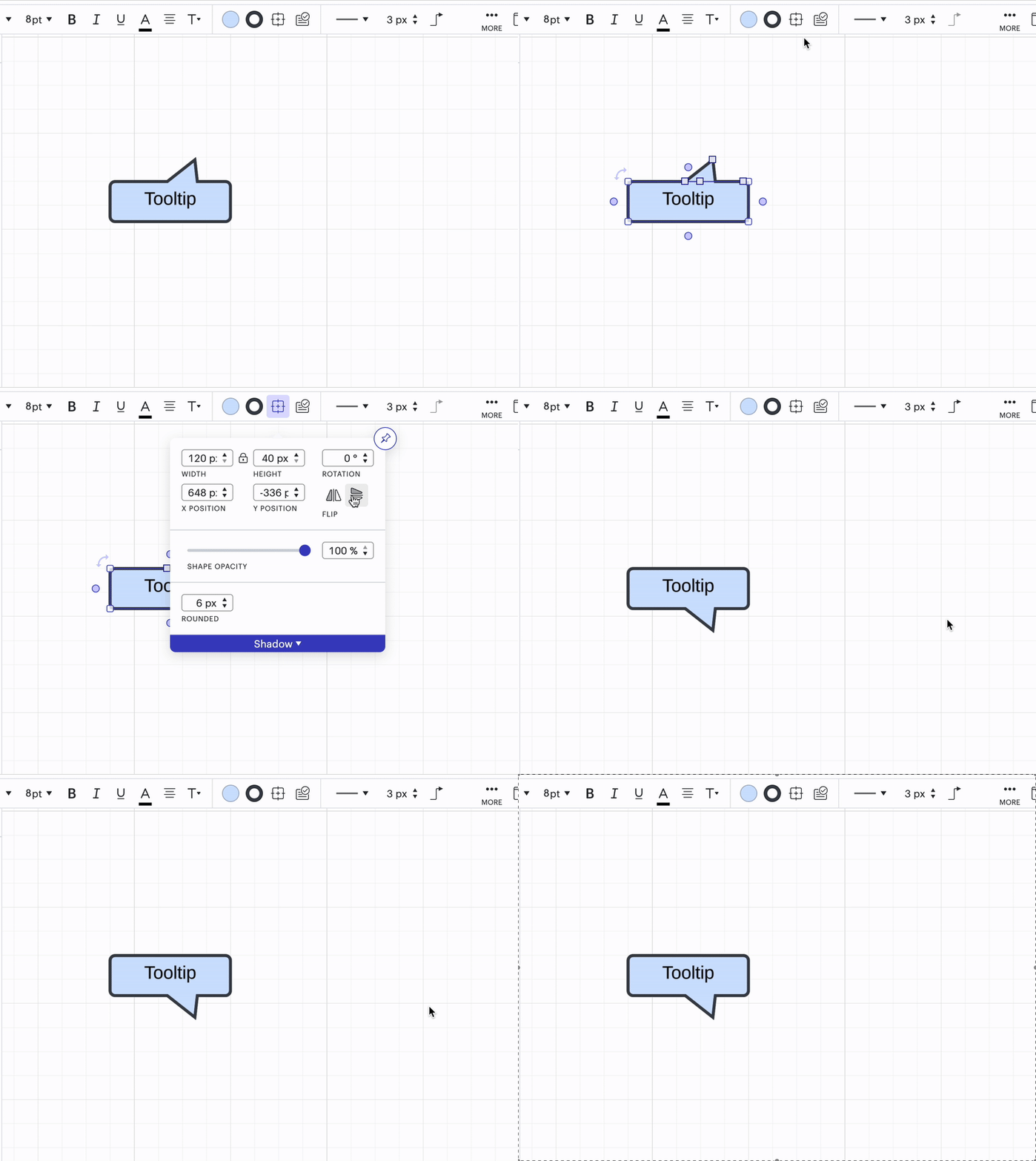
Thank you for the reply! Can you try selecting the shape, going to Shape Options, and flipping the shape vertically?


Comments

Braden F
February 15, 2020

Hi Richard

There is a work around for this:

1. Rotate the call out in 90 degree increments (hold down SHIFT during rotation) until the arrow is pointing in the desired direction.

2. With the call out selected go into the text properties dropdown and click 'rotate' until the text in the call out is properly oriented.

Abby S
Lucid community team
February 18, 2020

Hi Braden

Thanks for providing that workaround-- it's a great idea and I'll have to give that a try!

Braden F
February 18, 2020

No problem Abby. Actually on second look I just realized that Lucid has the ability to just grab the pointer (by clicking the point in the center of where the pointer connects to the primary box) and move it anywhere on the periphery of the box. So no need to rotate anything!

Margarita K
January 2, 2023

Hi Braden! Thank you very much for this explanation about grabbing the pointer. It is super helpful!

April 22, 2024

where do i find said callouts? i cannot find them

Kelsey Gaag
Lucidite
April 23, 2024

Hi @yianni

You can find the callout shape by going to the shapes panel in Lucidchart and searching ‘callout’. 


April 23, 2024

Hi @yianni

You can find the callout shape by going to the shapes panel in Lucidchart and searching ‘callout’. 


Hello I tried doing that but didn't find any. 


I find actually have UI Misc folder

Kelsey Gaag
Lucidite
April 23, 2024

Hi @yianni

If you have a free account, this shape library is premium and not accessible to your subscription level. However, if you have a paid account you can find this shape and the UI MISC shapes by following these instructions: 

  • In the shapes panel click on More Shapes
  • Search UI MISC 
  • Select the library
April 23, 2024

Hi @yianni

If you have a free account, this shape library is premium and not accessible to your subscription level. However, if you have a paid account you can find this shape and the UI MISC shapes by following these instructions: 

  • In the shapes panel click on More Shapes
  • Search UI MISC 
  • Select the library

Hello I do not have that ui misc library and I'm pretty sure it's a paid subscription through my company

Kelsey Gaag
Lucidite
April 23, 2024

Hi @yianni

Do you have a UI Mockups library? Can you provide a screenshot?