Richard F101
Mar 27, 2018 3:58 PM UTC
Solved

Switch pointer on callout shapes

I found the callout shape but the arrow does not move around the rectangle to allow it to point in any direction.  It only points up. Is there another shape that works like the one in PowerPoint which allows the arrow to point in any direction?

Kelsey Gaag
Lucidite
Apr 15, 2025 10:06 PM UTC

Hi ​@Graysanalysis, 

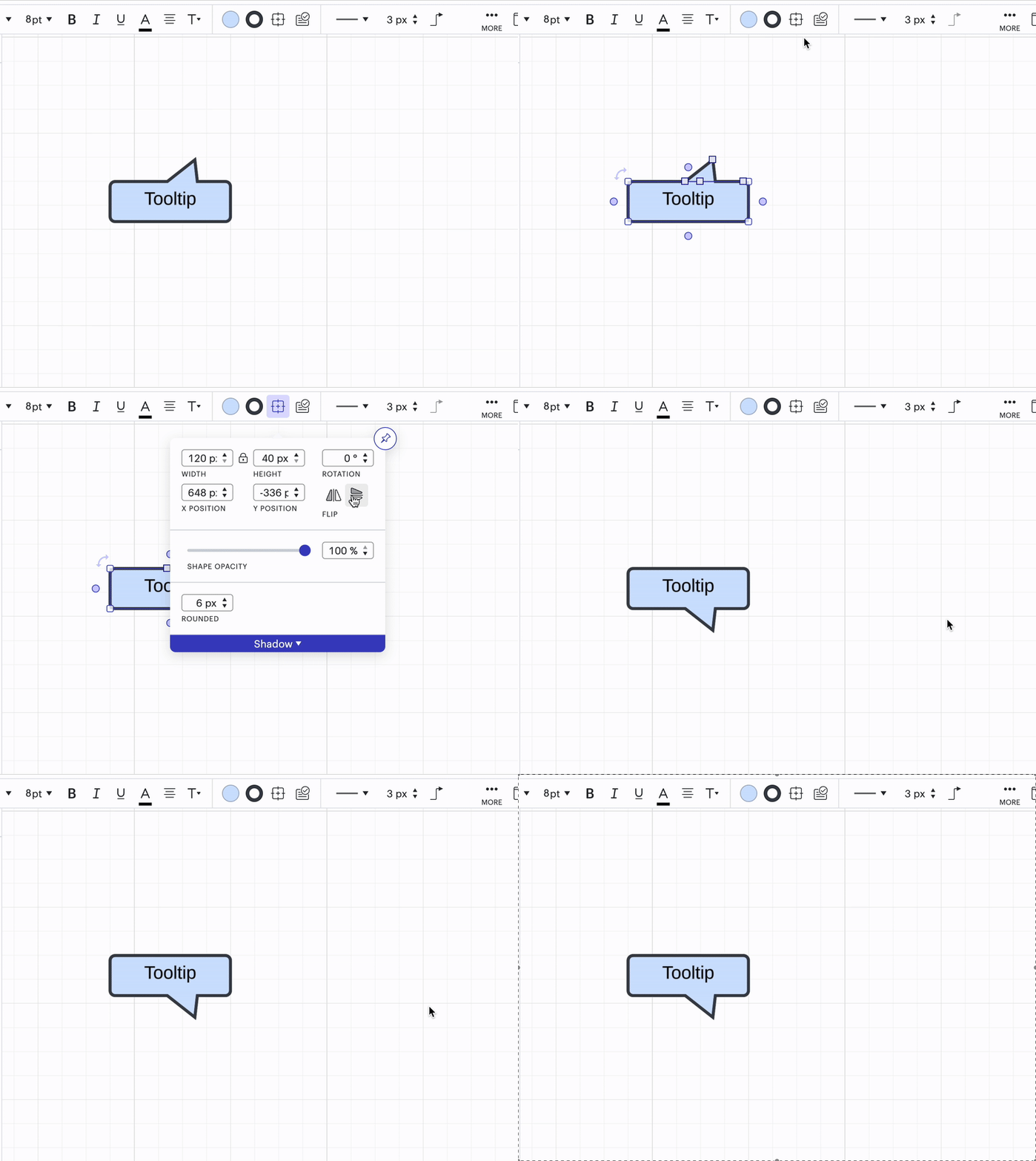
Thank you for the reply! Can you try selecting the shape, going to Shape Options, and flipping the shape vertically?


Comments

Braden F
Feb 15, 2020 10:14 PM UTC

Hi Richard

There is a work around for this:

1. Rotate the call out in 90 degree increments (hold down SHIFT during rotation) until the arrow is pointing in the desired direction.

2. With the call out selected go into the text properties dropdown and click 'rotate' until the text in the call out is properly oriented.

Translate
Abby S
Lucid community team
Feb 18, 2020 2:53 PM UTC

Hi Braden

Thanks for providing that workaround-- it's a great idea and I'll have to give that a try!

Translate
Braden F
Feb 18, 2020 6:53 PM UTC

No problem Abby. Actually on second look I just realized that Lucid has the ability to just grab the pointer (by clicking the point in the center of where the pointer connects to the primary box) and move it anywhere on the periphery of the box. So no need to rotate anything!

Translate
Margarita K
Jan 2, 2023 9:41 AM UTC

Hi Braden! Thank you very much for this explanation about grabbing the pointer. It is super helpful!

Translate
Apr 22, 2024 6:11 PM UTC

where do i find said callouts? i cannot find them

Translate
Kelsey Gaag
Lucidite
Apr 23, 2024 3:26 PM UTC

Hi @yianni, 

You can find the callout shape by going to the shapes panel in Lucidchart and searching ‘callout’. 


Translate
Apr 23, 2024 3:40 PM UTC

Hi @yianni, 

You can find the callout shape by going to the shapes panel in Lucidchart and searching ‘callout’. 


Hello I tried doing that but didn't find any. 


I find actually have UI Misc folder

Translate
Kelsey Gaag
Lucidite
Apr 23, 2024 4:10 PM UTC

Hi @yianni, 

If you have a free account, this shape library is premium and not accessible to your subscription level. However, if you have a paid account you can find this shape and the UI MISC shapes by following these instructions: 

  • In the shapes panel click on More Shapes
  • Search UI MISC 
  • Select the library
Translate
Apr 23, 2024 4:19 PM UTC

Hi @yianni, 

If you have a free account, this shape library is premium and not accessible to your subscription level. However, if you have a paid account you can find this shape and the UI MISC shapes by following these instructions: 

  • In the shapes panel click on More Shapes
  • Search UI MISC 
  • Select the library

Hello I do not have that ui misc library and I'm pretty sure it's a paid subscription through my company

Translate
Kelsey Gaag
Lucidite
Apr 23, 2024 4:32 PM UTC

Hi @yianni, 

Do you have a UI Mockups library? Can you provide a screenshot? 

Translate