Jayce J
August 15, 2022
Solved

Resize generated sequence diagram by UML markup

  • August 15, 2022
  • 13 replies
  • 233 views

Hi there

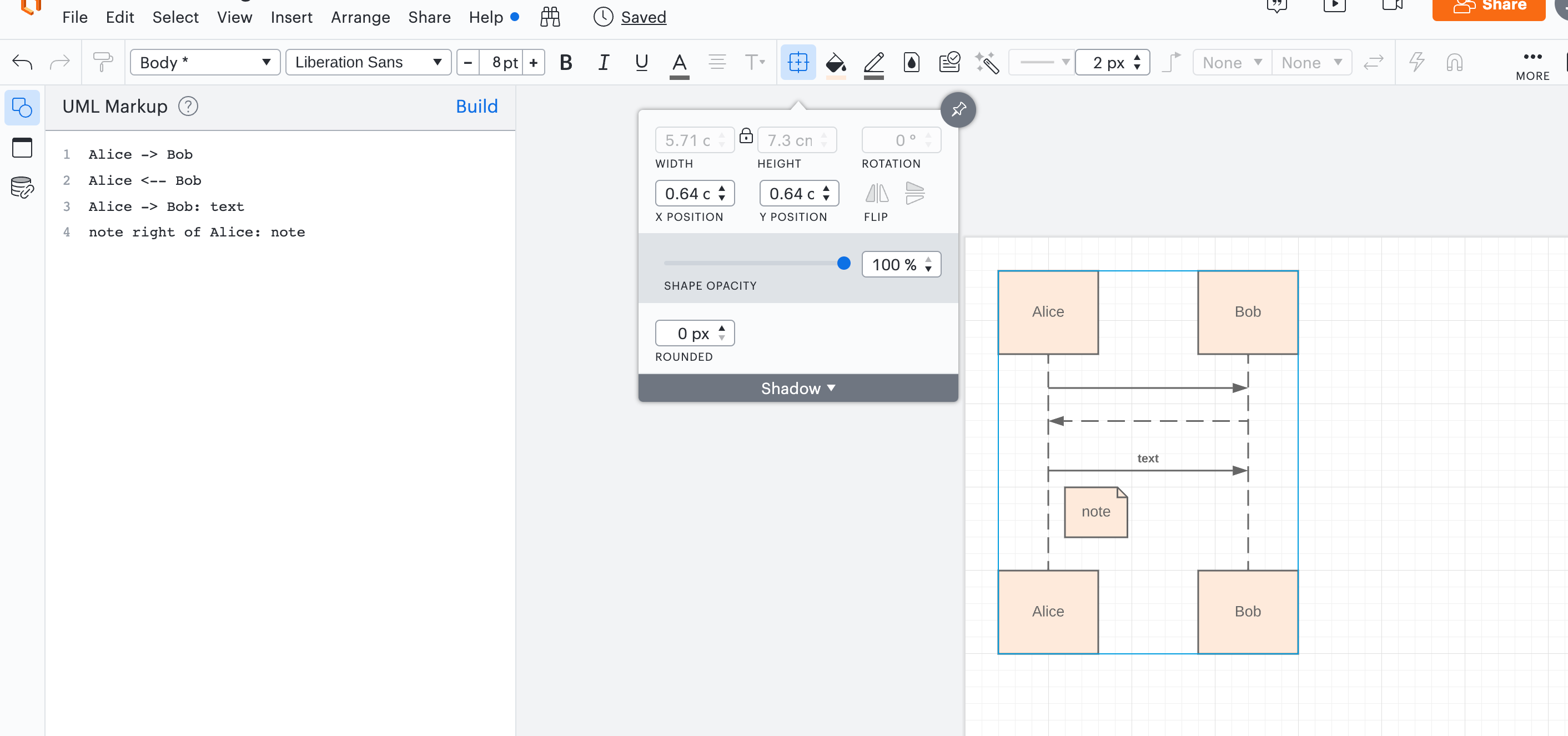
I found I'm not able to resize the sequence diagram generated by UML markup after 'Build'. I have some old diagrams that can be resized but lost the capability after I click 'Build'.
Best answer by Addie

Hi there, thank you for contributing your feedback. Please upvote and add your thoughts to this product feedback thread addressing the UML markup experience so our developers can take a closer look at improving the experience:


Comments

Phillip W
Lucid support team
August 15, 2022

Hi Jayce

Thank you for posting in the Lucid Community and thank you for the heads up on this issue. This is something our devs are currently working on and I will continue to provide information here as it is made available to me. 

In the meantime if you select the UML and right-click to Ungroup the shapes you can then use the select all feature (Cmmd/cntrl + A) and resize all of the shapes from there. 

Hope this helps--please let me know if you have any additional questions. Cheers!

Jayce J
Jayce JAuthor
August 16, 2022

Hey Phillip 

Thanks for getting back. I tried it and it seems ungrouping is an irreversible operation which blocks me from reediting the UML markup. Hope it can be fixed soon :). Thanks!

Krejcarek, J
September 29, 2022

Any update on this?   I experience similar if using the "Ungroup" workaround the underlying UML markup is lost.

So a person needs to use the "Ungroup" cautiously.   i.e.  Don't forget to save a copy of your URL markup to the side (or be prepared to dig it out of a revision).

Micah
Lucid community team
September 29, 2022

Hi there thanks for continuing this thread. Unfortunately I currently don't have an update on this issue's resolution - I am so sorry for the inconvenience! We appreciate you sharing your experience with the "Ungroup" workaround and your tip about keeping your markup available in case you need to make additional edits. I'll be sure to update this thread as soon as I have additional information to share!

Francesco M
October 10, 2022

Hi there

I'm also looking forward for a fix. The ungroup-resize workaround implies a number of inconsistencies to fix that makes the whole functionality time saving useless (but thanks for suggesting it!).

Phillip W
Lucid support team
October 10, 2022

Hey Francesco 

Thank you for keeping this thread going and apologies for the trouble here. We appreciate you sharing your experience with the "Ungroup" workaround. I will be sure to update this thread as soon as we have more information! 

Tony E
January 19, 2023

Hi there! I wanted to follow up on this to see if there was any update? I am facing the same issue.

Micah
Lucid community team
January 19, 2023

Hi Tony thanks for continuing this thread. At this time I don't have an update to share on an improvement to this experience with Lucidchart's UML tool. Please stay tuned on this thread - we'll share an update here as soon as it's available!

ignacio.goyetche
March 23, 2023

Hi this still not fixed March 23 please fix this issue that makes this really difficult to use.

Addie
March 23, 2023

Hi Ignacio

Thank you for checking in and our apologies for the inconvenience - unfortunately we don't have an update at this time but we will be sure to update this thread as soon as we have news! Thanks for your feedback and we appreciate your patience as our development team looks into this.

Addie