Solved

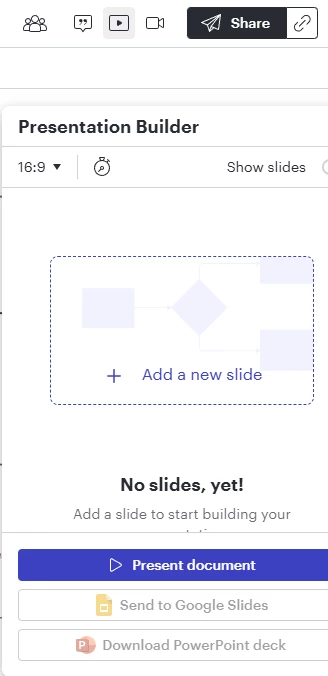
Presentation builder opens every time I open a document

  • April 27, 2026
  • 5 replies
  • 211 views

Forum|alt.badge.img+2

How do I make it not do that. It’s annoying. I’ve tried closing it and opening the file again but it keeps popping up. 


Best answer by Thesenioranalyst

Seems the problem has gone away without my intervention. Thanks for trying to help. 

Comments

Forum|alt.badge.img+2
  • Lucid support team
  • April 30, 2026

Hello ​@Thesenioranalyst, thank you for posting in the Lucid Community! 

Could you try opening your document in a private or incognito window to help us narrow down the potential cause? Could you also try connecting to a different network or disconnecting from your VPN (if applicable)? Sometimes account performance issues can be related to internet security/speed or browser issues. These steps will help us eliminate that possibility. For help with opening an incognito window, please see this community post

Could you also try a “hard refresh” on your browser? This forces the browser to ignore the cached version of the page and pull a fresh state from the server.

  • Windows/Linux: Press Ctrl + F5 (or Ctrl + Shift + R).

  • Mac: Press Cmd + Shift + R.

If those don’t resolve the problem, please, let me know so I can continue looking into the issue. Thank you.


Forum|alt.badge.img+2

Seems the problem has gone away without my intervention. Thanks for trying to help. 


Forum|alt.badge.img+2
  • Lucid support team
  • May 1, 2026

Hello ​@Thesenioranalyst, I’m glad the issue was resolved. Please, do not hesitate to reach out again if you run into any other questions or issues. 


  • July 28, 2026

I am having difficulty when opening my paths in LucidSpark.  It opens by default using presentations.

When I click on Paths it goes to the screen below. I don’t seem able to turn it off.

I want to use paths so students can navigate around their work using frames. There is no option to select any of my paths.

Without the paths students don’t have access to the frame numbers to navigate around the board.

They have to drag their way across the screen.

I have done a hard refresh on the browser and opened in an incognito window but that hasn’t helped.


alison cheney
Forum|alt.badge.img+4
  • Lucid community team
  • July 31, 2026

Hi ​@Annette K,

Thank you for adding to this thread in the Lucid Community, and I sincerely apologize for the delay. What you're experiencing is actually connected to a recent product update. Lucid recently combined Paths and Presentations into a single unified feature in LucidSpark.

Here's what's changed: instead of Paths being a separate tool, you now access it from within the Presentation Builder. When you click Paths, it takes you into the builder where you choose your presentation type:

  • Presentation — a formal, view-only mode (more closely cropped, controls hidden)
  • Paths — a collaborative mode that keeps the surrounding canvas visible, great for interactive sessions

To help students navigate using frame numbers, they should be able to use the Paths play type from within the builder, which preserves the canvas view. If you're not seeing the option to select between these two types once you're in the builder, that may be worth flagging to our support team so they can take a closer look at your specific setup. Please see the Gif video below showing what this looks like!


Please let me know if you have any additional questions!