Answer

Org chart issue: Changing data field does not persist

  • February 21, 2025
  • 3 replies
  • 41 views

Forum|alt.badge.img

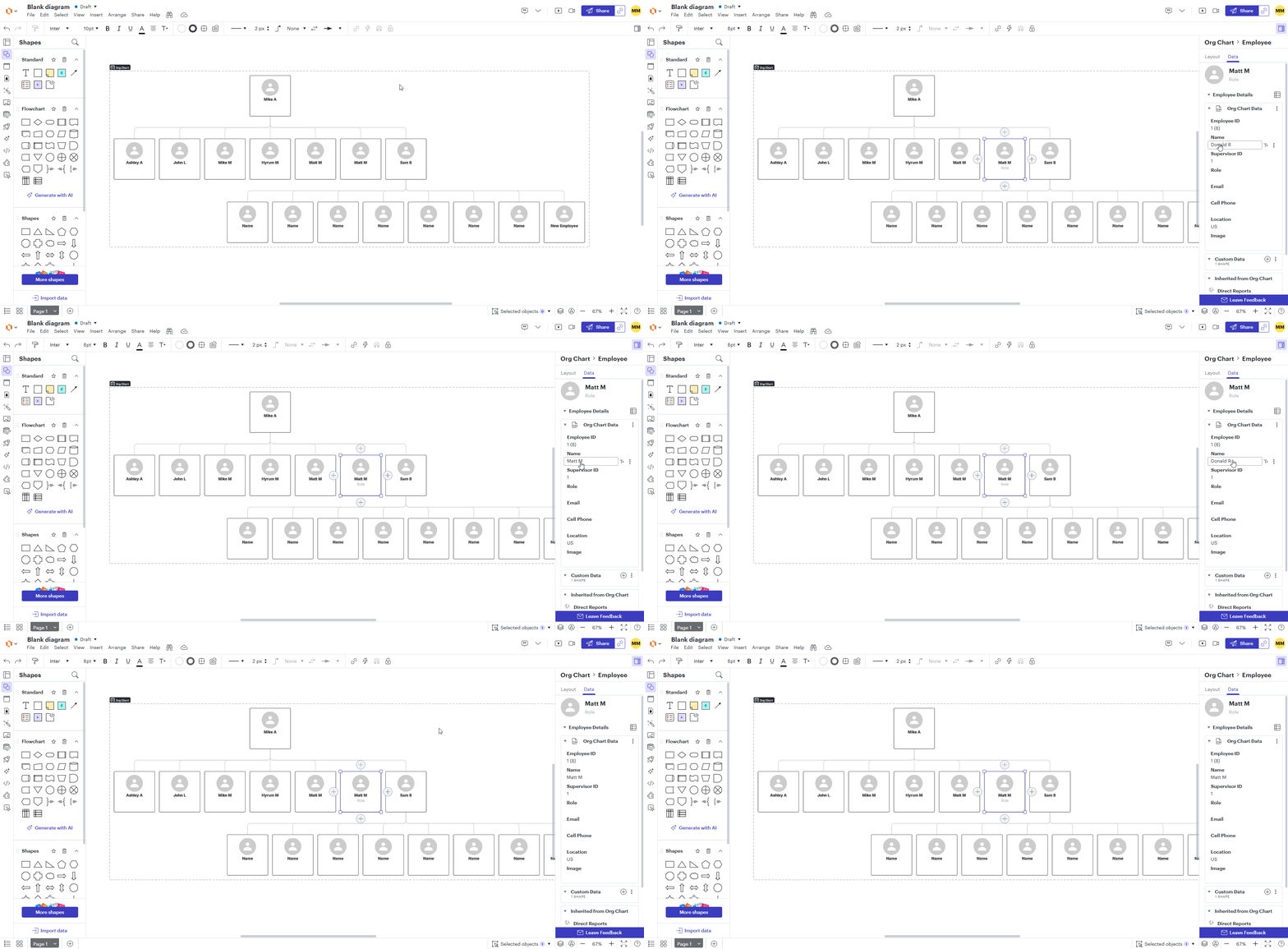
Building a new org chart, but after several new entries suddenly data fields for new entries cannot be modified.  Typing in the changed value, hitting enter, does not change the graphic display and the data value reverts.  Hard refresh of browser does not change the behavior.


Best answer by Ambar D

Hi ​@murphymw and ​@a_korat, thank you for posting in the Lucid Community! Thank you ​@aparrish for your help here as well. Are you still having trouble with this issue? I sincerely apologize for the late reply here, but I’m happy to help!

Could you try the following steps to help us narrow down the potential cause? Sometimes account performance issues can be related to internet security/speed or browser issues. These steps will help us eliminate that possibility. 

  • Opening your document in a private or incognito window. For help with opening an incognito window, please see this community post.
  • Connecting to a different network or disconnecting from your VPN (if applicable)

If those don’t resolve the problem, can you please send the following information so I can take a closer look?

  • A screenshot of the associated Javascript Console output after reproducing the issue. You can open your Javascript Console by pressing Ctrl+Shift+J (if your computer is a Windows/Linux) OR Cmd+Opt+J (if your computer is a Mac)
  • A temporary Support PIN for this document. This will allow me to take a closer look at the issue you’re experiencing. For more information on generating a Support PIN, check out this Help Center article. This PIN is only accessible by members of the Lucid support team, so it can be safely shared within this thread.

Comments

aparrish
Lucid Legend Level 7
Forum|alt.badge.img+15
  • Lucid Legend Level 7
  • February 21, 2025

@murphymw Here is Lucid’s article on importing an org chart:

https://help.lucid.co/hc/en-us/articles/16463330693268-Create-an-org-chart#set-up-data-source-for-import

Please keep in mind that synching is only one way, which means you can edit the source file (e.g., Google Sheet) but not the exported file (e.g., in Lucidchart).

Hope that helps!


Forum|alt.badge.img
  • February 25, 2025

I am having this same issue, and I did not import anything, I am testing the default org chart LucidChart gives. Is this a bug?


Ambar D
Forum|alt.badge.img+10
  • Lucid community team
  • Answer
  • July 8, 2025

Hi ​@murphymw and ​@a_korat, thank you for posting in the Lucid Community! Thank you ​@aparrish for your help here as well. Are you still having trouble with this issue? I sincerely apologize for the late reply here, but I’m happy to help!

Could you try the following steps to help us narrow down the potential cause? Sometimes account performance issues can be related to internet security/speed or browser issues. These steps will help us eliminate that possibility. 

  • Opening your document in a private or incognito window. For help with opening an incognito window, please see this community post.
  • Connecting to a different network or disconnecting from your VPN (if applicable)

If those don’t resolve the problem, can you please send the following information so I can take a closer look?

  • A screenshot of the associated Javascript Console output after reproducing the issue. You can open your Javascript Console by pressing Ctrl+Shift+J (if your computer is a Windows/Linux) OR Cmd+Opt+J (if your computer is a Mac)
  • A temporary Support PIN for this document. This will allow me to take a closer look at the issue you’re experiencing. For more information on generating a Support PIN, check out this Help Center article. This PIN is only accessible by members of the Lucid support team, so it can be safely shared within this thread.
