Solved

Note text formatting

  • June 17, 2026
  • 4 replies
  • 87 views

Forum|alt.badge.img+1

 I want to change the defaults of the “Note” text box with both resize and change of text, but text defaults to Inter 8 pt. font and the size returns to Lucid default.  Any ideas?

Best answer by alison cheney

Hi ​@ddentry47,

Thanks for your response in this thread and thank you ​@aparrish for your amazing guidance and thoughts here!

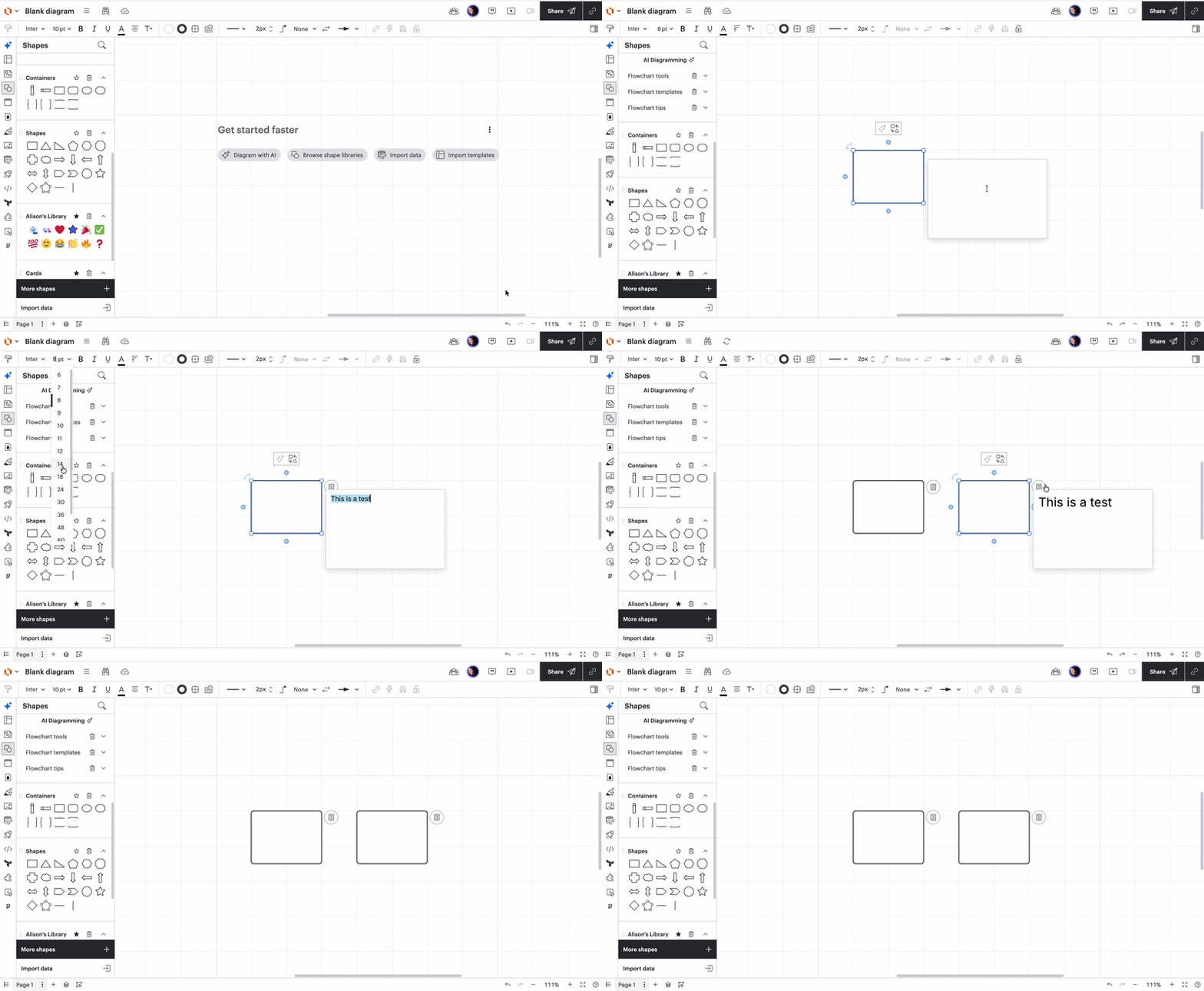
I want to clarify that when you are doing what ​@aparrish recommended by copying and pasting your note with your preferred format, are you copying the shape or object that has the note inside of it? I included a Gif below showing what it looks like on my end. When I copy the entire shape with the note inside, the format, including the size of the text copies over. Have you already tried this below?
 

If this keeps happening, could you please send the following information so I can take a closer look at the root cause?

  • Could you try opening your document in a private or incognito window to help us narrow down the potential cause? For help with opening an incognito window, please see this community post.
  • Could you also try connecting to a different network or disconnecting from your VPN (if applicable)? Sometimes account performance issues can be related to internet security/speed or browser issues. These steps will help us eliminate that possibility. 

If those don’t resolve the problem, can you please send the following information so I can take a closer look?

  • A screenshot of the issue (showing the font size in the note)

  • A screenshot of the associated Javascript Console output after reproducing the issue. You can open your Javascript Console by pressing Ctrl+Shift+J (if your computer is a Windows/Linux) OR Cmd+Opt+J (if your computer is a Mac).

Thanks for your help and patience!

Comments

aparrish
Lucid Legend Level 7
Forum|alt.badge.img+18
  • Lucid Legend Level 7
  • June 18, 2026

@ddentry47 it sounds like you’re referring to the Note shape/text formatting (not a Sticky Note) and wanting the text style to stay consistent when you resize the shape.

Lucidchart separates the shape size from the text formatting, so resizing a shape does not automatically scale the font size. This is intentional so that changing the size of a shape doesn’t unexpectedly change the readability or formatting of the text inside it.

A few things you can try:

  • If you want new Notes to use a specific style, try creating a Note with your preferred formatting and copying that formatted Note into your documents so future Notes use your preferred style.
  • If the text keeps reverting to Inter 8 pt., check whether you’re editing the default Note shape or inserting a new Note from the toolbar/library (those can behave differently). If your text is reverting to Inter 8 pt., that’s likely the default Note formatting being applied rather than a saved custom style.

For default styles, Lucidchart doesn’t currently allow you to globally change every built-in shape’s default font behavior (for example, making all Notes automatically use a different font size or resize text with the shape).

However, you can create a consistent workflow by doing the following:

  • Formatting a Note shape the way you want (font, size, alignment, etc.) and using it as your template.
  • Creating a custom shape library or
  • Selecting multiple Note shapes and applying the same formatting at once if you need to update an existing diagram.

Also, just to clarify: are you trying to change the default formatting for all future Note shapes, or are you trying to make the text automatically scale when you drag the Note larger/smaller? The solution may be different depending on the goal.


Forum|alt.badge.img+1
  • Author
  • June 18, 2026

aparrish, Thank you for you help.

For clarification, I am attempting to change the default formatting for all future Note shapes. 

In trying your recommendations to create a new Note with my preferred formatting and then copying that formatted Note to be used in the future - I am unable to save a note with new formatting. The Note is not a shape or object that can be selected, ie right click or enclosed with a mouse selection. It can not be dragged into a library to be saved. It is a static box that disappears when clicked outside the box. 

Also when I do make changes to a particular Note (size of box and font) only the font is saved. The size reverts to the default.

I don’t know if it matters but I am using MacOS.


Please advise. Thanks,
ddentry47 


alison cheney
Forum|alt.badge.img+4
  • Lucid community team
  • Answer
  • June 18, 2026

Hi ​@ddentry47,

Thanks for your response in this thread and thank you ​@aparrish for your amazing guidance and thoughts here!

I want to clarify that when you are doing what ​@aparrish recommended by copying and pasting your note with your preferred format, are you copying the shape or object that has the note inside of it? I included a Gif below showing what it looks like on my end. When I copy the entire shape with the note inside, the format, including the size of the text copies over. Have you already tried this below?


If this keeps happening, could you please send the following information so I can take a closer look at the root cause?

  • Could you try opening your document in a private or incognito window to help us narrow down the potential cause? For help with opening an incognito window, please see this community post.
  • Could you also try connecting to a different network or disconnecting from your VPN (if applicable)? Sometimes account performance issues can be related to internet security/speed or browser issues. These steps will help us eliminate that possibility. 

If those don’t resolve the problem, can you please send the following information so I can take a closer look?

  • A screenshot of the issue (showing the font size in the note)

  • A screenshot of the associated Javascript Console output after reproducing the issue. You can open your Javascript Console by pressing Ctrl+Shift+J (if your computer is a Windows/Linux) OR Cmd+Opt+J (if your computer is a Mac).

Thanks for your help and patience!


Forum|alt.badge.img+1
  • Author
  • June 22, 2026

Alison,

  Thank you for your help.  

I created a note associated with a box as you indicated in your GIF and also by Left Clicking the box and Add Note.  Both yielded the same results.

I used a different network and changed to a different browser.

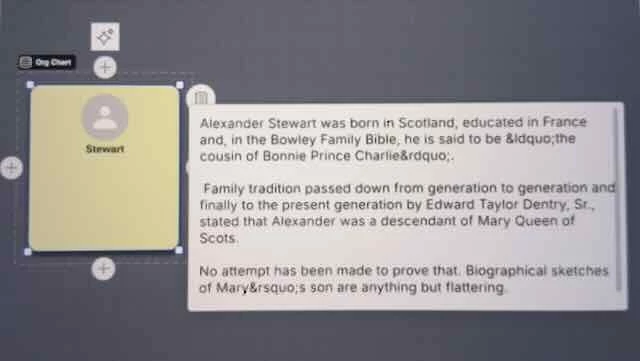
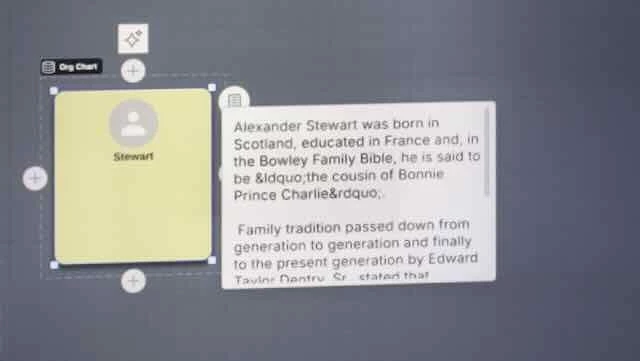
My issue is with maintaining the size of the note after changing its dimensions from the default.  I adjust the size to my preferred dimensions for readability. (see below)


After a short time or if I leave the file the dimensions return to the default (see below).


I was unable to obtain the Javascript Console using the Mac commands Cmd+Opt+J, so it is not included here.

Once again thank you for your help with my issue.  - Dave