Answer

Not all text in shape is displayed upon exporting

  • December 20, 2023
  • 7 replies
  • 55 views

Forum|alt.badge.img+1

As per the title.


I’m exporting shape data to csv, within each shape is text.

However, only the first line of text is being displayed in the output.

e.g. Shape in chart has first line 1.11, 2nd line blah blah blah

‘blah blah blah’ is not rendering in the output, only 1.11


How do I obtain all text within the shape?

Best answer by Micah

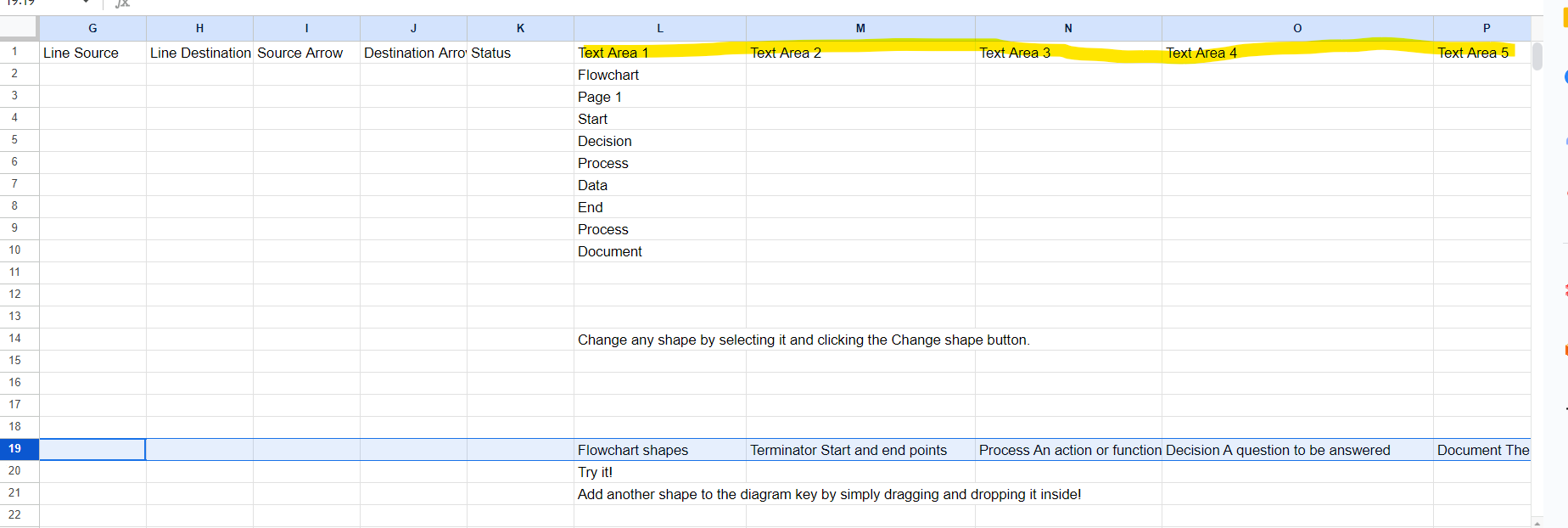
Hi Steven, thanks for your response. Can you confirm if the subsequent lines are present in later columns (i.e. M and N)? Because these appear to be clean line breaks, I suspect that the text is not captured within a single cell. For example, for the “3.04” cell you’ve highlighted, I believe the text “Queries?” might be in row 91 column M. 


You can see this behavior in my example above. Line 19 of my data corresponds to the “Flowchart shapes” block on the left of the diagram. Under “Text Area 1”, “Text Area 2,” and so on, you can see the subsequent lines of text contained within that block. 


Comments

Micah
Forum|alt.badge.img+20
  • Lucid community team
  • December 20, 2023

Hi @EvansSM, thanks for your post! This sounds unusual - all text should be captured via the export. I’ve performed an example export myself and would love to compare to what you’re seeing. Beginning in column L and continuing into the following columns, you can see the complete text contained by shapes in my flowchart:


For your reference, I generated this CSV from this template

and I’ve also attached the CSV itself. 


To clarify, are you seeing no data at all in your column L, or partial? If you’re willing to share a screenshot of what you’re seeing vs what you expect to see, that would be helpful for me to understand!


Forum|alt.badge.img+1
  • Author
  • December 21, 2023

Thanks Micah - please see below:


Sometimes, the value is partial, most of the time it’s missing.

thanks, Steven


Micah
Forum|alt.badge.img+20
  • Lucid community team
  • Answer
  • December 21, 2023

Hi Steven, thanks for your response. Can you confirm if the subsequent lines are present in later columns (i.e. M and N)? Because these appear to be clean line breaks, I suspect that the text is not captured within a single cell. For example, for the “3.04” cell you’ve highlighted, I believe the text “Queries?” might be in row 91 column M. 


You can see this behavior in my example above. Line 19 of my data corresponds to the “Flowchart shapes” block on the left of the diagram. Under “Text Area 1”, “Text Area 2,” and so on, you can see the subsequent lines of text contained within that block. 


Forum|alt.badge.img
  • November 21, 2025

Is there any way for the export to include the Shape ID value? 


Ambar D
Forum|alt.badge.img+10
  • Lucid community team
  • November 24, 2025

Hi ​@Chris_Weir, thanks for adding to this thread! 

Are you exporting a CSV of shape data, or another method of exporting your data? To clarify- are you hoping for this shape ID value shown below to be included upon export?


Forum|alt.badge.img
  • November 25, 2025

I am just trying to export to CSV. The only column not available is the Shape ID


Zuzia S
Forum|alt.badge.img+8
  • Lucid community team
  • November 27, 2025

@Chris_Weir thank you for following up in this thread! 

In the case of shape data export in CSV format, the ID of the shape within Lucid becomes the ID of the entity, which is usually the first column in the document titled “Id”. It looks as such:

We’re very interested in your feedback and committed to continually improving our products. Please first search the Product Feedback section of this community (with the filter Topic Type = Idea) to see if it’s already been submitted. If so, please add any additional details you’d like and upvote the request - this consolidation helps to refine feedback and properly capture the popularity of the request.

If no one has submitted this idea yet, please create one of your own and be sure to include details about your use case or what you’d like to see in this experience. This will also allow other users with similar requests to discover and upvote it, then add details of their own.

For more information on how Lucid manages feedback via this community, take a look at this post:

Cheers!