
Question

Lucid Spark - nested frames broken when pasting

  • April 15, 2026
  • 1 reply
  • 7 views

Forum|alt.badge.img+1

There seems to be a bug when copying and pasting nested objects (or at least nested frames & containers).

On board 1, all frames are contained, so if I drag the outer frame everything inside moves with it.

When copying and pasting onto another board, the nesting is lost for many of the frames. They appear behind the container and are no longer inside it.

Screenshot:
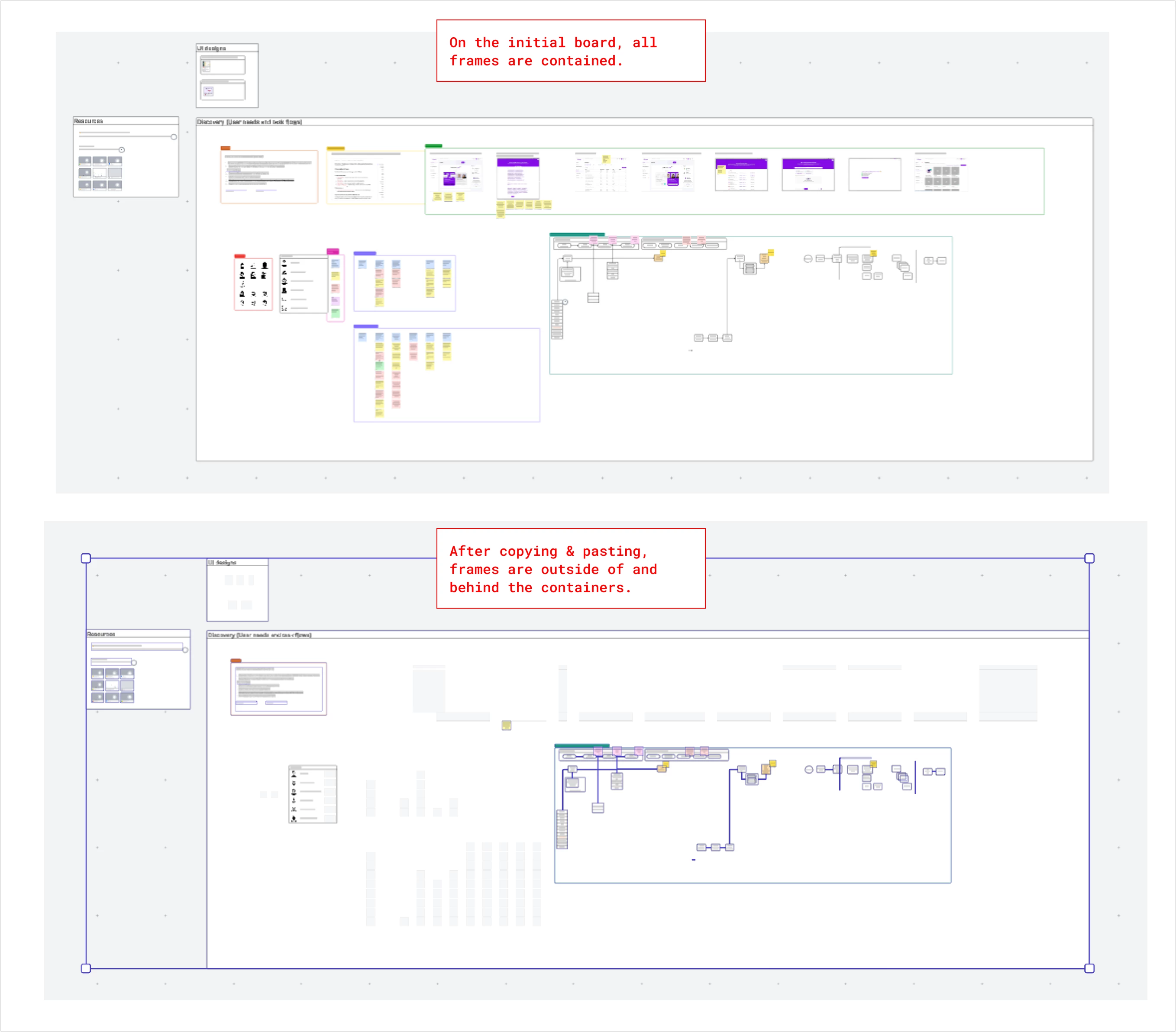
 

(In the bottom one, all the light gray objects are hidden behind the frames that they were supposed to be inside of.)


Comments

justinjohnson57
Forum|alt.badge.img+2

Hi ​@dustin.hansen!

Thank you so much for reaching out to the Lucid Community! I’m sorry to see that you are having issues with the nested objects of the container appearing behind it when you copy and paste it to a new board. Completely understandable if this has caused any frustration -- I would love to help out! 

We did attempt to reproduce this on our end just to see if this could be a potential bug, however, we did not get the same results. This just means we will have to either do a workaround or some troubleshooting in case its a performance issue with your Lucidspark!


From what I can see in the screenshot you sent, it appears that the largest container is overlapping the content that is supposed to be contained/nested inside when you copy and paste it over to a new board. Good news is that there is definitely a workaround for this! We have a very detailed Help Center article that you can view here: Organize and arrange objects - Arrange overlapping objects. Basically what you would do here is highlight the large container that holds all the nested objects, right click the container and select Arrange > Send to Back, seen in the article provided. This way all the nested objects appear in the container as they did in the original board when copied over to the new board.


If that does not work for you, this could potentially be an issue with the performance of Lucidspark. To troubleshoot, could you try opening your board, and the board you are pasting into, in a private or incognito window to help us narrow down the potential cause? Could you also try connecting to a different network or disconnecting from your VPN (if applicable)? Sometimes account performance issues can be related to internet security/speed or browser issues. These steps will help us eliminate that possibility. For help with opening an incognito window, please see this community post.

If those don’t resolve the problem, can you please send the following information so I can take a closer look?

  • Any additional screenshots of the issue you can provide. 
  • A screenshot of the associated Javascript Console output after reproducing the issue. You can open your Javascript Console by pressing Ctrl+Shift+J (if your computer is a Windows/Linux) OR Cmd+Opt+J (if your computer is a Mac).

Thanks in advance for your help and patience! Please feel free to let me know if you run into any snags or have further questions/concerns.


Best,

Justin J.