Solved

Line positioned automatically in Lucidchart

  • December 2, 2025
  • 3 replies
  • 27 views

Forum|alt.badge.img+1

I want to align the position of the phone icon so that it lines up with the API Gateway of Service A and also aligns with the internal ALB within the Security Group. The arrow line keeps dropping, and I want everything to be on the same plane, but I can’t get it to work. Do you have any suggestions?
 

Video https://drive.google.com/file/d/1GbzgmVhooI3o2V0xrPI3kAy4jXYcgAxR/view

Best answer by Zuzia S

Hi ​@suwat, thanks for posting in the Community!

I have removed the link to your document from this thread for privacy reasons.

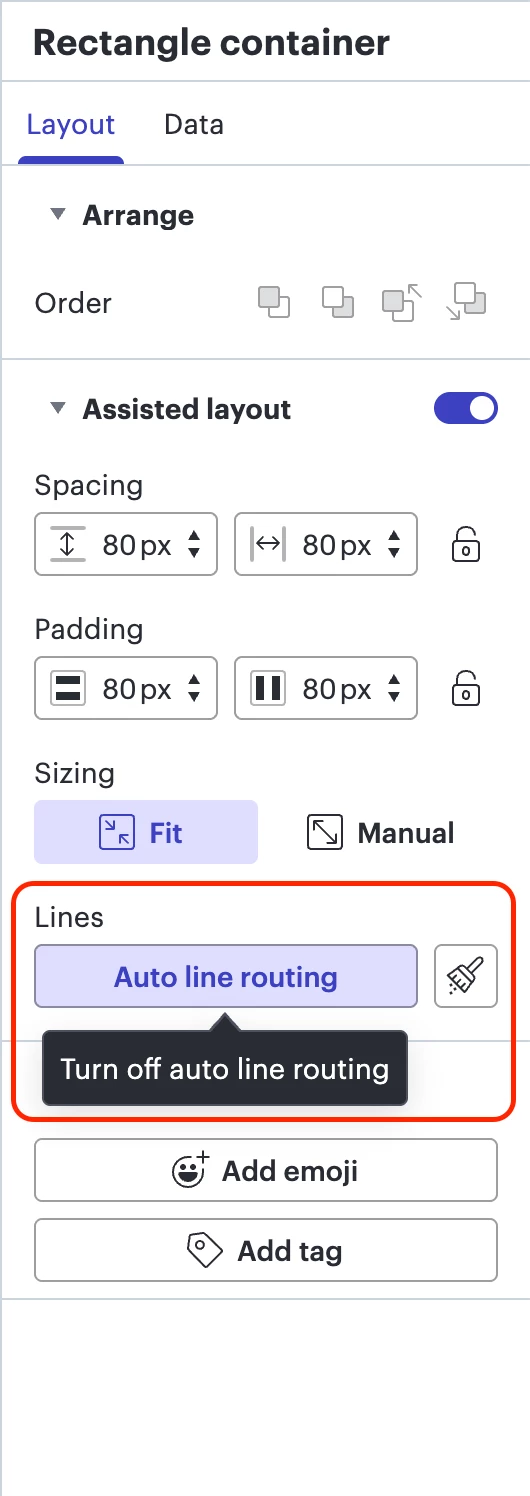
After having a closer look, it seems like auto line routing is turned on for the rectangle container where the shape is located. Could you please select the given container > click on Layout > click on Auto line routing to turn it off > try to place the shape again. As such:

Let me know if this helps. Cheers!

Comments

Zuzia S
Forum|alt.badge.img+8
  • Lucid community team
  • Answer
  • December 5, 2025

Hi ​@suwat, thanks for posting in the Community!

I have removed the link to your document from this thread for privacy reasons.

After having a closer look, it seems like auto line routing is turned on for the rectangle container where the shape is located. Could you please select the given container > click on Layout > click on Auto line routing to turn it off > try to place the shape again. As such:

Let me know if this helps. Cheers!


Forum|alt.badge.img+1
  • Author
  • December 10, 2025

Thank you for the suggestion. It’s a good option, but I prefer everything to be automatic. If I add too many components, it will take a lot of time to organize them. Nevertheless, thank you very much.


Zuzia S
Forum|alt.badge.img+8
  • Lucid community team
  • December 10, 2025

@suwat thank you for following up! Unfortunately, this isn’t currently supported in Lucid, but we’re very interested in your feedback and committed to continually improving our products. Please first search the Product Feedback section of this community (with the filter Topic Type = Idea) to see if it’s already been submitted. If so, please add any additional details you’d like and upvote the request - this consolidation helps to refine feedback and properly capture the popularity of the request.

If no one has submitted this idea yet, please create one of your own and be sure to include details about your use case or what you’d like to see in this experience. This will also allow other users with similar requests to discover and upvote it, then add details of their own.

Finally, for more information on how Lucid manages feedback via this community, take a look at this post:

Cheers!