Solved

Issue with diagram importing via Word add-in

  • February 26, 2026
  • 1 reply
  • 6 views

Forum|alt.badge.img+2

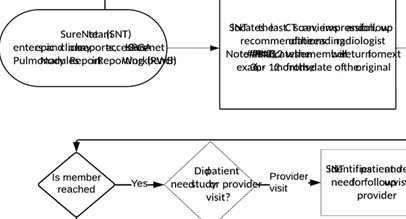
When importing a Lucidchart diagram into Word using the add-in, the layout changes.  Some words overlap each other and are no longer contained within their respective shapes.  The diagram appears correctly in Lucidchart but not after being imported into Word.

What causes this issue, and how can it be fixed?

Best answer by alison cheney

Hi ​@Sally,

Thank you for posting in the Lucid Community!

Could you please try the following steps below to narrow down the cause of your diagram displaying incorrectly?

  • Try opening your Word document in a private or incognito window to help us narrow down the potential cause? For help with opening an incognito window, please see this community post.
  • Try connecting to a different network or disconnecting from your VPN (if applicable)? Sometimes account performance issues can be related to internet security/speed or browser issues.
  • Uninstall and reinstall the Lucid add-in. 
    • Note: if the add-in has been deployed by your admin you will not be able to uninstall it.

If you have tried the above troubleshooting steps and are still experiencing issues, can you export the Lucid document as an image and insert the downloaded image into your Word document?

Thanks in advance for your help and patience!

Comments

alison cheney
Forum|alt.badge.img+4
  • Lucid community team
  • Answer
  • February 26, 2026

Hi ​@Sally,

Thank you for posting in the Lucid Community!

Could you please try the following steps below to narrow down the cause of your diagram displaying incorrectly?

  • Try opening your Word document in a private or incognito window to help us narrow down the potential cause? For help with opening an incognito window, please see this community post.
  • Try connecting to a different network or disconnecting from your VPN (if applicable)? Sometimes account performance issues can be related to internet security/speed or browser issues.
  • Uninstall and reinstall the Lucid add-in. 
    • Note: if the add-in has been deployed by your admin you will not be able to uninstall it.

If you have tried the above troubleshooting steps and are still experiencing issues, can you export the Lucid document as an image and insert the downloaded image into your Word document?

Thanks in advance for your help and patience!