Rich S101
March 14, 2017
Solved

Indenting Bulleted Lists in Lucid

  • March 14, 2017
  • 17 replies
  • 1384 views

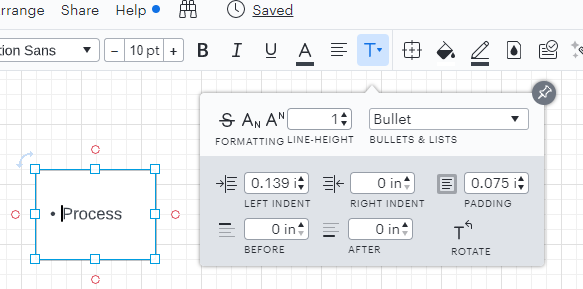
Is there a way to control the size of the tab for bulleted / numbered lists? The current tab space is much too big for my needs and is wasting space on my diagram. Please and thank you!

Best answer by Karsten B

Rich

Thanks for reaching out!  You can change the indent on bulleted/numbered lists.  It is accessed from the Text formatting option at the top of the editor.  

Hopefully this helps!

Comments

Micah
Lucid community team
March 20, 2023

Hi Mariajose thanks for continuing this thread and apologies for the trouble! Can you please let me know if you are attempting to create this bulleted line of text within a shape or a standalone text box? Would you also please share a screenshot of what you're observing with this second line slightly indented so I can better understand the issue? Finally can you please let me know if this occurs in only one document or in any? Thanks for your help and patience!

Mariajose V
March 20, 2023

Hi Micah. I am trying to create this within a shape. The weird thing is that if I copy and paste a group of bullets they bullets DO get pasted in but when I try to insert a new bullet even within those bullets I get the "no bullet" behavior. It occurs in any document where I try to create text within a shape from scratch or add a bullet inside a shape. Here is a snip of what I mean

Micah
Lucid community team
March 20, 2023

Hi Mariajose thanks for that screenshot - I see what you mean where you would expect to see additional bullet points with each no line. Can you confirm that in this state when you press ctrl+enter to create a new line that the "Bullet" formatting setting is still applied within the Text Options menu?

Mariajose V
March 20, 2023

Yes exactly when I check the text formatting options the system "thinks" that this is a bullet but only the first bullet is "bulleted" - it shows the way it shows in your screenshot

Micah
Lucid community team
March 20, 2023

Hi Mariajose thanks for getting back to me and confirming! This sounds unusual - I've converted your post into a private ticket so I can reach out directly for more information. Please refer to your email for further communication!

July 23, 2024

I am also encountering this issue. None of the above keyboard shortcuts will indent or outdent a numbered or bulleted list. Should I submit a ticket to my transition team? I am in LucidSpark, working in a table. From the screenshot, I want 4 to become a. underneath 3.


Kelsey Gaag
Lucidite
July 24, 2024

Hi @sarahjustice

Thank you for the reply! In a normal text box you can achieve this by hitting tab on the second line. However, in a table this functionality is not possible since hitting tab takes you to the next column. 
 

Unfortunately, this isn’t currently supported in Lucid, but we’re very interested in your feedback and committed to continually improving our products. You can add this as an idea in our Product Feedback section if you would life for it to be added to tables in Lucidspark.

Please first search the Product Feedback section of this community (with the filter Topic Type = Idea) to see if it’s already been submitted. If so, please add any additional details you’d like and upvote the request - this consolidation helps to refine feedback and properly capture the popularity of the request.

If no one has submitted this idea yet, please create one of your own and be sure to include details about your use case or what you’d like to see in this experience. This will also allow other users with similar requests to discover and upvote it, then add details of their own.

Finally, for more information on how Lucid manages feedback via this community, take a look at this post: