I saw another used asked for this feature several years ago. I'm evaluating LucidChart for company deployment and this feature - the ability to shade highlight or bold a specific field in an ERD is essential for us. Is it possible in LucidChart?
Hi @Nora M, thanks for adding to this thread, that’s a great question! My apologies for any confusion here- there have been enhancements since this post was last updated, and this is now available.
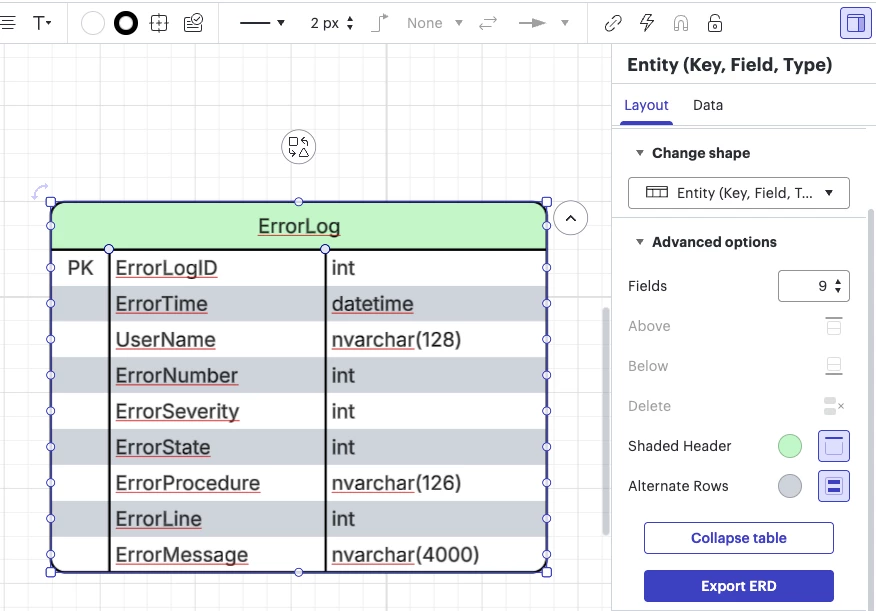
To highlight the header of ERD shapes, you can follow these steps:
Select your ERD shape and the contextual panel should open.
In the contextual panel, scroll down and select the icon next to Shaded Header.
Select your preferred color.
In this same menu, you can also select shading for alternate rows if you’d like!
Shaded header and shaded alternate rows on an ERD shape
Please let me know if you have any further questions. Happy to help!
Hi Matt thanks for posting in the Lucid Community! At this time highlighting or shading a specific row within an ERD table isn't currently supported in Lucidchart. Our apologies for the inconvenience here - I certainly understand how this could be an important part of your diagram. Our development team is highly interested in your feedback and if you're willing to share it they would love to hear more about your use case via the Product Feedback space in this community. Thank you for your insight that helps us improve our products!
It is however possible to style individual fields within a row to edit the text by applying a style. While this does require styling the text in each cell separately you can still achieve a look that distinguishes the row as a whole. In my example below I've bolded and colored one of the rows in my ERD:
I hope this helps! Please let me know if you have additional questions.
One way to accomplish this in leu of an integrated solution is to layer a box on top of your table filled with your color. Adjust the opacity to allow you to view the underlaying text.
Hi @Nora M, thanks for adding to this thread, that’s a great question! My apologies for any confusion here- there have been enhancements since this post was last updated, and this is now available.
To highlight the header of ERD shapes, you can follow these steps:
Select your ERD shape and the contextual panel should open.
In the contextual panel, scroll down and select the icon next to Shaded Header.
Select your preferred color.
In this same menu, you can also select shading for alternate rows if you’d like!
Shaded header and shaded alternate rows on an ERD shape
Please let me know if you have any further questions. Happy to help!
A Lucid or airfocus account is required to interact with the Community, and your participation is subject to the
Supplemental Lucid Community Terms.
You may not participate in the Community if you are under 18. You will be redirected to the Lucid or airfocus app to log in.
A Lucid or airfocus account is required to interact with the Community, and your participation is subject to the
Supplemental Lucid Community Terms.
You may not participate in the Community if you are under 18. You will be redirected to the Lucid or airfocus app to log in.



 Your privacy choices


