
Question

How to add title to rectangle containers in Lucid

  • December 3, 2025
  • 3 replies
  • 19 views

Astrid_G
Lucid Legend Level 3
Forum|alt.badge.img+7

I’m using the Rectangle Container, from the Container sub menu, and once it is on the canvas and selected I can see “Add Title” positioned centrally just above the shape outline
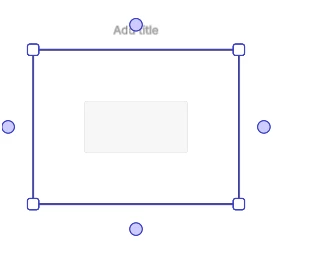
 

When I try single clicking in that area to set the title, the Drag Line from shape arrow pops up and I can’t get to the Add Title area.  Double clicking in the vicinity opens up a new text box that isnt associated with the container.

I eventually double clicked in the right place which is within the container, on the other side of the top outline from “Add Title”.  
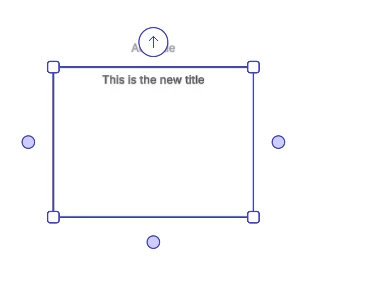
So, the title is now set and is part of the container, as it moves with it.  However, the “Add Title” grey text is still visible above the container when the whole object is selected.  Shouldnt that disappear once the container does have a title within itself?
If the Shape data is exported to csv, the text string for the Title appears in the Text Area 2 column, and there’s nothing in Text Area 1.

Comments

Zuzia S
Forum|alt.badge.img+8
  • Lucid community team
  • December 5, 2025

Hi ​@Astrid_G, thank you for posting in the Community! I’ll be happy to help. 

It seems like I was not able to reproduce the issue you are experiencing. Could you please try double-clicking in the title area without clicking on the arrow, nor too far from the title section either? As such:

Please let me know if you keep on encountering issues then!

Cheers!


Astrid_G
Lucid Legend Level 3
Forum|alt.badge.img+7
  • Author
  • Lucid Legend Level 3
  • December 7, 2025

Hi ​@Astrid_G, thank you for posting in the Community! I’ll be happy to help. 

It seems like I was not able to reproduce the issue you are experiencing. Could you please try double-clicking in the title area without clicking on the arrow, nor too far from the title section either? As such:

Please let me know if you keep on encountering issues then!

Cheers!

Hi Zuzia

Thanks for getting back to me so quickly. 

I can edit the title with the method you suggest but its fiddly and not intuitive. 

If the actual edit field for the title shows in the top left corner, why not put the “Add Title” label in the same area.

Alternatively it would help if the cursor changed while hovering over “Add Title” so you know its a field that can be edited,  or maybe a popup that says “double click here” before the cursor gets to the connecting arrow.  If you are moving the cursor too quickly you are more likely to double click and get the “drag line from shape” function, which does provide a hover-over pop-up.

Thanks

Astrid


Zuzia S
Forum|alt.badge.img+8
  • Lucid community team
  • December 11, 2025

@Astrid_G thank you for following up and apologies for the misunderstanding on my end! I have assumed that the Alignment of the text was set in the middle beforehand in your case.

However, I understand that having selected the middle text placement yet having Frame titles on the left at all times is confusing. I can confirm that our product team is planning to remove the alignment controls for Frame titles to avoid this issue, and Frame titles will remain on the left. 

We’re very interested in your feedback and committed to continually improving our products. Please first search the Product Feedback section of this community (with the filter Topic Type = Idea) to see if it’s already been submitted. If so, please add any additional details you’d like and upvote the request - this consolidation helps to refine feedback and properly capture the popularity of the request. 

If no one has submitted this idea yet, please create one of your own and be sure to include details about your use case or what you’d like to see in this experience. This will also allow other users with similar requests to discover and upvote it, then add details of their own.

Finally, for more information on how Lucid manages feedback via this community, take a look at this post: 

Cheers!