

Lisa B
May 23, 2023
Solved

How can I scroll up and down in a Lucidchart document?

  • May 23, 2023
  • 16 replies
  • 5635 views

I've been using Lucid for several years now and I swear that in that time I have always been able to scroll up and down in a document just using my mouse wheel. To scroll left/right I have to hold the 'shift' key and to zoom in and out I had to hold the 'control' key (Mac).

But as of just today it seems the mouse wheel only zooms in and out and I can't figure out how to simply scroll up and down in a document! I'm not talking about dragging the whole canvas; I just mean scrolling up and down. All the help articles say the mouse wheel zooms but I really feel like that hasn't always been the case. 

Regardless of if I'm going crazy though I can't figure out a way to just scroll up/down. Some things I've tried that didn't work are; holding the 'space bar' while scrolling; pressing down on the mouse wheel (that just acts the same as the right click). Even trying to scroll up and down using two fingers on my track pad behaves strangely like it can't decide whether it is zooming or scrolling. So none of that worked but holding 'shift' while scrolling still allows me to scroll left/right. 

Best answer by Phillip W

Hey Lisa

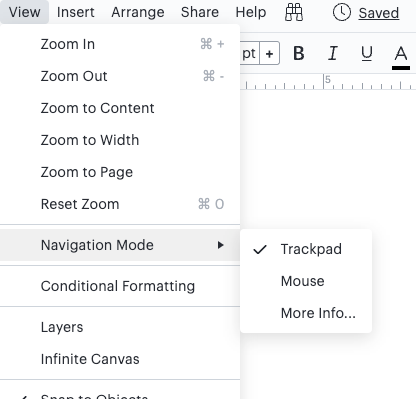
Thanks for posting in the Lucid Community! You may want to check your Navigation Mode preference by clicking View > Navigation Mode and ensure this is set to Mouse. 

If this doesn't help or you have any other questions please let me know!

Comments

Kelsey Gaag
Lucidite
October 31, 2024

Hi @kpaully23

Thank you for the reply! You can turn infinite canvas off by going to File > Settings > Document Settings > Canvas and Page > Toggle Infinite Canvas. 


October 31, 2024

Under Document Settings I do not have Canvas and Page option.

Kelsey Gaag
Lucidite
October 31, 2024

Hi @kpaully23

Thank you for the reply! Can you provide a screenshot? Are you working in Lucidspark or in Lucidchart? 

October 31, 2024

I am working in Lucidchart. 


Kelsey Gaag
Lucidite
October 31, 2024

Hi @kpaully23

Thank you for the reply! I have removed your screenshot since it contains information private to your account. Could you try opening your document in a private or incognito window to help us narrow down the potential cause? Could you also try connecting to a different network or disconnecting from your VPN (if applicable)? Sometimes account performance issues can be related to internet security/speed or browser issues. These steps will help us eliminate that possibility. For help with opening an incognito window, please see this community post (in English).


 Can you provide a screenshot of the issue of your document settings if the problem persists?

October 8, 2025

shift+scroll wheel will scroll left and right
shift+crl+scroll wheel will scroll up and down

Thank you for this simple reply. This was exactly the info I was looking for, I couldn’t find it anywhere else and it was making me nuts.