Solved

Export Lucidspark document not available

  • February 16, 2026
  • 6 replies
  • 33 views

Forum|alt.badge.img+1

Hello All, 

I have a lucidapp Individual Plan and I use this tool from 2018.

Today I found something strange, I can’t more export my diagrams and save them in PNG to attach in my documents.

I see all the links in grey.
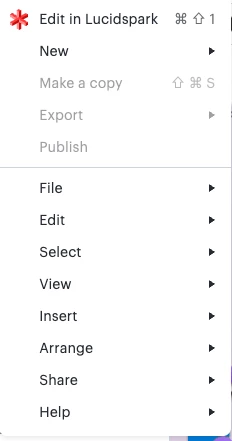
It’s a my issue or application issue? 

Two weeks ago everything works fine.


All the best

Alessandro Ciappei

Best answer by Zuzia S

@aciappei thanks for following up! 

If the issue is specific to Google Chrome, could you please try the following troubleshooting steps?:

  • Clearing your cache and cookies in a regular browsing session and try exporting again
  • Disabling all your extensions > try exporting again. If it works, re-enabling extensions one by one to identify the culprit
  • Updating Chrome as we support the latest stable version of Chrome OS.

I hope this is helpful! Please let us know how it goes.

Cheers

Comments

Humas1985
Lucid Legend Level 10
Forum|alt.badge.img+24
  • Lucid Legend Level 10
  • February 17, 2026

Hi ​@aciappei 

Similar issues have been discussed recently. Could you please take a look at the following post and see if it helps?

Why is Export not available anymore? | Community

Hope this helps - Happy to help further!!
Thank you very much and have a great one!
Warm regards


Zuzia S
Forum|alt.badge.img+8
  • Lucid community team
  • February 18, 2026

Hi ​@aciappei, thank you for posting in the Community and thank you ​@Humas1985 for chiming in! I’ll be happy to help.

Could you try opening your Lucid account/document in a private or incognito window to help us narrow down the potential cause? Could you also try connecting to a different network or disconnecting from your VPN (if applicable)? Sometimes account performance issues can be related to internet security/speed or browser issues. These steps will help us eliminate that possibility. For help with opening an incognito window, please see this community post.

If those don’t resolve the problem, can you please send the following information so I can take a closer look?:

  • A screenshot of the associated Javascript Console output after reproducing the issue. You can open your Javascript Console by pressing Ctrl+Shift+J (if your computer is a Windows/Linux) OR Cmd+Opt+J (if your computer is a Mac).
  • A Technical Support PIN for your account. This PIN is safe to post in this thread because it is only accessible by members of the Lucid support staff. You can find steps for generating a Support PIN in this  Help Center article .

Thanks for your help and patience!


Forum|alt.badge.img+1
  • Author
  • February 20, 2026

Hi everyone,

Thanks for the suggestions. I tried using Incognito mode, but the issue persists.

However, I just tested a different browser, Safari, and I am able to export successfully there. This seems to isolate the problem to Chrome on my Mac. Does anyone have insights into why Chrome specifically might be failing, or what settings I should check?

Best regards,

Alessandro


Zuzia S
Forum|alt.badge.img+8
  • Lucid community team
  • Answer
  • February 26, 2026

@aciappei thanks for following up! 

If the issue is specific to Google Chrome, could you please try the following troubleshooting steps?:

  • Clearing your cache and cookies in a regular browsing session and try exporting again
  • Disabling all your extensions > try exporting again. If it works, re-enabling extensions one by one to identify the culprit
  • Updating Chrome as we support the latest stable version of Chrome OS.

I hope this is helpful! Please let us know how it goes.

Cheers


Forum|alt.badge.img+1
  • Author
  • March 2, 2026

Hi ​@Zuzia S


thank you for your reply, I tried to clear cache and remove eventual add-ons, but still not working.

At this point I remove google chrome, and reistall it, and now it’s working. 

I don’t know what happened, but for work purpose I’m unable to make a lot of testing. 

Maybe the problem was related on some strange behaviour.


Now it’s fixed, thank you


Alessandro


Zuzia S
Forum|alt.badge.img+8
  • Lucid community team
  • March 3, 2026

@aciappei thank you for trying the troubleshooting steps above!

Reinstalling Google Chrome likely updated your browser to the latest stable version, which may have resolved the issue since Lucid is optimized to perform best on the most up-to-date version of Chrome.

Please let me know if you have any further questions or concerns. We’re happy to help!