Oct 27, 2026 7:08 PM UTC
Solved

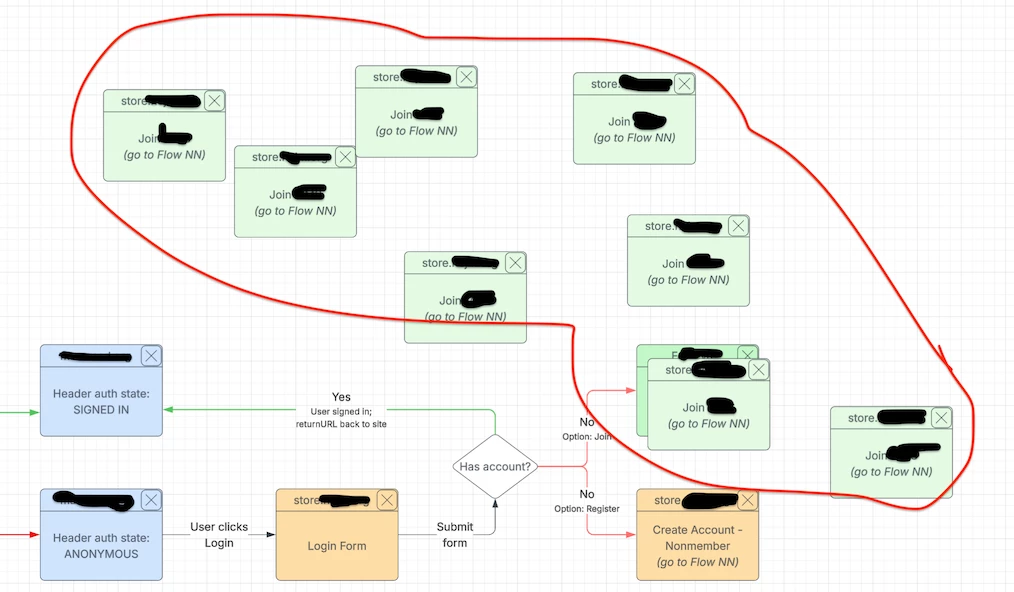
Duplicate shapes get pasted into file if shapes panel is active

I’m a longtime Lucidchart user but for the last couple of months, I’ve been hitting a bug in all my files that’s making it impossible to create and share new diagrams, or edit existing ones.

Brief summary:

  1. Edit a file or create new file, finish the diagram until it’s ready to share → everything goes fine
  2. Share it with others, using shareable link (edit & share).
  3. Later, return to the file, eg to screenshare it.
    1. If the ‘Shapes’ modal is open, then immediately wherever I put my cursor, a shape that I’ve used previously will get pasted in, over and over and over again.
    2. If the Shapes model is closed/inactive, the duplication stops.
    3. Doesn’t matter if I use the share link to get back to the file, or just navigate to it through lucid.app.
  4. Basically renders the file unusable. 😓

I’m using Lucidchart in Chrome latest on Macbook Pro. 

I’ve tried copying old files and revising them, creating new files, clearing browser cache/cookies, etc., and the problem still occurs on any file I open and then revisit.

 

alison cheney
Lucid community team
Oct 30, 2026 6:34 PM UTC

Hi ​@SaraF,

Thank you for posting in the Lucid Community, and I appreciate your patience with my response here. I am sorry you are experiencing this and I’m happy to help find out what the underlying issue is!

Could you please try opening your document in a private or incognito window to help us narrow down the potential cause? Could you also try connecting to a different network or disconnecting from your VPN (if applicable)? Sometimes account performance issues can be related to internet security/speed or browser issues. These steps will help us eliminate that possibility. For help with opening an incognito window, please see this community post.

If those don’t resolve the problem, can you please send the following information so I can take a closer look?

  • A screenshot of the associated Javascript Console output after reproducing the issue. You can open your Javascript Console by pressing Ctrl+Shift+J (if your computer is a Windows/Linux) OR Cmd+Opt+J (if your computer is a Mac).

  • A temporary Document Support PIN for this document? This will help me take a closer look at what’s going on. This PIN is safe to post in this thread because it is only accessible by members of the Lucid support staff. You can find steps for generating a Support PIN in this Lucid Help Center article: Generate a Lucid Support PIN.

Thanks in advance for your help and patience!

Comments

SaraFAuthor
Oct 27, 2026 7:27 PM UTC

Found related discussions tho it’s not clear what the fix was -- only use Lucidchart after disabling all my browser extensions?? Yikes.


Translate
alison cheney
Lucid community team
Oct 30, 2026 6:34 PM UTC

Hi ​@SaraF,

Thank you for posting in the Lucid Community, and I appreciate your patience with my response here. I am sorry you are experiencing this and I’m happy to help find out what the underlying issue is!

Could you please try opening your document in a private or incognito window to help us narrow down the potential cause? Could you also try connecting to a different network or disconnecting from your VPN (if applicable)? Sometimes account performance issues can be related to internet security/speed or browser issues. These steps will help us eliminate that possibility. For help with opening an incognito window, please see this community post.

If those don’t resolve the problem, can you please send the following information so I can take a closer look?

  • A screenshot of the associated Javascript Console output after reproducing the issue. You can open your Javascript Console by pressing Ctrl+Shift+J (if your computer is a Windows/Linux) OR Cmd+Opt+J (if your computer is a Mac).

  • A temporary Document Support PIN for this document? This will help me take a closer look at what’s going on. This PIN is safe to post in this thread because it is only accessible by members of the Lucid support staff. You can find steps for generating a Support PIN in this Lucid Help Center article: Generate a Lucid Support PIN.

Thanks in advance for your help and patience!

Translate