Solved

Data syncing using Excel/Microsoft 365 in Lucid

  • August 12, 2025
  • 10 replies
  • 100 views

Shannon B
Forum|alt.badge.img+3

Hi, I'm trying to import data using Excel through a Microsoft 365 and I’m not seeing the syncing option that’s available through Microsoft 365. 

When I try to import a dataset, I am given these options: 
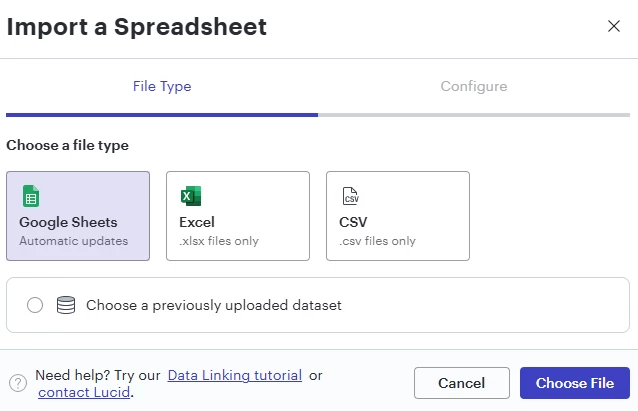
 

If I select Excel, then it just prompts me to upload a file and I’m not given these sync options that are shown in the help center article.
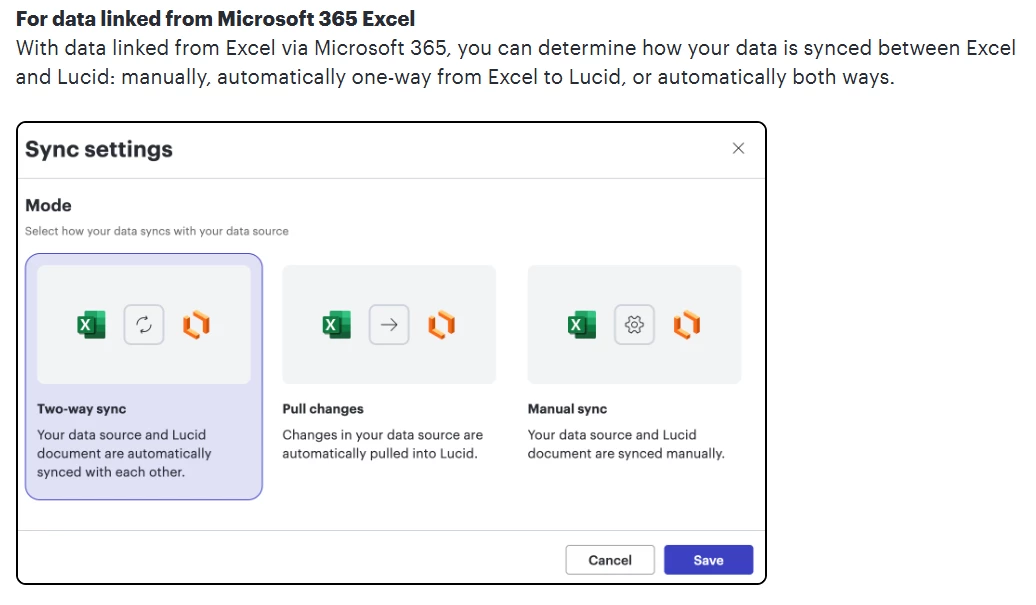
 

How do I get Lucidchart to allow me to upload a Microsoft 365 spreadsheet so I can have syncing?

Best answer by Ambar D

Hi ​@Heavlynn, thanks for adding to this thread! Sorry you’re having trouble here.

To clarify - are you updating an existing chart that already has data from Excel? Have you previously uploaded data from Excel to Lucid successfully, or are you having trouble with your initial upload?

I recommend reading through the Link data to a Lucidchart document as a great starting point, but I’m happy to help here.

A couple of things to note when it comes to permissions here: If you are importing data from Google or Microsoft 365, you will need to grant Lucidchart permission to access your Google or Microsoft account. Click Authenticate, select your Google account, and click Allow to grant this permission.

If you don’t see Excel as an option, reach out to your Microsoft admin—they may need to grant Lucid access to your Microsoft account.

Comments

Humas1985
Lucid Legend Level 10
Forum|alt.badge.img+24
  • Lucid Legend Level 10
  • August 13, 2025

Hi ​@Shannon B 

Dynamic data linking with automatic refresh is only available on the Enterprise plan, Free, Individual, and Team plans don’t have it. Also, Lucidchart yet to support true two-way syncing with Microsoft 365 Excel, you can link and pull updates one-way, but direct uploads are static snapshots with no ongoing sync.

To learn more - Lucid Microsoft 365 Excel Integration [Beta]

Hope this helps - Happy to help further!!
Thank you very much and have a great one!
Warm regards


Shannon B
Forum|alt.badge.img+3
  • Author
  • August 13, 2025

Hi Huma - I am on the Enterprise plan. Do I need to contact support to get this feature in my account? I’m not as concerned with the two-way sync, I just want my chart to automatically refresh regularly, or at least be able to manually refresh without uploading a new Excel doc.


Kelsey Gaag
Forum|alt.badge.img+16
  • Lucidite
  • August 19, 2025

Hi Shannon! It looks like you currently don’t have access to beta features, which is why are unable to see the Excel two way sync option. I am converting your post to a ticket so our support team can help you further. 


Shannon B
Forum|alt.badge.img+3
  • Author
  • August 21, 2025

Hi Kelsey - I am not interested in the two-way sync option right now. I just want my Microsoft 365 Excel to update my Lucidchart as the knowledgebase says it should be able to do (the Pull Changes option). Right now, I don’t even see a Microsoft 365 option for uploading data, just “Excel”. The knowledgebase article gives the impression these are two different things (Excel is a static one-time upload and Microsoft 365 allows for automated syncing to Lucidchart).

If that is also still in beta, the knowledgebase article should state that.


Kelsey Gaag
Forum|alt.badge.img+16
  • Lucidite
  • August 21, 2025

Hi ​@Shannon B

Thank you for the feedback. I will pass this a long to our Help Center team.! You can still export data from Excel online to a .xlsx file and then import it through Lucid as a workaround. 


Forum|alt.badge.img
  • November 11, 2025

I have the same problem and I am on and Enterprise plan. I just want my chart to auto update based on the changes that are made to my spreadsheet. I get the same exact options that the user listed in an earlier thread. 


Ambar D
Forum|alt.badge.img+10
  • Lucid community team
  • Answer
  • November 14, 2025

Hi ​@Heavlynn, thanks for adding to this thread! Sorry you’re having trouble here.

To clarify - are you updating an existing chart that already has data from Excel? Have you previously uploaded data from Excel to Lucid successfully, or are you having trouble with your initial upload?

I recommend reading through the Link data to a Lucidchart document as a great starting point, but I’m happy to help here.

A couple of things to note when it comes to permissions here: If you are importing data from Google or Microsoft 365, you will need to grant Lucidchart permission to access your Google or Microsoft account. Click Authenticate, select your Google account, and click Allow to grant this permission.

If you don’t see Excel as an option, reach out to your Microsoft admin—they may need to grant Lucid access to your Microsoft account.


Forum|alt.badge.img

Hi ​@Ambar D , I’ll sub in for ​@Heavlynn - Having the same issue. I’m updating an existing chart that already has data from Excel. I uploaded that data successfully. My account shows that I’ve connected to the Lucid Microsoft 365 Excel Integration [Beta]… One weird thing that happened: When I tried to authorize the connection, the pop-up window didn’t recognize my work email address - which is what I use whenever I access Microsoft. At one point there was an error message that said I can’t use a work or school account to log in… I’m also unable to replace my dataset - Everything seems to be working as designed, but the data is unchanged. So I’m in a bit of a bind.


Forum|alt.badge.img

Nvm - It was just a permissions issue on my end 🙄


Ambar D
Forum|alt.badge.img+10
  • Lucid community team
  • December 17, 2025

Hi ​@elizabeth.raub, thanks for adding to this thread! I’m happy to hear that this has been resolved for you.  

Would you mind providing a screenshot of the error message you were seeing if you have one? 

Let me know if you have any further questions here and I’m happy to help!