Shannon B
August 12, 2025
Solved

Data syncing using Excel/Microsoft 365 in Lucid

  • August 12, 2025
  • 12 replies
  • 305 views

Hi, I'm trying to import data using Excel through a Microsoft 365 and I’m not seeing the syncing option that’s available through Microsoft 365. 

When I try to import a dataset, I am given these options: 
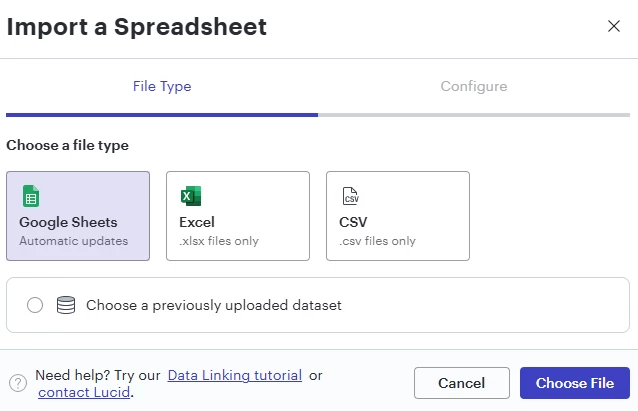
 

If I select Excel, then it just prompts me to upload a file and I’m not given these sync options that are shown in the help center article.
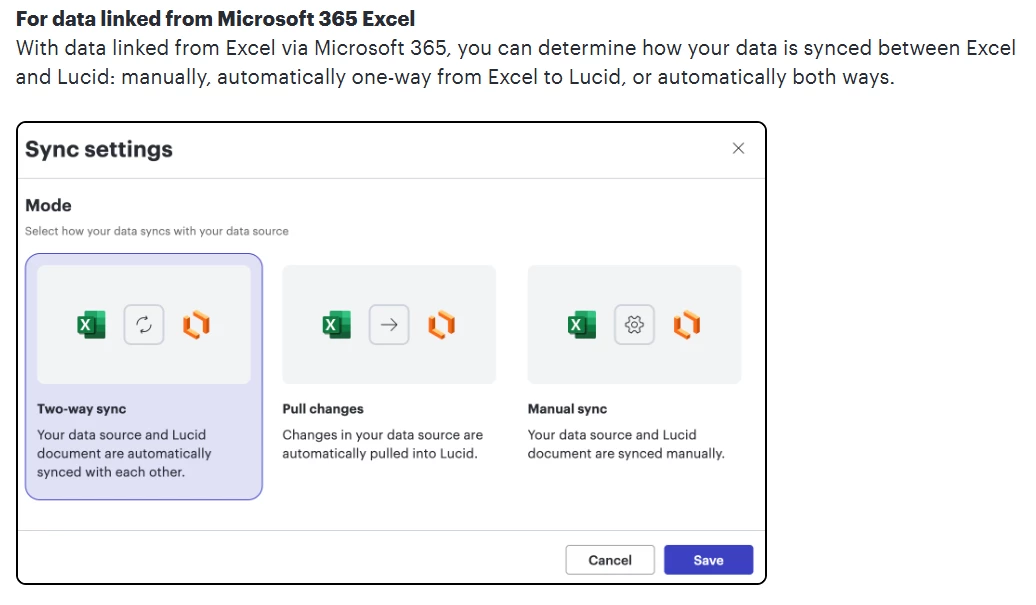
 

How do I get Lucidchart to allow me to upload a Microsoft 365 spreadsheet so I can have syncing?

Best answer by Ambar D

Hi ​@Heavlynn, thanks for adding to this thread! Sorry you’re having trouble here.

To clarify - are you updating an existing chart that already has data from Excel? Have you previously uploaded data from Excel to Lucid successfully, or are you having trouble with your initial upload?

I recommend reading through the Link data to a Lucidchart document as a great starting point, but I’m happy to help here.

A couple of things to note when it comes to permissions here: If you are importing data from Google or Microsoft 365, you will need to grant Lucidchart permission to access your Google or Microsoft account. Click Authenticate, select your Google account, and click Allow to grant this permission.

If you don’t see Excel as an option, reach out to your Microsoft admin—they may need to grant Lucid access to your Microsoft account.

Comments

February 10, 2026

Nvm - It was just a permissions issue on my end 🙄

Hi Elizabeth,


What permission did you end up needing? Thanks 

Ambar D
Lucid community team
February 12, 2026

Hi ​@julianvarga, just jumping in here to provide some help!

To clarify- are you also having trouble with updating existing linked data? Additionally, are you using Google or Microsoft 365 Excel?

As a good starting point, I recommend reading trough this section of the help center article. Something to note is that our data import size limit is 2MB. Please let us know if you are attempting to import a file that size or larger.