Solved

Custom canvas size setting

  • February 11, 2026
  • 6 replies
  • 28 views

Forum|alt.badge.img+1


New → Blank Document
Hamburger → File → Settings → Document Settings


I want to design a poster that is 32 inches tall and 24 inches wide. 


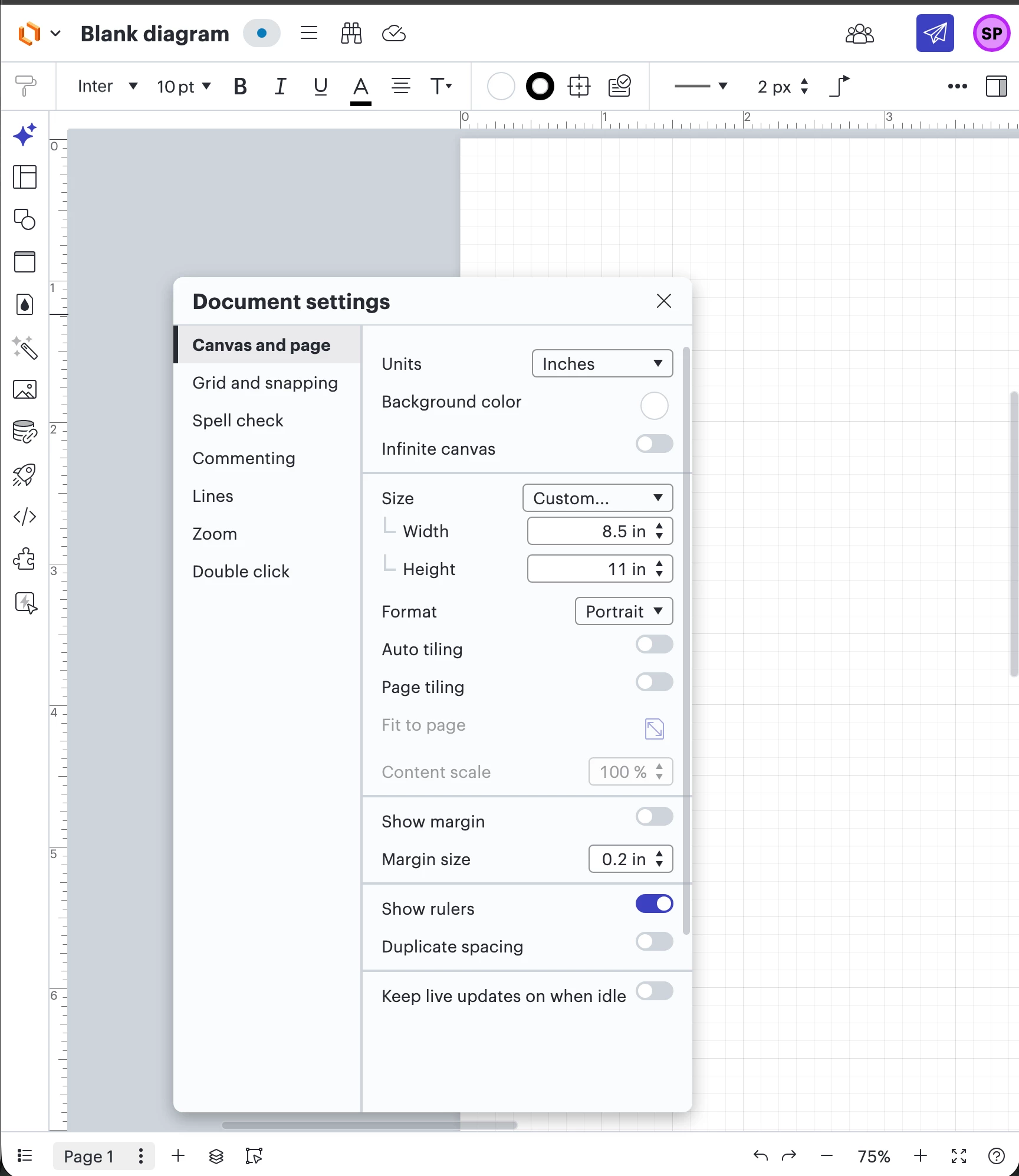
Units → Inches
Infinite cavas → False
Auto tiling → False
Page tiling → False


Format → Portrait
Size → Custom 
Height → 36

When I click out, it goes right back to 11

Width → 24 instead


The Format selector gets stuck flipping between settings.

Please help! I should be able to make a poster!

Best answer by alison cheney

 Hi ​@sydneypemberton,

Thank you for posting in the Lucid Community! ​@Shira M, thank you for the amazing support and suggestions you've already shared.

@sydneypemberton, have you had a chance to try any of Shira’s suggestions yet?


In order to help us rule out performance issues or specific document glitches, could you please try these steps below:

  • Try opening your document in a private or incognito window. For help with opening an incognito window, please see this community post.

  • Try connecting to a different network or disconnecting from your VPN (if applicable). Sometimes account performance issues can be related to internet security/speed or browser issues.

  • @Shira M mentioned toggling Infinite Canvas ON and then OFF again. This can reset manual page boundaries.

  • Ensure Custom is selected in the Size dropdown before typing your numbers

If none of these steps above work, could you share a temporary Document Support PIN for this document? This will help me take a closer look at what’s going on. This PIN is safe to post in this thread because it is only accessible by members of the Lucid support staff. You can find steps for generating a Support PIN in this Lucid Help Center article: Generate a Lucid Support PIN.  Thanks for your help and patience!

Comments

Shira M
Lucid Legend Level 5
Forum|alt.badge.img+10
  • Lucid Legend Level 5
  • February 12, 2026

@sydneypemberton it sounds like you’re hitting a frustrating loop while trying to set up your poster dimensions, but based on your description and the screenshot, there are a few likely culprits for why the settings aren't sticking. One common issue in Lucidchart is that the "Custom Size" fields often require you to press Enter/Return on your keyboard immediately after typing the number. If you simply click out of the box or move to the next field, the software may revert to the previous default value of 11 inches. Also, the flickering you're seeing in the Format selector suggests a potential conflict between the manual dimensions and the "Page Tiling" logic, or perhaps a minor browser rendering glitch.

To resolve this, I recommend first ensuring that you press Enter after each dimension change to "lock" the value in. If the menu continues to behave erratically or keeps flipping between settings, it would be helpful to know which browser and device you are using, as extensions or a full browser cache can sometimes interfere with the menu. You might also try toggling the Infinite Canvas setting on and then back off again to reset the canvas boundaries before entering your 24x36 dimensions. For more information about these controls, you can refer to the official Adjust document and board settings article.


alison cheney
Forum|alt.badge.img+4
  • Lucid community team
  • Answer
  • February 12, 2026

 Hi ​@sydneypemberton,

Thank you for posting in the Lucid Community! ​@Shira M, thank you for the amazing support and suggestions you've already shared.

@sydneypemberton, have you had a chance to try any of Shira’s suggestions yet?


In order to help us rule out performance issues or specific document glitches, could you please try these steps below:

  • Try opening your document in a private or incognito window. For help with opening an incognito window, please see this community post.

  • Try connecting to a different network or disconnecting from your VPN (if applicable). Sometimes account performance issues can be related to internet security/speed or browser issues.

  • @Shira M mentioned toggling Infinite Canvas ON and then OFF again. This can reset manual page boundaries.

  • Ensure Custom is selected in the Size dropdown before typing your numbers

If none of these steps above work, could you share a temporary Document Support PIN for this document? This will help me take a closer look at what’s going on. This PIN is safe to post in this thread because it is only accessible by members of the Lucid support staff. You can find steps for generating a Support PIN in this Lucid Help Center article: Generate a Lucid Support PIN.  Thanks for your help and patience!

Forum|alt.badge.img+1

Thank you Alison and Shira.

I have created a video to show the entire reproduction as well as my browser and machine info. 

I don’t see an option to upload a video, so I’ve shared it via Drive.
https://drive.google.com/file/d/1vv8lctrZTMk2a_gOMoNLKgbP8-xLjS87


I highly doubt it’s a performance issue. I’m on a beefy machine.
I highly doubt it’s a network speed issue. I’m on fiber.

This document is literally what you just saw created here, nothing special.
The support PIN is `dulBUQUoMxoCHuVdkT8PZXX5grBS7yboVB205363277`.

 
Best regards,
- Sydney


alison cheney
Forum|alt.badge.img+4
  • Lucid community team
  • February 17, 2026

Hi ​@sydneypemberton,

Thanks for your response in this thread and for providing such detailed information!

I was able to take a closer look at your document with the support pin you provided. I went ahead and changed the settings on your document to 24 in (width) and 32 in (height). Please let me know if the document adjusted correctly on your end. I’m happy to help if you have any additional questions. Good luck designing your poster!


Forum|alt.badge.img+1

This is happening across documents for me. 

I’m actually moving to Photoshop for better collaboration, thanks for your help though!  I’ll hang onto that document in case I need it.

Also, FWIW, after I responded, I went in and somehow was able to adjust a document myself. I don’t know what changed, but I’m not able to reproduce being able to change it again now. 

It might be worth creating a bug for your developers. 

Cheers,

Sydney


alison cheney
Forum|alt.badge.img+4
  • Lucid community team
  • February 17, 2026

Hi ​@sydneypemberton,

Thank you for keeping me informed! I will definitely check with our development team.

If this same issue arises in your other Lucid documents in the future, I have included this workaround (see screenshots below) in case it’s helpful. This allows you to manually drag (horizontally & vertically) to adjust the width and height of your document.

Use the double arrow at the top right of your document to adjust the width.


Use the double arrow at the bottom left of your document to adjust the height.
*You can use the double arrow in the bottom right corner to adjust both the width and height.

Thank you for your help and patience. Please let me know if you have any additional questions!
