Solved

Copy or move a tab to a different file in Lucid

  • October 20, 2020
  • 5 replies
  • 221 views

Mary A

I have a LucidChart which currently has 20 tabs.  I would like to copy one tab to a different LucidChart but can't figure out how.  

Is this possible?  I am envisioning something like Excel's Right Click Copy Tab Navigate to New File Paste.

Thanks in advance!

Best answer by Leianne C

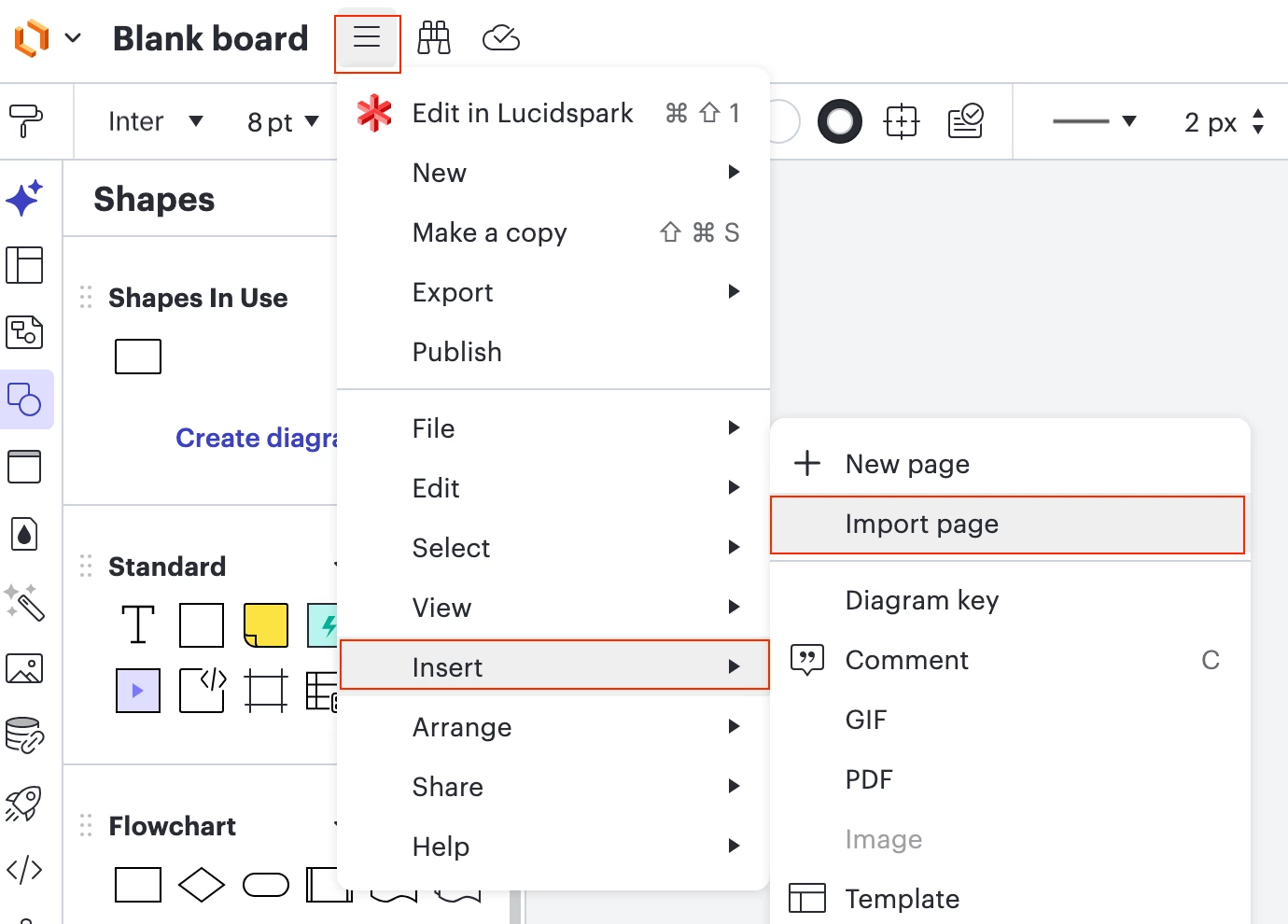
Thank you for sharing the idea post, ​@Romuel! While it’s not exactly the same, it is possible to insert/import a page tab from one document into another. To do this, you will need to open the destination document and open the menu. From there, hover your cursor over “Insert” and  select Import Page. This will allow you to find the document you’d like to insert. For more details, please see this Help Center article.

Hope this helps! Please let us know if you have any questions. 

Comments

Ashley C
Forum|alt.badge.img+11
  • Lucid support team
  • October 21, 2020

Thanks for reaching out on Lucidchart Community! 

Unfortunately what you are trying to do is not currently supported in Lucidchart. Would you mind adding your idea to our product feedback section? These requests are sent directly to the development teams for their consideration and helps inform which features take priority.

Thanks for your request and I apologize for any inconvenience this causes you.


Forum|alt.badge.img
  • August 2, 2024

Hi - 3 years ago this was a need.  It sill is.  This is a very basic requirement; any plans to incorporate this functionality?


Kelsey Gaag
Forum|alt.badge.img+16
  • Lucidite
  • August 5, 2024

Hi @edonkers

Thank you for your post! It looks like the user above did not post this in our Product Feedback section and I currently don’t have any updates on this request. 

I would recommend posting this as an idea in our Product Feedback section be sure to include details about your use case or what you’d like to see in this experience. This will also allow other users with similar requests to discover and upvote it, then add details of their own. The top upvoted ideas will be shared with our Product Development team for consideration.

For more information on how Lucid manages feedback via this community, take a look at this post:


Forum|alt.badge.img+3
  • January 27, 2026

Someone did add this - see 


Leianne C
Forum|alt.badge.img+15
  • Lucid support team
  • Answer
  • January 28, 2026

Thank you for sharing the idea post, ​@Romuel! While it’s not exactly the same, it is possible to insert/import a page tab from one document into another. To do this, you will need to open the destination document and open the menu. From there, hover your cursor over “Insert” and  select Import Page. This will allow you to find the document you’d like to insert. For more details, please see this Help Center article.

Hope this helps! Please let us know if you have any questions.