Solved

Cannot re-order files in a shared folder (e.g. A to Z or Z to A) but others can

  • January 9, 2026
  • 9 replies
  • 44 views

Forum|alt.badge.img+1

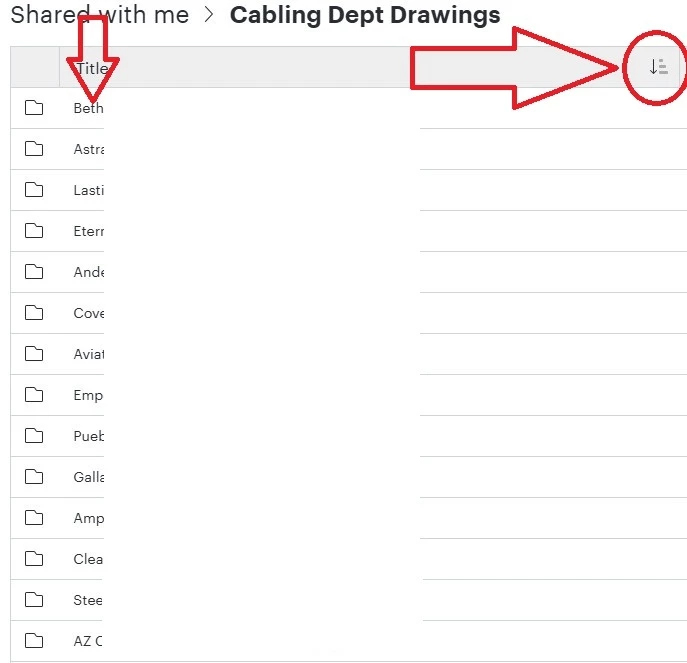
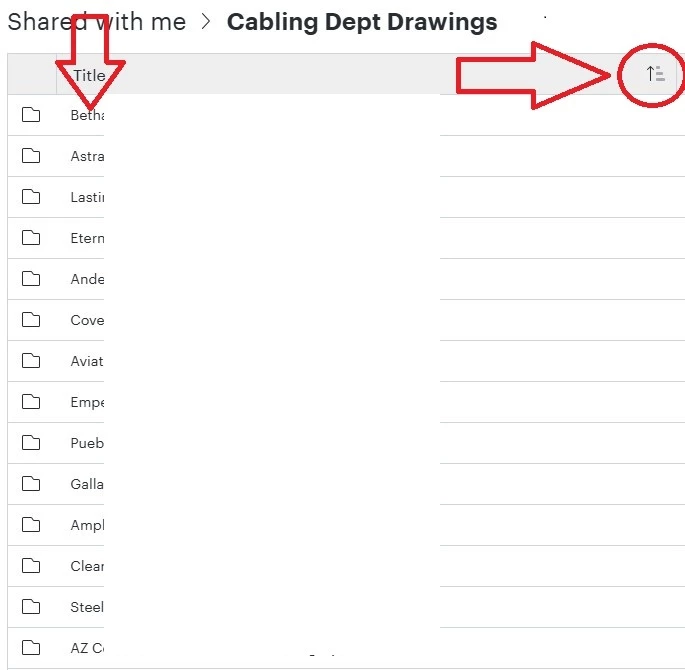
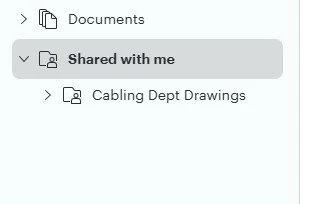
Some time ago I was able to re-order the files in the “Shared with me” folder, but now I can no longer set the order (whether it be by date, users, or by title) the same within any sub directories and folders.
Try to organize by title in A to Z format
Try to organize by title in Z to A format

Notice how the order will not change and is just all mixed up. Searching for a specific file is difficult when the files are randomly organized.


I was told to un-share all the files and have someone re-share them, BUT, there is no “Un-share” option, only “Leave Folder” - Now I am the Owner of most of the files, if I leave the shared folder, will all my owned files disappear? Or will they stay in the shared folder and can be re-shared with me again?


Best answer by Zuzia S

Hi ​@john-h thank you for posting in the Community and thank you ​@Humas1985 for your help!

@john-h I was not able to reproduce the issue you are experiencing. Could you please try the following troubleshooting steps to rule a few things out?:

  • Does the issue occur in order Documents lists, such as “My documents” for instance?
  • Could you try opening your document in a private or incognito window to help us narrow down the potential cause? Could you also try connecting to a different network or disconnecting from your VPN (if applicable)? Sometimes account performance issues can be related to internet security/speed or browser issues. These steps will help us eliminate that possibility. For help with opening an incognito window, please see this community post.

    If those don’t resolve the problem, could you please provide the following information?

  • A screenshot of the associated Javascript Console output after reproducing the issue. You can open your Javascript Console by pressing Ctrl+Shift+J (if your computer is a Windows/Linux) OR Cmd+Opt+J (if your computer is a Mac).
  • A Technical Support PIN for your account, which can be safely shared in this thread. Please navigate to your Account Settings to generate this PIN. For more information on generating a Support PIN, check out this Help Center article.

Thanks for your help and patience!

Comments

Humas1985
Lucid Legend Level 10
Forum|alt.badge.img+24
  • Lucid Legend Level 10
  • January 10, 2026

Hi ​@john-h 

This is expected Lucidchart behavior: sort order cannot be controlled within “Shared with me” folders. Using Leave folder will not delete documents you own, it only removes your access to that shared folder view.

Hope this helps - Happy to help further!!
Thank you very much and have a great one!
Warm regards


Forum|alt.badge.img+1
  • Author
  • January 12, 2026

Thanks for the reply, I used to be able to sort the folders, then one day it stopped, and The other folks that I share with CAN sort and re-order their ‘shared’ folders..


I’ll try leaving the folder and having my coworkers to re-share with me.


Zuzia S
Forum|alt.badge.img+8
  • Lucid community team
  • Answer
  • January 12, 2026

Hi ​@john-h thank you for posting in the Community and thank you ​@Humas1985 for your help!

@john-h I was not able to reproduce the issue you are experiencing. Could you please try the following troubleshooting steps to rule a few things out?:

  • Does the issue occur in order Documents lists, such as “My documents” for instance?
  • Could you try opening your document in a private or incognito window to help us narrow down the potential cause? Could you also try connecting to a different network or disconnecting from your VPN (if applicable)? Sometimes account performance issues can be related to internet security/speed or browser issues. These steps will help us eliminate that possibility. For help with opening an incognito window, please see this community post.

    If those don’t resolve the problem, could you please provide the following information?

  • A screenshot of the associated Javascript Console output after reproducing the issue. You can open your Javascript Console by pressing Ctrl+Shift+J (if your computer is a Windows/Linux) OR Cmd+Opt+J (if your computer is a Mac).
  • A Technical Support PIN for your account, which can be safely shared in this thread. Please navigate to your Account Settings to generate this PIN. For more information on generating a Support PIN, check out this Help Center article.

Thanks for your help and patience!


Forum|alt.badge.img+1
  • Author
  • January 12, 2026

Hi ​@john-h thank you for posting in the Community and thank you ​@Humas1985 for your help!

@john-h I was not able to reproduce the issue you are experiencing. Could you please try the following troubleshooting steps to rule a few things out?:

  • Does the issue occur in order Documents lists, such as “My documents” for instance?

No, I’m able to sort and organize files and folders just fine

  • Could you try opening your document in a private or incognito window to help us narrow down the potential cause? Could you also try connecting to a different network or disconnecting from your VPN (if applicable)? Sometimes account performance issues can be related to internet security/speed or browser issues. These steps will help us eliminate that possibility. For help with opening an incognito window, please see this community post.

  • I have tried this at my office computer, at my Warehouse computer (it is in a different location than that of my office computer), and at home on a ‘normal’ network that does not have a VPN. 

  • I normally use the Chrome Browser I also tried to sort using the Microsoft (Edge) browser and I still cannot sort or re-order files or folders.

  • If those don’t resolve the problem, could you please provide the following information?

  • A screenshot of the associated Javascript Console output after reproducing the issue. You can open your Javascript Console by pressing Ctrl+Shift+J (if your computer is a Windows/Linux) OR Cmd+Opt+J (if your computer is a Mac).
  • Ok will do
  • A Technical Support PIN for your account, which can be safely shared in this thread. Please navigate to your Account Settings to generate this PIN. For more information on generating a Support PIN, check out this Help Center article.
  • Done and sent

Thanks for your help and patience!

ok Got the Java script screen shot and sent that via e-mail, also sent the requested Pin to you via e-mail as well


Forum|alt.badge.img+1
  • Author
  • January 13, 2026

@Zuzia any movement on this issue?


Zuzia S
Forum|alt.badge.img+8
  • Lucid community team
  • January 13, 2026

@john-h Thank you for providing the requested information, I was able to reproduce the issue.

I have connected with our Development Team and have logged this issue with them for further investigation. While we don't have an estimated timeline for a fix, we understand this issue is impacting your workflow, and we sincerely apologize for the disruption.

To help you continue your work and move forward in the best way possible, as a workaround I recommend navigating the Documents list on the left-side panel, which does list folders in alphabetical order.

To ensure our communication remains streamlined and easily trackable, please follow along on this thread for updates, and post any additional questions or concerns below. This helps us maintain all context in a single location for our internal teams and other users who can benefit from this post.

Thank you for your continued collaboration!


Forum|alt.badge.img+1
  • Author
  • January 13, 2026

@john-h Thank you for providing the requested information, I was able to reproduce the issue.

I have connected with our Development Team and have logged this issue with them for further investigation. While we don't have an estimated timeline for a fix, we understand this issue is impacting your workflow, and we sincerely apologize for the disruption.

To help you continue your work and move forward in the best way possible, as a workaround I recommend navigating the Documents list on the left-side panel, which does list folders in alphabetical order.

To ensure our communication remains streamlined and easily trackable, please follow along on this thread for updates, and post any additional questions or concerns below. This helps us maintain all context in a single location for our internal teams and other users who can benefit from this post.

Thank you for your continued collaboration!

Thanks for the update, and I’m glad that you were able to reproduce the issue I’m having.

I have been using the side panel to navigate the folders, but when I get to the folder that contains the files I need, I can no longer use the side panel, and a few of my folders have lots of files in a random order and searching for the required file takes time.. So I hope that it can be fixed at some point, I’ll step back and let your Development Team work on it. 

I had planned on leaving the folder and having my co-worker re-share it to me, but I’ll not do that either. 


Thanks for your time on this


Zuzia S
Forum|alt.badge.img+8
  • Lucid community team
  • January 13, 2026

@john-h thank you for following up! 

While we are investigating the issue and ruling a few things out, could your colleague indeed remove you as a collaborator from the folder, and add you again? We would like to see whether the issue persists then. 

Additionally, could you please confirm through which permissions (edit, share, etc) the folder is being shared with you, and whether that user is also part of the account?

Thanks for your continued patience here!


Forum|alt.badge.img+1
  • Author
  • January 14, 2026

Well, we tried the leave folder and had them re-shared back to me with no change in the sort issue I’m having.


and we made sure that the permissions were set to share - edit as well