Solved

Can't enable embed code: sticky note error

  • July 22, 2026
  • 3 replies
  • 314 views

Forum|alt.badge.img

I am trying to embed my process map. I’ve done this with a bunch of process maps successfully but I have two process maps that won’t let me activate the embed code because “the setting to show the sticky note author is on”. 

I’ve turned that setting off and it still isn’t letting me activate the embed code. I’ve tried making a copy of the chart and still running into the issue. 


Any ideas or thoughts on what I can do? A main reason we are using Lucidchart is because we can embed it into Monday.com so this is pretty frustrating!
Best answer by alison cheney

Hi ​@csorum,

Thank you for reaching out, and I’m sorry for the frustration this issue has caused! Thank you ​@Humas1985 for your thoughts and support here!

Our development team is aware of this bug and is actively looking into a long-term fix. While we don't have an exact timeline for when the fix will be released, we do have a workaround that should allow you to activate your embed code right away:

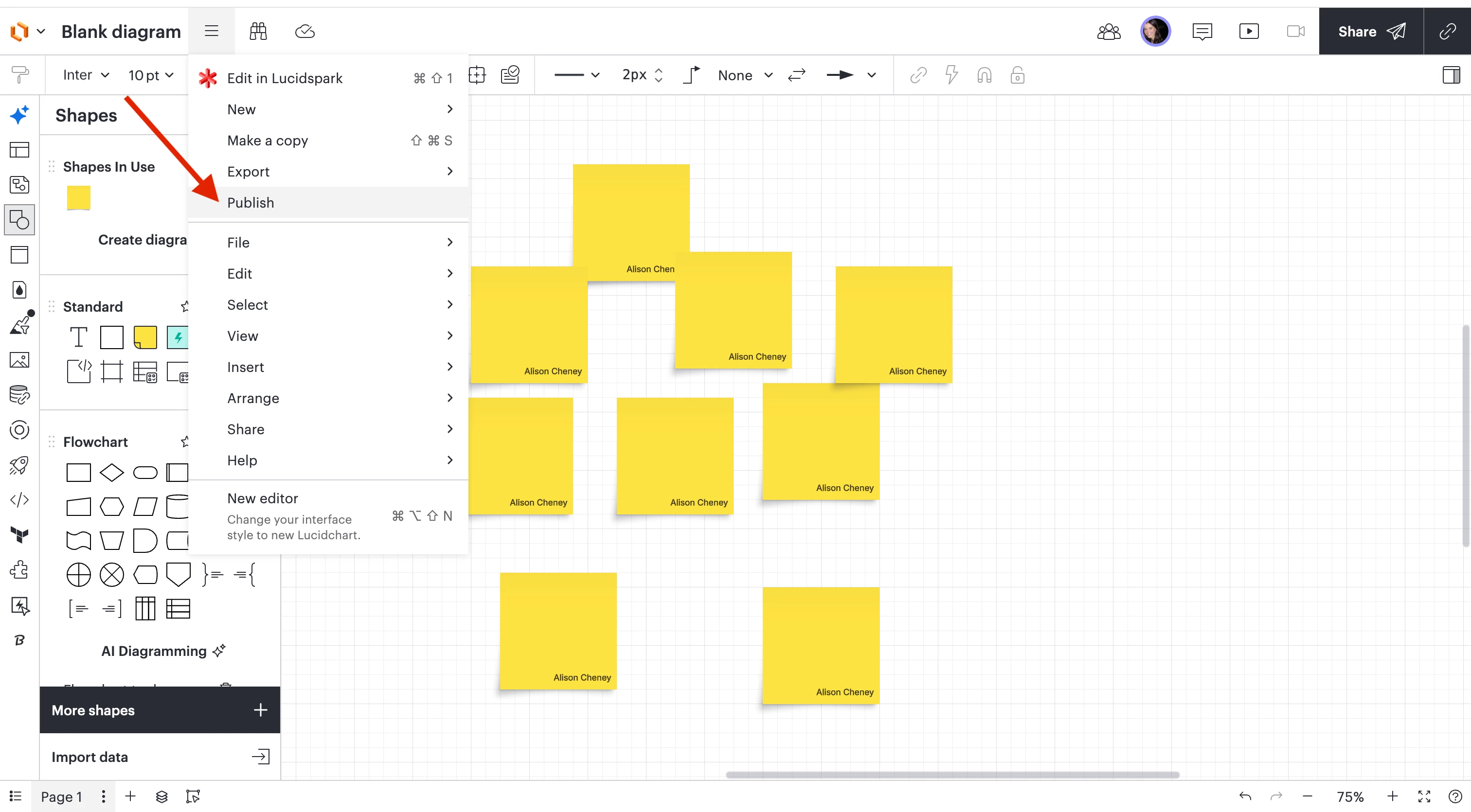
  1. Open the Publish modal for your document. (see screenshot below)

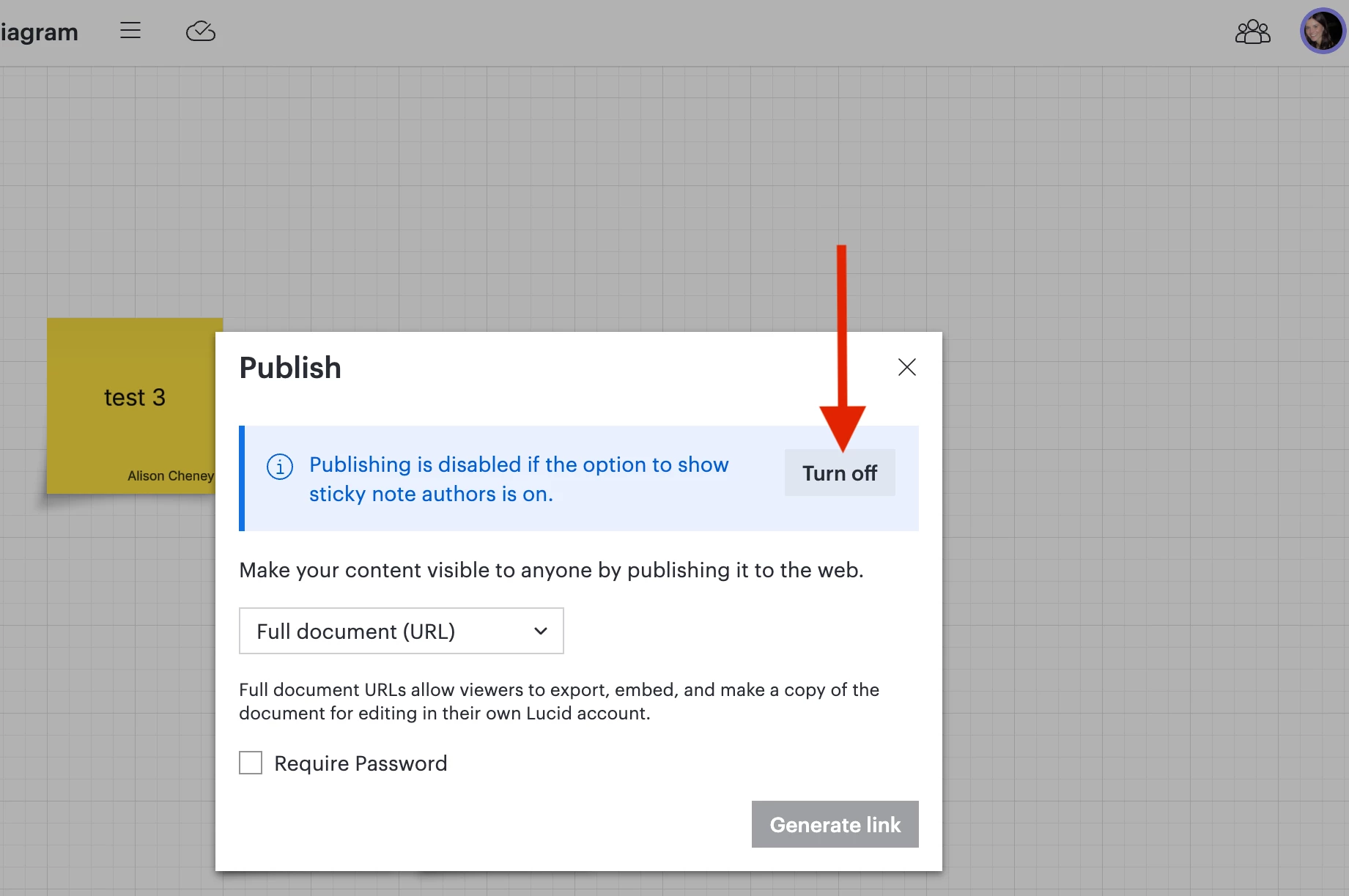
  1. Disable the Sticky Note Author setting within the Publish modal. (see screenshot below)
  1. Return to the Embed modal to generate and activate your code.

Thank you for bringing this to our attention and for your patience while our team works on a permanent solution. Please let me know if the workaround works for you or if you need help with anything else!

Comments

Humas1985
Lucid Legend Level 10
Forum|alt.badge.img+24
  • Lucid Legend Level 10
  • July 24, 2026

Hi ​@csorum 

User can’t publish or embed a document while sticky note authors are enabled, so the setting has to be fully disabled in the document before embed activation will work.

Lucid also notes this is a document-level setting, and existing documents may need the setting changed inside the editor rather than only at the default/account level

To learn more - How do I turn off "show author" as a default for new sticky notes? | Community

Hope this helps !!


Forum|alt.badge.img
  • Author
  • July 24, 2026

Thank you! I changed the document settings so it no longer does this as a default and I’ve turned it off in the actual chart in the collaborator settings, but it is still not letting me activate the embed code. I am a little lost on how to receive support from the Lucid Team if we have an enterprise account..


alison cheney
Forum|alt.badge.img+4
  • Lucid community team
  • Answer
  • July 27, 2026

Hi ​@csorum,

Thank you for reaching out, and I’m sorry for the frustration this issue has caused! Thank you ​@Humas1985 for your thoughts and support here!

Our development team is aware of this bug and is actively looking into a long-term fix. While we don't have an exact timeline for when the fix will be released, we do have a workaround that should allow you to activate your embed code right away:

  1. Open the Publish modal for your document. (see screenshot below)

  1. Disable the Sticky Note Author setting within the Publish modal. (see screenshot below)
  1. Return to the Embed modal to generate and activate your code.

Thank you for bringing this to our attention and for your patience while our team works on a permanent solution. Please let me know if the workaround works for you or if you need help with anything else!