Delivered

How do I turn off "show author" as a default for new sticky notes?

Related products:Lucidspark
  • December 12, 2023
  • 11 replies
  • 3374 views

Howard S
Forum|alt.badge.img+1

Recently I created a new board and now anytime I create a sticky note it’s defaulting to show author and I have to click on them to un-check this option. Is there a way to turn this off as a default setting.  I was out of the office for two weeks so this seems like a recent behavior change. 
January 27, 2026

Hi,

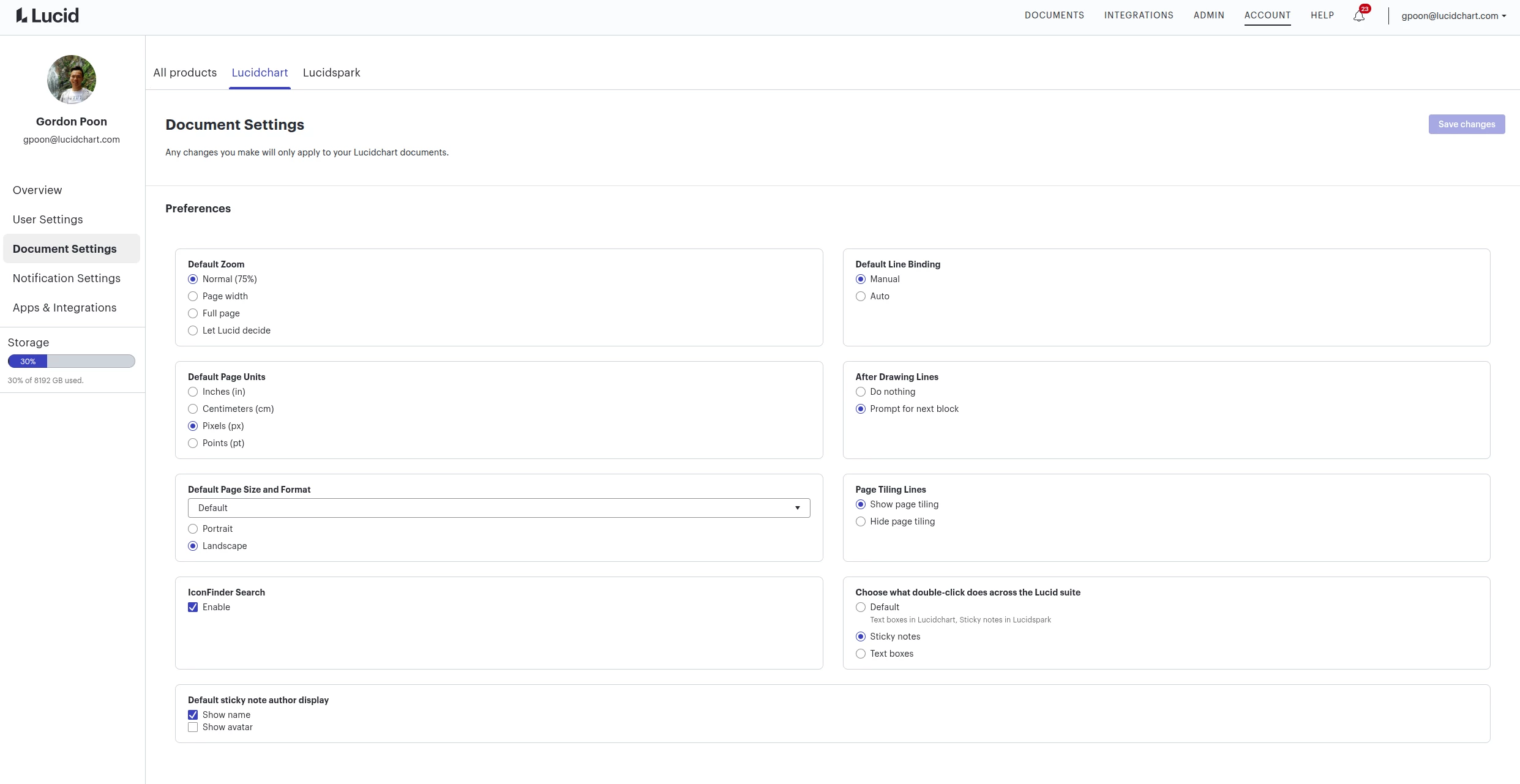
We recently introduced the option to show author avatar and/or name. With that, we also made a user document setting where you can turn on/off these show options for all new documents. It is under account settings > document settings > Lucidchart > Default sticky note author display.

Note that, despite it being under Lucidchart, it will change the default for all products. We are planning to reorganize the document settings in the future, so please expect that the page may look different from the time when this reply is posted.    


Comments

Micah
Forum|alt.badge.img+20
  • Lucid community team
  • December 12, 2023

Hi Howard, thanks for your post! You’re correct - displaying the author name is a recently released feature in Lucidspark. To disable this for all sticky notes, simply toggle off this setting within the collaboration tools menu:


Forum|alt.badge.img

@Micah - the original question is the one I have as well. “Is there a way to turn this off as a default setting?”

Implicitly your answer seems to be “no”. Can we have the ability to turn off both collaborator colors and “show authors” by default? Retaining ownership of ideas impedes the mixing of ideas that whiteboards are so helpful for.


Micah
Forum|alt.badge.img+20
  • Lucid community team
  • May 28, 2024

Hi @Andrew Davis, thanks for following up on this thread. You’re correct - while this ability exists as a setting within individual, existing documents, there is not a setting that establishes either of these attributes as a default for all new documents. I certainly understand how that could be useful, though, and I’ve gone ahead and converted this thread to an idea within our Product Feedback section so that you and others can upvote it and comment with any additional use case details. 

Finally, for more information on how Lucid manages feedback via this community, take a look at this post:


Forum|alt.badge.img+1
  • November 15, 2024

I would prioritize this feature setting for all new documents. The author name takes up valuable real estate in an already constrained space, and adds little value to the collaboration effort. Many teams would designate authorship by the color of the sticky note itself, if we pick up from the analog experience (‘Bob, you get the green stickies. Suzie, you are the orange stickies’). Thank you.


Micah
Forum|alt.badge.img+20
  • Lucid community team
  • November 15, 2024

@CGreenlee Thanks for this insight into what you’d like to see - definitely noted!


Gil M
Forum|alt.badge.img+4
  • January 22, 2026

Any update on this in the last year?


I am working in Chart and my name now shows up on every Post It. I’m the only one working on this chart. How can I turn this “enhancement” off?


Gordon
Forum|alt.badge.img+2
  • Lucid product team
  • January 27, 2026

Hi,

We recently introduced the option to show author avatar and/or name. With that, we also made a user document setting where you can turn on/off these show options for all new documents. It is under account settings > document settings > Lucidchart > Default sticky note author display.

Note that, despite it being under Lucidchart, it will change the default for all products. We are planning to reorganize the document settings in the future, so please expect that the page may look different from the time when this reply is posted.    


Gil M
Forum|alt.badge.img+4
  • January 27, 2026

Thank you, this worked as you described.

I have a clarification question: Is there anyway to change the setting of an existing document with the similar settings? I do not see anything under Board or Document setting, which is where I would expect that to be.


Gordon
Forum|alt.badge.img+2
  • Lucid product team
  • January 27, 2026

Thank you, this worked as you described.

I have a clarification question: Is there anyway to change the setting of an existing document with the similar settings? I do not see anything under Board or Document setting, which is where I would expect that to be.


Hi Gil,

To change the show author option of an existing document, you would need to open the editor and toggle it off of the collaboration menu. We currently don’t support bulk changing the settings for multiple existing documents at once. If this becomes a predominant issue, we may consider it later. But we expect this kind of requests to go away over time given the ability to configure show author option for any new documents.


Gil M
Forum|alt.badge.img+4
  • January 27, 2026

Thank you, Gordan!


Ambar D
Forum|alt.badge.img+10
  • Lucid community team
  • January 30, 2026
IdeaDelivered