Answer

Can't delete row in Lucidchart table

  • December 3, 2024
  • 1 reply
  • 32 views

Forum|alt.badge.img

I am trying to delete a row in a table but when I select the row and click on the delete row icon only the first cell in the row gets deleted. Not sure what I'm doing wrong I've tried selecting the entire row using the shift/click method.  Thanks
Best answer by Michelle S

Hi ​@julianbain ,

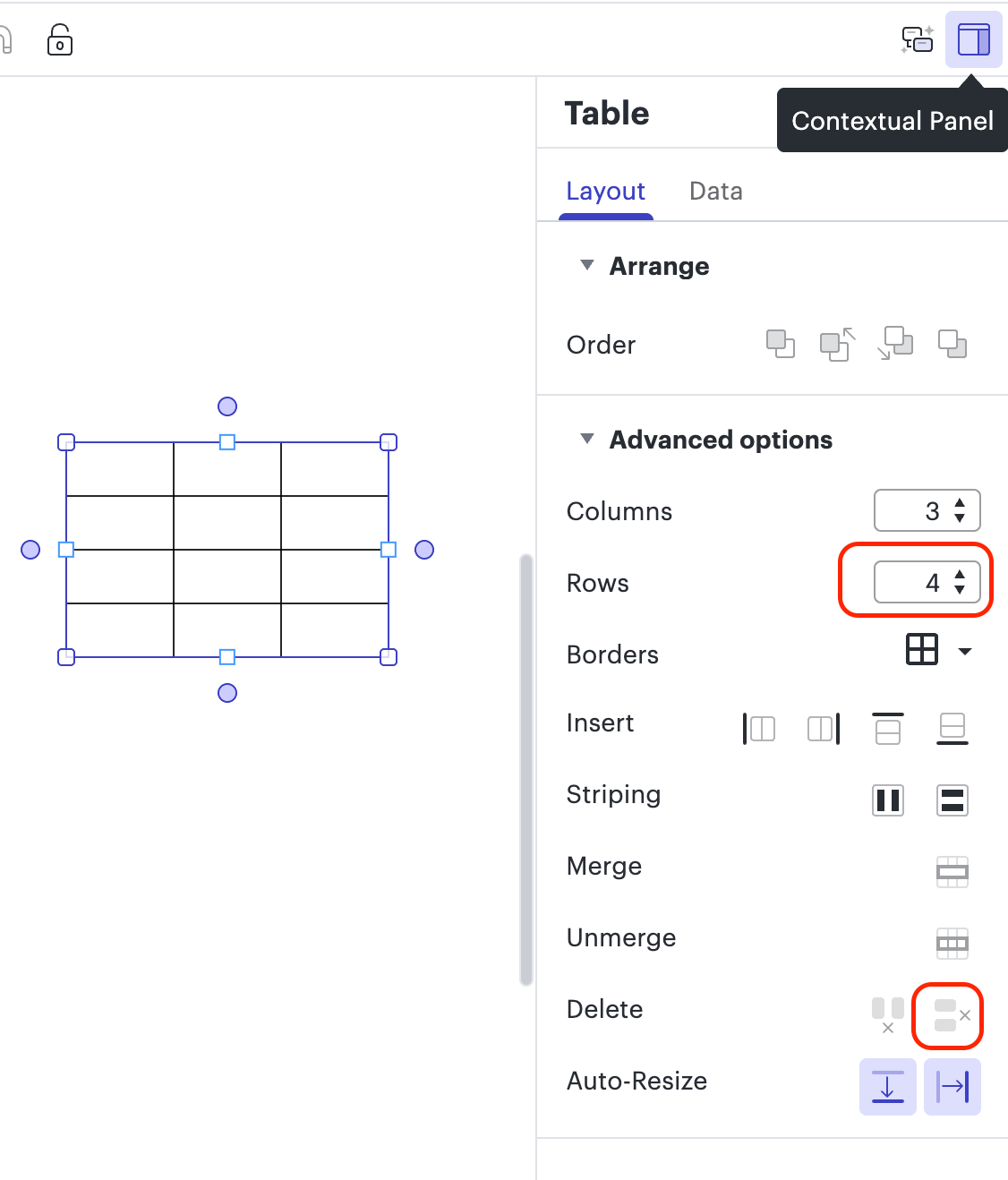
Thanks for posting in the Lucid Community! You can adjust the number of rows in your table by clicking on the table and then, in the Contextual Panel on the right side of the editor,  change the number of rows. Alternatively, you can select a cell in the row you want to delete and choose the Delete Row button. 

If that doesn’t help, can you please send a screenshot of what you are experiencing so I can take a closer look? 

Comments

Forum|alt.badge.img+8
  • Lucid support team
  • Answer
  • December 4, 2024

Hi ​@julianbain ,

Thanks for posting in the Lucid Community! You can adjust the number of rows in your table by clicking on the table and then, in the Contextual Panel on the right side of the editor,  change the number of rows. Alternatively, you can select a cell in the row you want to delete and choose the Delete Row button. 

If that doesn’t help, can you please send a screenshot of what you are experiencing so I can take a closer look?