I have about 25 flowcharts, some with multiple pages. Is it possible to export all of them to a single PDF or even multiple PDFs in one file? I can get Adobe to combine all of them.
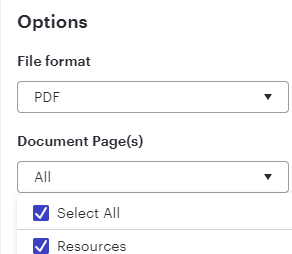
The ability to export to a .pdf is supported at the individual file level, but you can export all of the pages in that LucidChart to a single .pdf file. When you go to File>Export>PDF, go to the “Document Page(s)” section and choose Select All.
Since you have multiple LucidCharts, you’ll still need to do this step once for each document, but it should save you a bit of time.
As far as creating and individual .pdf file to consolidate everything, I think you’ll still need to leverage a third-party tool like Adobe.
Yes, you can. When exporting the chart all you need to do is select PDF, Click Maybe later on the next popup and then under document pages choose all. See Screenshots.
The ability to export to a .pdf is supported at the individual file level, but you can export all of the pages in that LucidChart to a single .pdf file. When you go to File>Export>PDF, go to the “Document Page(s)” section and choose Select All.
Since you have multiple LucidCharts, you’ll still need to do this step once for each document, but it should save you a bit of time.
As far as creating and individual .pdf file to consolidate everything, I think you’ll still need to leverage a third-party tool like Adobe.
Hi @Kaitlyn S, thank you for posting your question in the Lucid Community!
Please let me know if you have further questions regarding exporting one Lucid document with multiple pages. I would suggest the same steps that @chuck.macdermott and @bram.moreinis mentioned above. When exporting as a PDF, click on the ‘Select All’ option from the ‘Document Pages’ dropdown as shown below.
However, as @Chris Mosch mentioned, the ability to export multiple Lucid documents into a single PDF isn’t currently supported in Lucid, but we’re very interested in your feedback and committed to continually improving our products.
If you would like to leave a feature request, please first search the Product Feedback section of this community (with the filter Topic Type = Idea) to see if it’s already been submitted. If so, please add any additional details you’d like and upvote the request - this consolidation helps to refine feedback and properly capture the popularity of the request.
If no one has submitted this idea yet, please create one of your own and be sure to include details about your use case or what you’d like to see in this experience. This will also allow other users with similar requests to discover and upvote it, then add details of their own.
Finally, for more information on how Lucid manages feedback via this community, take a look at this post:
A Lucid or airfocus account is required to interact with the Community, and your participation is subject to the
Supplemental Lucid Community Terms.
You may not participate in the Community if you are under 18. You will be redirected to the Lucid or airfocus app to log in.
A Lucid or airfocus account is required to interact with the Community, and your participation is subject to the
Supplemental Lucid Community Terms.
You may not participate in the Community if you are under 18. You will be redirected to the Lucid or airfocus app to log in.


 Your privacy choices


