I am creating a relatively complex Org Chart for our property management company, where several employees are in cross-functional roles. I would like to integrate each employee’s portfolio into the chart. Looking for something like you click on an employee and a dropdown list appears or a comment box. Even if it can add a link to redirect to another sheet within the document where I have the lists of properties broken down by property manager.
Hi @Lindsay Street, thank you for posting in the Lucid Community!
A dropdown list with employee information is not supported by Lucid at the moment, but we’re very interested in your feedback and committed to continually improving our products. Please first search the Product Feedback section of this community (with the filter Topic Type = Idea) to see if it’s already been submitted. If so, please add any additional details you’d like and upvote the request - this consolidation helps to refine feedback and properly capture the popularity of the request.
If no one has submitted this idea yet, please create one of your own and be sure to include details about your use case or what you’d like to see in this experience. This will also allow other users with similar requests to discover and upvote it, then add details of their own.
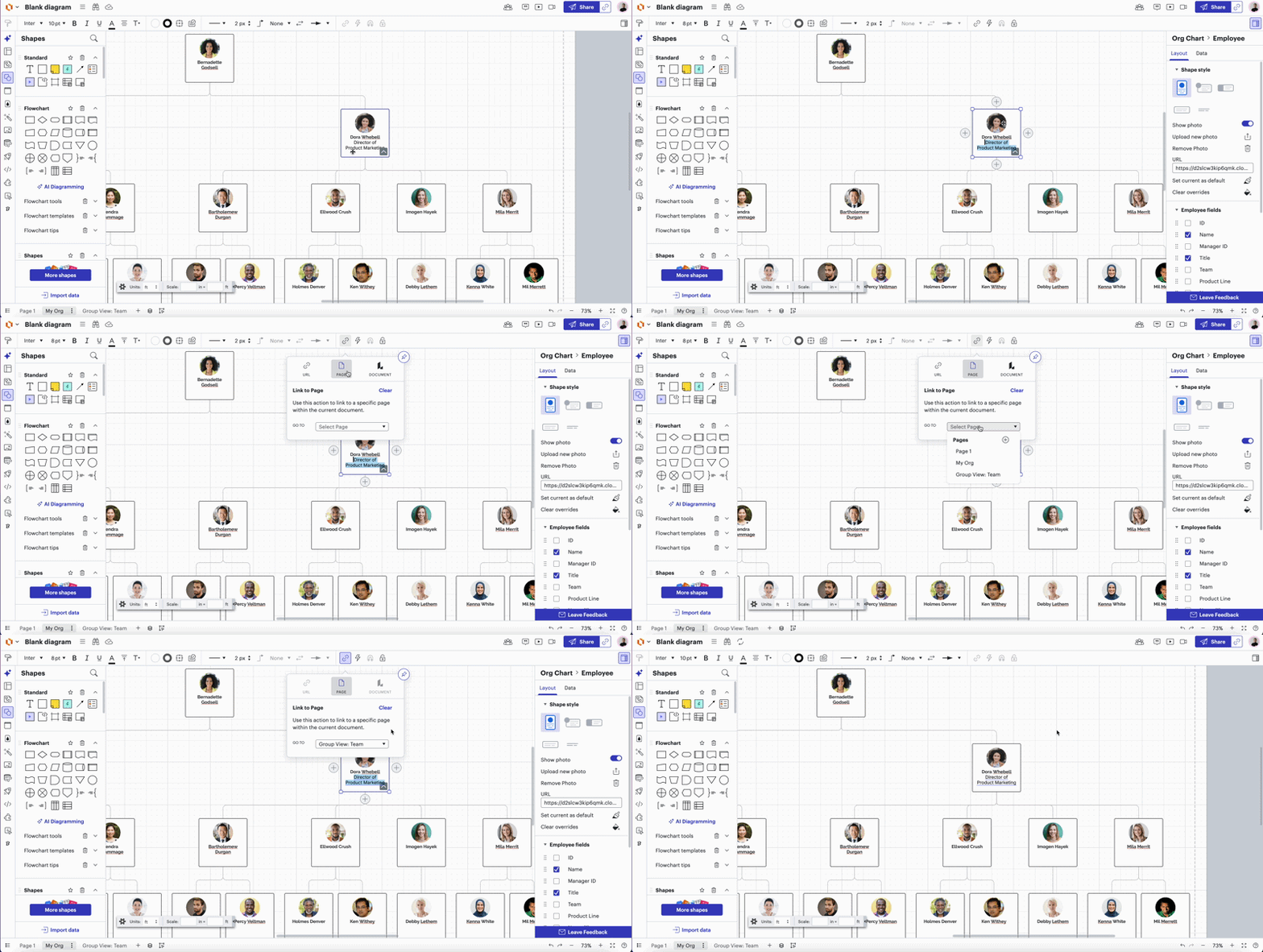
However, you can add a link to another page in the document within an employee shape. To do so, please select employee shape > select text > click “Link To” > click on “Page” > select page of your choice. As such:
Hi @Lindsay Street, thank you for posting in the Lucid Community!
A dropdown list with employee information is not supported by Lucid at the moment, but we’re very interested in your feedback and committed to continually improving our products. Please first search the Product Feedback section of this community (with the filter Topic Type = Idea) to see if it’s already been submitted. If so, please add any additional details you’d like and upvote the request - this consolidation helps to refine feedback and properly capture the popularity of the request.
If no one has submitted this idea yet, please create one of your own and be sure to include details about your use case or what you’d like to see in this experience. This will also allow other users with similar requests to discover and upvote it, then add details of their own.
However, you can add a link to another page in the document within an employee shape. To do so, please select employee shape > select text > click “Link To” > click on “Page” > select page of your choice. As such:
A Lucid or airfocus account is required to interact with the Community, and your participation is subject to the
Supplemental Lucid Community Terms.
You may not participate in the Community if you are under 18. You will be redirected to the Lucid or airfocus app to log in.
A Lucid or airfocus account is required to interact with the Community, and your participation is subject to the
Supplemental Lucid Community Terms.
You may not participate in the Community if you are under 18. You will be redirected to the Lucid or airfocus app to log in.


 Your privacy choices


